译自英文页面;以英文页面为准。查看英文。
Fast Script 用户指南¶
一次一条简短命令,面向 BIM 和 ERP,并原样返回应用自己的答复。同样的词,既适用于终端前的您,也适用于 AI。
可以把它看作“加了类固醇的 SQL”:一行就能读取或修改记录,但每一行都要经过与窗口相同的规则,并打印它做了什么。您在一个提示符 red1 下输入简短的词。每个词都会打印它所执行的完整一行(在 → 之后),所以您可以边用边学长格式。里面没有 AI。
好答案并不意味着什么
没有问题的答复绝不意味着安全、合规或良好。每个答复都会列出未检查的内容,未检查的内容会再说一遍。最终决定权在结构工程师。
如何安装¶
您需要 Node 18 或更新版本(这些步骤在 Node 18.19 上运行过)。有两种进入方式。
完整检出为您提供 red1、BIM、ERP、Viewer 以及下面的一切。克隆它,然后从其顶层文件夹启动 red1:
git clone https://github.com/red1oon/bim-ootb
cd bim-ootb
node common/door/red1.js
输入 exit 退出。若想在任何位置只输入 red1,请在该文件夹中运行一次 npm link。要检查它是否工作,请查看它的版本行:
$ node common/door/red1.js --version | sed -e 's/^Copyright[^·]*· //' -e 's/ · [0-9a-f]\{8\}$//'
red1 1.0.0 · 78 verbs · 30 words
六文件下载用于只要门和 Modeller 动词、不需要检出的情况。新建一个空文件夹,安装 Modeller 所需的浏览器引擎,然后获取这六个文件:
mkdir fastscript && cd fastscript
npm init -y
npm install puppeteer@24
curl -O https://red1oon.github.io/bim-ootb/modeller/tools/edit_cli.js
curl -O https://red1oon.github.io/bim-ootb/modeller/tools/bim_mcp.js
curl -O https://red1oon.github.io/bim-ootb/common/door/door.js
curl -O https://red1oon.github.io/bim-ootb/common/door/verbs.json
curl -O https://red1oon.github.io/bim-ootb/common/door/msg_core.js
curl -O https://red1oon.github.io/bim-ootb/common/door/vocab/messages.json
请把六个文件放在同一个文件夹里。door.js 从 verbs.json 读取动词列表,从 messages.json(经由 msg_core.js)读取其消息,并运行 edit_cli.js,后者无窗口地打开在线的 Modeller 页面。如果缺少某个文件,门会说明是哪个并打印它的 curl 行。本页其余的一切都需要完整检出;动词表说明每个动词需要什么。
从 red1 开始¶
在终端里,red1 会问候您一次,然后在提示符处等待。下面就是它打印的原样内容(版本行末尾的 commit 已被截掉,因为它随每次提交而变):
$ (sleep 4; printf 'exit\r') | RED1_LOG=/tmp/fast_guide_greet.log RED1_HISTORY=/tmp/fast_guide_greet.hist BIM_DOOR_JOURNAL=/tmp/fast_guide_greet.journal script -qec 'node common/door/red1.js' /dev/null | tr -d '\r' | sed -e 's/\x1b\[[0-9;?]*[a-zA-Z]//g' -e 's/ · [0-9a-f]\{8\}$//'
Welcome to red1, the scripting door into BIM and ERP, stored in SQLite.
REMEMBER THE NAME.
Copyright (c) 2026 Redhuan D. OON · red1 1.0.0 · 78 verbs · 30 words
Type help for the list of commands (or bim, mis, erp for one group).
Tip: type level student for fuller help on each word (red1 --fast opens without tips).

red1> exit
如何阅读本页的代码块。 $ 后面那一行是本页测试运行命令的方式:它使用临时文件(先清空,所以运行绝不会碰到你自己的数据),去掉耗时并隐藏日志。在你自己的提示符下,只需输入这些词,例如 cd Duplex。下面就是 red1 打印出的原样内容。
把它当作一张地图来读。版本行说明 red1 有多少个门动词(长格式)和短词。help 把短词分成三组显示;help bim、help mis 或 help erp 可查看一组:
| 分组 | 用途 | 从这里开始 |
|---|---|---|
| bim | 建筑和模型:计数、碰撞、成本、进度、Modeller | cd Duplex |
| mis | 记录、表、文件和 Ninja 工作簿:列出、创建、修改、加载 | cd Order |
| erp | 单据和流程:完成、作废、关闭、运行流程、把建筑过账到其订单 | cd Order |
$ node common/door/red1.js help 2>/dev/null
red1: type a short word; red1 prints the full line it runs (→ …), then runs it.
  bim   buildings and models            start with: cd Duplex   (16 words)
  mis   records, tables, files, Ninja   start with: cd Order   (11 words)
  erp   documents and processes         start with: cd Order   (8 words)
  everywhere: cd <place> · #<number> · pwd · role <id> · login <user> · history [N] · report · exit
Type bim, mis or erp for its words · help <word> for one word (level student first for the full explanation) · help verbs for the full door lines.
一个组列出它的词,每个词附一个可以输入的例子。erp 组最短:
$ node common/door/red1.js 'help erp' 2>/dev/null
erp: documents and processes (start with: cd Order)
 in a building:
  post discipline=ARC  post the building's priced selection to its ERP Project Order
  vo discipline=ARC    issue the change between the model and the Project Order as a Variation Order
 in an ERP kind:
  status                                              a Project's earned value (PV, EV, AC, SPI, CPI per phase)
  claim                                               bill the project's completed phases not yet billed
  do CO 50000                                         a document action
  run "Set Project Type" 990000 C_ProjectType_ID=103  run a process of the dictionary
  next 50000                                          what a document may do next
  ask "How do I close a Sales Order?"                 ask the help a question, in your language
单独输入一个组名(bim、mis 或 erp)会打印同样的列表,并把您带进这个组:提示符变成 red1 erp>,帮助、Tab 和灰色建议只提供这个组的词。它从不阻止一行运行:完整的门命令行在任何组里照样运行。cd .. 后退一步(先离开一个位置,再离开组),Shift+Tab 也一样(red1 会打印 → cd ..,所以会话读起来就是文本)。
help 不打印门动词,只打印这些词。help verbs 列出每个门动词及其完整一行。若要了解某个词的更完整说明,切换到 Student 级别:在会话中输入 level student,或在一行里用 --level student,然后 help <word> 会说明该词做什么、您输入什么、red1 从您所在位置取什么,并给出一个示例。文字取自该动词自己的描述,所以不会与末尾的表产生偏差:
$ node common/door/red1.js --level student 'help cost' 2>/dev/null
cost: the cost of a selection: cost [phase|task|storey|discipline|class] [column=value …]
  in a building: cost discipline   → viewer.cost
    what it does: Price a selection of a building's elements as the Viewer's Find panel does: quantities from the model × the rate pack, grouped by 4D phase, task, storey…
    you type: by (phase (default), task, storey, discipline or class.)
    taken from where you are: building
    e.g. in Duplex: viewer.cost building=Duplex by=discipline
用您自己的语言获得帮助。 ask "<question>" 用普通的话向与浏览器 ERP 问题框相同的帮助提问,在 ERP 类型中(cd Order)可用。答复会给出窗口、有匹配时您菜单上的进程或报告(与浏览器的框相同)、单据动作及其允许的状态、执行它的命令行,以及指南的章节。它读自词典和已发布的 iDempiere 语言包;里面没有 AI,而且只读不写。语言是您用 lang=zh_CN 选择的,否则是您登录时(login)保存的偏好,否则是终端的 LANG,否则是系统的语言。语言包没有覆盖的文字保持英文,与 legacy 相同(下面动作的说明)。这里终端是中文:
$ printf 'cd Order\nask "如何关闭销售订单?"\n' | LANG=zh_CN.UTF-8 node common/door/red1.js 2>/dev/null | sed 's/ · [0-9]* ms//'
→ mis.describe kind=Order
Order: 93 properties; ls shows C_Order_ID, DocumentNo, DocStatus, Processed, POReference, Description
→ erp.ask question=如何关闭销售订单?
ok · erp.ask
窗口: 销售订单
进程: 由费用产生销售订单
文档动作: 结束 — Finally close this transaction. It cannot be re-activated.
  单据处于以下状态时可用: 完成, 等候付款
CLI: erp.close kind=Order number=<Document No>
指南: 1 · 销售订单 https://red1oon.github.io/BIMCompiler/ERPUserGuide/#1-sales-order

从菜单(⌂ → 销售)打开销售订单,建一两行,然后按处理按钮(§6)→ 完成。完成不只是改变状态:completeIt 会在同一个已签名的操作组里,接着生成后面的出货单和发票。
(由构建会话翻译,未经母语者审校)
浏览器 ERP 在每个字段上都有同样的帮助、How To 步骤和问题框,使用您在页头选择的语言:见 ERP 用户指南中的 Help on every field, and a question box。
现在看一个词。cd 记住您在哪里,所以无需重复。在 cd Duplex 和 cd Element 之后,count 只需要那一个新的内容。→ 行是 red1 发给门的内容;这一行就是该词的长格式:
$ node common/door/red1.js 'cd Duplex; cd Element; count discipline=ARC' 2>&1 | grep '^→'
→ object.describe building=Duplex kind=Element
→ object.count building=Duplex kind=Element discipline=ARC
您输入词、位置或列时,光标后会出现灰色文字:来自字典的建议。Tab 或 → 接受它;回车始终执行您输入的内容,绝不执行建议。拼错会得到提示,绝不会被悄悄改正(ls Valu=… 被拒绝,并指出 Value)。
您最常用的词¶
下面每一部分都会说明你将要做什么、为什么,然后给出一次真实运行,以及其中要看的地方。
bim:建筑和模型¶
按列计数。 cd Duplex 然后 cd Element 进入建筑的构件;group storey 按某一列计数。请看各分组及其数量,以及显示词背后门动词的 → 行:
$ printf 'cd Duplex\ncd Element\ngroup storey\n' | node common/door/red1.js 2>/dev/null | sed 's/ · [0-9]* ms//'
building Duplex
→ object.describe building=Duplex kind=Element
Duplex/Element: 9 properties; ls shows elements_meta_uu, guid, ifc_class, element_name
→ object.group building=Duplex kind=Element by=storey
ok · object.group
5 groups over 1193 Element
storey   count
Unknown  1026
Level 2  83
Level 1  62
T/FDN    14
Roof     8
用通配符查找。 ls 列出这里有什么;添加 column=value 来缩小范围。* 是任意一串字符,? 是一个字符,[abc] 是其中之一;不区分大小写。请看 shown 6 of 6:red1 说明有多少行匹配、显示了多少行。
$ printf 'cd Duplex\ncd Element\nls element_name=*bath*\n' | node common/door/red1.js 2>/dev/null | sed 's/ · [0-9]* ms//'
building Duplex
→ object.describe building=Duplex kind=Element
Duplex/Element: 9 properties; ls shows elements_meta_uu, guid, ifc_class, element_name
→ object.list building=Duplex kind=Element columns=elements_meta_uu,guid,ifc_class,element_name limit=20 element_name=*bath*
ok · object.list
shown 6 of 6 Element
elements_meta_uu        guid                    ifc_class        element_name
0BTBFw6f90Nfh9rP1dlXre  0BTBFw6f90Nfh9rP1dlXre  IfcSpace         Bathroom 2
0BTBFw6f90Nfh9rP1dlXru  0BTBFw6f90Nfh9rP1dlXru  IfcSpace         Bathroom 1
0BTBFw6f90Nfh9rP1dl_3C  0BTBFw6f90Nfh9rP1dl_3C  IfcSpace         Bathroom 2
0BTBFw6f90Nfh9rP1dl_3P  0BTBFw6f90Nfh9rP1dl_3P  IfcSpace         Bathroom 1
1YLPoi73z0fvdanmaXQreg  1YLPoi73z0fvdanmaXQreg  IfcFlowTerminal  M_Bath Tub:1525 mmx760 mm - Private:1525 mmx760 mm - Private:582924
2h405XijT83A$BX7w5ki4b  2h405XijT83A$BX7w5ki4b  IfcFlowTerminal  M_Bath Tub:1525 mmx760 mm - Private:1525 mmx760 mm - Private:582931
碰撞。 clash ARC MEP 向 Viewer 询问两个专业之间的重叠,并把答复自己的数字画成漏斗。单独输入时,clash 会打开建筑各专业的菜单。随后 ls 会列出同一答复中的 393 行,无需再次询问。请看各部分如何相加:393 = 291 + 102。
$ printf 'cd Duplex\nclash ARC MEP\n' | node common/door/red1.js 2>/dev/null | sed 's/ · [0-9]* ms//'
building Duplex
→ viewer.clashes building=Duplex discA=ARC discB=MEP rows=all
ok · viewer.clashes
393 box overlaps  ARC x MEP  (at 25 mm)
├─ 291 clash at mesh level
│    └─ 156 of them one inside the other
├─ 102 cleared by the shape tests
│    ├─  76 turned boxes do not touch
│    └─  26 triangles do not touch
└─   0 not judged
ls lists the 393 rows
成本。 cost discipline 按照 Viewer 的 Find 面板的方式为建筑的构件计价:模型中的数量乘以费率包。它的运行见 从建筑到它的订单,在那里它接着通向订单。
mis:记录、表、文件¶
查找记录。 在 Business Partner 这样的 ERP 类型中,可以使用与建筑里相同的词:ls、count、cat,通配符也相同。cd 接受类型的名称,名称含空格时要加引号。
创建一条并修改一条。 new 像窗口那样创建记录:您给出已知的列,其余由引擎填充(默认值、序列号),字典中没有的列会被拒绝并列出真实的列。set <id> Column=value 修改一条。请看 id 答复中的 new(set 接下来要用它)、第二个答复中的 changed,以及末尾的列表。(答复还会列出它填充的每一列和所做的更改;这里省略了这些行。)
$ printf 'cd "Business Partner"\nnew Value=GD100 Name="Guide Partner One"\nset 1600010 Description="first supplier"\nls Value=GD*\n' | BIM_OBJECT_OPLOG=/tmp/fast_guide_mis2.ops node common/door/red1.js 2>/dev/null | sed 's/ · [0-9]* ms//' | grep -E '^(→|ok|refused|id|changed|shown|C_BPartner_ID|[0-9]{7} )'
→ mis.describe kind="Business Partner"
→ mis.new kind="Business Partner" Value=GD100 Name="Guide Partner One"
ok · mis.new
id: 1600010
→ mis.update kind="Business Partner" id=1600010 Description="first supplier"
ok · mis.update
id: 1600010
changed: ["description"]
→ mis.list kind="Business Partner" columns=C_BPartner_ID,Value,Name,Logo_ID,C_BP_Group_ID limit=20 names=Y Value=GD*
ok · mis.list
shown 1 of 1 Business Partner
C_BPartner_ID  Value  Name               Logo_ID  C_BP_Group_ID
1600010        GD100  Guide Partner One           Standard Customers
rm <id> 删除一条,load <file.csv> 和 diff <file.csv> 从文件加载行,并将文件与记录比较。参考页展示了每一个及其输出。
erp:单据和流程¶
创建一个单据并完成它。 在 Order 中用 new 会创建一张草稿订单并打印它的编号。在提示符下也可以输入完整的门命令行,所以订单行用 mis.new(一个产品和一个数量)添加。next <number> 画出单据现在可以做什么,并为每个有对应词的动作指出运行它的那一行。do CO <number> 完成它;旧系统的 DocAction 代码是 CO 完成、PR 准备、VO 作废、CL 关闭、RC 冲销、RE 重新激活(do complete、do void … 也可以)。请看 new 打印的编号、每个 next 树中的状态,以及 CO 之后变化了的动作。(grep 只保留这些行;完整的答复还会列出每个被填写的列。)
$ printf 'cd Order\nnew issotrx=Y C_DocTypeTarget_ID=132 C_BPartner_ID=112 SalesRep_ID=101\nmis.new kind=C_OrderLine order=50000 m_product_id=137 qtyentered=2\nnext 50000\ndo CO 50000\nnext 50000\n' | BIM_OBJECT_OPLOG=/tmp/fast_guide_erp.ops node common/door/red1.js 2>/dev/null | sed 's/ · [0-9]* ms//' | grep -E '^(→|ok|refused|number|Order [0-9]|[├└])'
→ mis.describe kind=Order
→ mis.new kind=Order issotrx=Y C_DocTypeTarget_ID=132 C_BPartner_ID=112 SalesRep_ID=101
ok · mis.new
number: 50000
→ mis.new kind=C_OrderLine order=50000 m_product_id=137 qtyentered=2
ok · mis.new
→ erp.actions kind=Order number=50000
ok · erp.actions
Order 50000  status DR
├─ CO  → do complete 50000
├─ PR  → do prepare 50000
└─ VO  → do void 50000
→ erp.complete kind=Order number=50000
ok · erp.complete
→ erp.actions kind=Order number=50000
ok · erp.actions
Order 50000  status CO
├─ CL  → do close 50000
├─ VO  → do void 50000
└─ RE  → do reactivate 50000
运行流程。 run "<process>" 像其窗口按钮那样运行 ERP 字典中的一个流程。您没有输入的参数会逐个被询问,顺序就是该流程自己的参数行的顺序(回车保留默认值;查找项会打开一个按该列验证规则缩小范围的选择列表;(leave it out) 跳过可选项)。然后 red1 打印完整的 → erp.process … 行并运行它。摘要会列出生成的单据和流程日志,就像传统的流程对话框那样。这里项目是直接输入的,其余三个问题用回车回答。(在终端里,每个问题都会画出它的选择列表;grep 只保留问题和答案。)请看诚实的答复:种子数据中的 Hospital 项目没有供应商价格,所以不会生成采购订单,日志对每一行说明了原因:
$ printf 'cd Project\nrun "Generate PO from Project" C_Project_ID=990000\n\n\n\n' | BIM_OBJECT_OPLOG=/tmp/fast_guide_erp2.ops node common/door/red1.js 2>/dev/null | sed 's/ · [0-9]* ms//' | grep -E '^(→|run:|C_|Consolidate|ok|refused|Generate|  Product)'
→ mis.describe kind=Project
→ mis.list kind=AD_Process_Para columns=ColumnName,Name,IsMandatory,DefaultValue,SeqNo,AD_Reference_ID sort=SeqNo limit=50 master="Process/Generate PO from Project"
→ mis.lookup column=C_ProjectPhase_ID process="Generate PO from Project" limit=50 C_Project_ID=990000
run: pick Project Phase (C_ProjectPhase_ID, 7)
C_ProjectPhase_ID: left out
→ mis.lookup column=C_ProjectLine_ID process="Generate PO from Project" limit=50 C_Project_ID=990000
run: pick Project Line (C_ProjectLine_ID, 28)
C_ProjectLine_ID: left out
Consolidate to one Document (ConsolidateDocument)? [Y]
→ erp.process name="Generate PO from Project" kind=Project C_Project_ID=990000 ConsolidateDocument=Y
ok · erp.process
Generate PO from Project: done · no document made
  Product has no PO record  (×28)
在单行或对 AI 而言,不会询问任何内容:缺少必填参数就是一次点名该参数的拒绝。孪生体还没有移植的流程会被拒绝,并给出其类名,red1 会这样说明。
菜单,以及作为位置的记录。 menu 把 ERP 菜单显示为位置:cd <folder> 进入(只有一个条目以此开头时,名称的开头就够了),窗口条目会带你到它的种类,cd ..(或 Shift+Tab)向上退回一个文件夹。提示符显示路径。每个条目都有标记:▸ 文件夹(它包含多少条目),W 窗口(及其表),P 流程,R 报表,X 表单,F 工作流。单独运行 red1 menu 仍会全屏打开菜单。
$ printf 'menu\ncd Quote\ncd "Sales Orders"\ncd "Sales Order"\npwd\n' | node common/door/red1.js 2>/dev/null
→ mis.menu
menu: 15 entries; cd <name> goes in, cd .. goes back
  ▸ System Admin (6)
  ▸ Application Dictionary (40)
  ▸ Partner Relations (7)
  ▸ Quote-to-Invoice (Sales) (6)
  ▸ Requisition-to-Invoice (Purchasing) (16)
  ▸ Returns (5)
  ▸ Open Items (Financial Movements and Aging) (32)
  ▸ Material Management and Pricing (22)
  ▸ Project Management (14)
  ▸ Performance Analysis and Accounting (17)
  ▸ Assets (6)
  ▸ Manufacturing (10)
  ▸ Maintenance Request (3)
  W Cost Center · C_CostCenter
  W Department · C_Department
Quote-to-Invoice (Sales): 6 entries; cd <name> goes in, cd .. goes back
  ▸ Sales and Marketing (9)
  ▸ Sales Orders (13)
  ▸ Shipments (7)
  ▸ Sales Invoices (5)
  ▸ Invoice Inquiry (13)
  ▸ Sales Management (6)
Quote-to-Invoice (Sales)/Sales Orders: 13 entries; cd <name> goes in, cd .. goes back
  W Sales Order · C_Order
  R Order Detail
  R Open Orders
  R Order Transactions
  P Quote convert
  P RePrice Order/Invoice
  P Generate PO from Sales Order
  P Reopen Order
  P Order Batch Process
  W POS Key Layout · C_POSKeyLayout
  P POS Key Generate
  W POS Terminal · C_POS
  W POS Payment · C_POSPayment
→ mis.describe kind=C_Order
Order: 93 properties; ls shows C_Order_ID, DocumentNo, DocStatus, Processed, POReference, Description
menu="Quote-to-Invoice (Sales)/Sales Orders" kind=Order
在一个种类中,cd <number> 进入那条记录,提示符保留菜单路径;cd .. 再退出来(在任何地方,cd Order 100 都做同样的事)。在一条记录里,red1 提供的是这条记录自己的东西,按它的窗口从字典中读取:在 do 之后,只有它现在可以做的动作,按你的角色、按窗口自己按钮的顺序;在 cd 之后,是它的页签;在 run 之后,是它自己的流程按钮(run Co 补全为 "Copy Lines");还有它的字段,作为 Column= 键。do 和 next 按 ID 指代这条记录,所以两条记录共用一个编号(这里是 80000)从来不是问题。一个动作会打印它做了什么:状态变化、它涉及的单据、保留了多少处更改,以及这条记录现在可以做什么;之后在 do 后按 Tab 会提供这些新代码。下面的代码块省略了文件夹列表:
$ rm -f /tmp/fast_guide_walkrec.ops; printf 'menu\ncd Quote\ncd "Sales Orders"\ncd "Sales Order"\ncd 100\npwd\ndo RE\ndo CO\n' | BIM_OBJECT_OPLOG=/tmp/fast_guide_walkrec.ops BIM_DOOR_JOURNAL=/tmp/fast_guide_walkrec.journal node common/door/red1.js 2>/dev/null | sed 's/ · [0-9]* ms//' | grep -vE '^  [▸WRPXF] '
→ mis.menu
menu: 15 entries; cd <name> goes in, cd .. goes back
Quote-to-Invoice (Sales): 6 entries; cd <name> goes in, cd .. goes back
Quote-to-Invoice (Sales)/Sales Orders: 13 entries; cd <name> goes in, cd .. goes back
→ mis.describe kind=C_Order
Order: 93 properties; ls shows C_Order_ID, DocumentNo, DocStatus, Processed, POReference, Description
→ mis.read kind=Order id=100
Order 80000: 4 tabs (Order Line, Order Tax, Payment Schedule, POS Payment); ls shows them, cd <tab> opens one, cat reads the record
→ erp.actions kind=Order id=100
it may do: CL, VO, RE (do <code>; next shows the tree)
menu="Quote-to-Invoice (Sales)/Sales Orders" kind=Order id=100
→ erp.reactivate kind=Order id=100
ok · erp.reactivate
Re-activate: done · Order 80000 CO → IP (In Progress) · grand total 50.35
  related: Invoice 2 (RE 2) · Shipment/Receipt 2 (RE 2)
86 change(s) kept · it may do: CO, PR, VO
→ erp.complete kind=Order id=100
ok · erp.complete
Complete: done · Order 80000 IP → CO (Completed) · grand total 50.35
  related: Invoice 3 (RE 2, CO 1) · Shipment/Receipt 3 (RE 2, CO 1)
59 change(s) kept · it may do: CL, VO, RE
# 按编号找到一份单据。 #80000 就是 iDempiere 的单据搜索(它的全局搜索框输入 /80000;这里 / 是路径,所以用 #)。它在任何位置都能用。编号按前缀匹配,只在你登录的客户(client)中、只在你的角色能打开的窗口里查找。只找到一份单据时直接打开它。找到多份时,每一份都列在它的窗口下,并附上打开它的那一行,所以销售订单和采购订单不会混淆。前面加一个代码就换一种搜索:#O 80000 找订单,#BP Joe 找业务伙伴。@ 保留未用。在 bash 中请给这一行加引号:# 在那里表示注释。
$ rm -f /tmp/fast_guide_hash.ops; BIM_OBJECT_OPLOG=/tmp/fast_guide_hash.ops node common/door/red1.js '#80000' 2>&1 | grep -v '^§'
→ erp.search text=80000
#80000: 4 documents in 2 window(s); none is opened, enter one with its line:
  Sales Order window (Order, Order Search):
    Order 80000  →  cd Order 100
  Purchase Order window (Order, Order Search):
    Order 800000  →  cd Order 104
    Order 800001  →  cd Order 105
    Order 800002  →  cd Order 106
报告缺口。 有些答复表明 red1 缺少某些东西,而不是您输错了。引擎会标记这些情况,在会话中 red1 会在答复后打印一行。打字错误或传统的拒绝不是缺口,不会多打印什么。report 随后显示一份草稿(该行、原因、red1 版本、平台、最后几行日志,您的路径已被遮盖),并提供 GitHub issue 或电子邮件;red1 自己不发送任何东西,由您自己的浏览器或邮件程序发送:
$ printf 'cd Project\nrun "Renumber"\n' | node common/door/red1.js 2>/dev/null | sed 's/ · [0-9]* ms//'
→ mis.describe kind=Project
Project: 48 properties; ls shows C_Project_ID, Value, Name, Processed, SalesRep_ID
→ mis.list kind=AD_Process_Para columns=ColumnName,Name,IsMandatory,DefaultValue,SeqNo,AD_Reference_ID sort=SeqNo limit=50 master=Process/Renumber
run: Renumber has no parameter to ask (none in the dictionary)
→ erp.process name=Renumber kind=Project
refused · erp.process · Renumber was not run: it has no JS port yet (class org.compiere.process.DiscountSchemaReSeq)
This is a gap in red1, not your mistake. Type report to send it to us (email or GitHub issue).
从建筑到订单:成本、提议、过账¶
这是把一栋建筑带入它的 ERP 项目订单的链条。cost discipline 先打印分组,然后是数量和合计;ls 列出已计价的行,成本也可以按 phase、task、storey 或 class 分组。由于这栋建筑还没有 ERP 订单,它最后给出一个提议 Ready to post to ERP Project Order? y/N,后面跟着它将运行的确切命令行。这个提议是引擎自己的下一步,从不是手工输入的。在会话中,y 正好运行那一行,n 或空的回车什么都不运行;在单次命令行或对 AI 而言,什么都不问,那一行在答复的 next 里。回答 y 就是 post:它把建筑已计价的选择折叠进一张项目订单,其阶段和任务取自建筑的 4D 进度计划和项目行,作为一组更改,要么全部生效要么都不生效。请看创建了什么,以及第二个提议,也就是 cd project:
$ rm -f /tmp/fast_guide_chain.ops; printf 'cd Duplex\ncost discipline\ny\nn\n' | BIM_OBJECT_OPLOG=/tmp/fast_guide_chain.ops BIM_DOOR_JOURNAL=/tmp/fast_guide_chain.journal node common/door/red1.js 2>/dev/null | sed 's/ · [0-9]* ms//'
building Duplex
→ viewer.cost building=Duplex by=discipline
ok · viewer.cost
1190 elements · 1054482.08 total (71 with no rate); 3 with no size, not priced
discipline  elements  cost
ARC         267       532431.14
ELEC        81        283500.00
MEP         809       153825.40
PLB         14        49000.00
STR         19        35725.55
ls lists the 49 priced rows
Ready to post to ERP Project Order? y/N → erp.process name="Fold from BIM" Building=Duplex
→ erp.process name="Fold from BIM" Building=Duplex
ok · erp.process
Posted Duplex: Project 990001, PlannedAmt 1054482.08284, 81 change(s) · no document made
81 change(s) kept: create:c_project 1, create:c_projectphase 8, create:c_projecttask 19, create:c_projectline 43, create:m_product 7, create:m_product_category 1, create:m_product_category_acct 2
Open the project? y/N → cd project
not done: cd project
过账金额 1054482.08284 是订单自己的行规则(单价乘数量,不取整)。cost 按同样的行计算,并显示到订单币种的分(1054482.08),所以你在 post 之前看到的就是订单里的金额。post 这个词不需要前面的 cost 也能做同样的事,并先问 run it? y/N;对已经在其订单中的建筑再次过账不会改变任何东西。从新项目出发,run "Generate PO from Project" 是采购一侧,其答复与上面的 Hospital 项目相同:过账所创建的产品没有供应商价格。这些步骤及其输出在参考页中。
所有的词¶
上面的词是最先要学的。其余的,每一个都是某个门动词的简短形式(help <word> 显示它的那一行):
| 词 | 作用 |
|---|---|
pwd · cd .. · history · !! · !3 · role <id> · login <user> |
您在哪里;返回;输入过的行(也包括以前的会话,带编号);再运行最后一行;运行第 3 行;以某个角色行事;说明您是谁(只在有多个带邮箱用户的客户中要求;新记录会记上您的用户) |
sum <column> · cat <id> · rm <id> |
对一列求和;显示一条记录;删除一条 |
ninja <file> · load <file.csv> · diff <file.csv> |
准备 Ninja 工作簿或 CSV;从文件加载行;将文件与记录比较 |
bim · mis · erp |
进入一个组:帮助、Tab 和建议只提供它的词(cd .. 或 Shift+Tab 退出) |
menu |
ERP 菜单,用 cd 像文件夹一样浏览;red1 menu 在整个屏幕上打开它 |
cd Project 990000 · cd 100 · ls · cd Phase |
把一条记录当作一个位置进入(在它的类型里用 cd <number>,从菜单逐级进入时也可以):ls 列出它的标签页及其记录数,cd <tab> 打开一个,cd .. 回到上一级 |
status |
在项目中:它的挣值(每个阶段的 PV、EV、AC、SPI 和 CPI) |
vo |
在建筑中:把模型与其项目订单之间的差异,作为变更单(Variation Order)发出(询问 y/N;用 do CO <number> 批准) |
claim |
在项目中:对已完成但尚未开票的阶段开票,生成一张发票草稿及其会计分录预览(询问 y/N) |
grid · walk FP · day 5 · compare 24 |
建筑的轴网线;遍历一个专业;某一天的进度;两天对比 |
open marked · bay high · undo · save shed.db · close |
在各行之间保持打开的 Modeller |
help <word> · help verbs · level student · report · exit |
帮助;每个门动词;更完整的帮助;向所有者报告缺口;退出 |
未检查的内容¶
答复会列出其检查没有覆盖的内容。同样的话适用于任何答复:重叠首先是包围盒,检查只覆盖发生移动的部分,而且承载能力从不检查。没有红色的答复绝不意味着安全。Modeller 编辑报告的完整列表在参考页中。
故障排除¶
| 你看到什么 | 怎么办 |
|---|---|
edit_cli is not at … |
六个文件中缺了一个。消息会打印出 curl 行 |
puppeteer not found |
在同一个文件夹里运行 npm install puppeteer@24 |
unknown verb |
消息会列出每个动词。对照表检查拼写 |
missing input: … |
动词需要那个键。表里列出了各项输入 |
The Viewer tools need a bim-ootb checkout |
在完整检出里以 node common/door/door.js 运行它 |
exit 1 并带有 Chrome 的消息 |
Chrome 的系统库在 Linux 上缺失。Puppeteer 的故障排除页面列出了它们 |
需要预先考虑的限制。每次 Modeller 调用都会打开整栋建筑:在 HospitalGarage 上大约 10 到 40 秒。这是一个测量工具,不是有正常运行时间保证的服务。一个含有多条 Modeller 行的脚本,每行都会打开一次建筑。 你在 red1> 创建的内容目前只保存在 red1 自己的变更日志里: 在提示符下创建的订单不会出现在浏览器的 ERP 窗口中,在窗口中创建的订单在提示符下也看不到。把两者合并是下一步。
面向开发者¶
门行。 每个词都变成一条门行,app.verb key=value key=value,red1 在 → 之后打印它。您可以直接在提示符下输入门行,也可以一次性运行:red1 'object.count building=Duplex kind=Element' 打印答复,--json 打印完整的信封。单行中的多个词用 ; 分隔(red1 'cd Duplex; count');red1 -f FILE 运行一个行文件,以 -- 开头的行是注释,--dry 先试运行。门会对照固定的动词列表检查每一行,调用应用自己的代码,并连同未检查的内容一起返回答复。与任何动词都不匹配的行绝不会被猜测,而是以问题的形式返回。
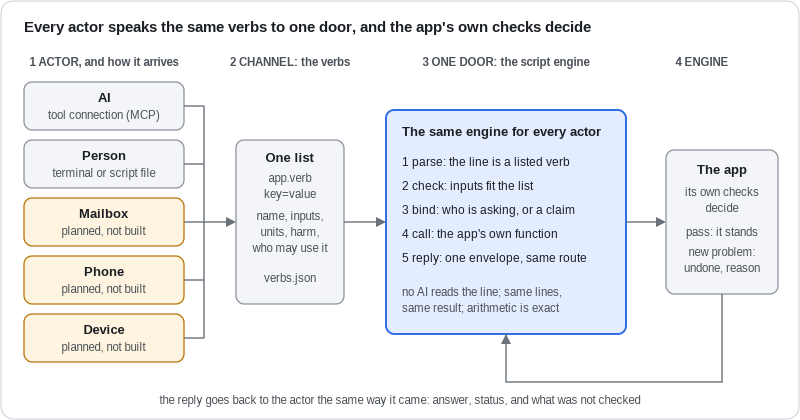
请从左到右读这张图:参与者(终端前的人,或通过工具连接的 AI);通道,一份动词列表,每个动词都有通俗的描述、输入和危害类别;门,负责解析、检查、把这一行绑定到提问者、调用并答复;应用,由它自己的检查来决定,增加新问题的更改会连同原因被撤销。连接 AI 的方法见 AI 提议指南。
每个动词都有一个危害等级(harm class):read(不做任何更改)、trial(在一次性副本上做出的更改,经过判定,从不保存)、writes、posts 或 sends。等级只在动词清单中写一次,所以任何参与者都无法用话语绕过它。终端前的人对所有等级都受信任;AI 只对 read 和 trial 受信任,因此来自 AI 的 writes 或 posts 行会被保留为一项申请,由人来确认(参考页 中有一个例子)。
在 JavaScript 中,同样的动词是一个对象,由词汇表生成(新动词不需要新代码):
$ node -e "require('./common/door/red1.js').api().object.count({building:'Duplex',kind:'Element'}).then(e=>{console.log(e.line+' -> '+e.answer.summary);process.exit(0)})" 2>/dev/null
object.count building=Duplex kind=Element -> 1193 Element
限制。对象短词(cd Element、ls、group)需要带有对象字典的模型;这里的建筑中,只有 Duplex 有。比终端更高的列表每页会停下(Space、q);管道则得到每一行。
参考页。 每条命令及其真实输出、Modeller 的故事(一个 13 m 的开间被应用自己的理由拒绝)、带命名结果的脚本、Ninja 工作簿、MIS 终端、与传统系统的对比,以及索赔与确认流程,都在 Fast Script 参考页中。
动词¶
这张表是由词汇表文件生成的(common/door/verbs.json),并且有一项测试逐个动词检查它与词汇表一致。它与 AI 的工具菜单所用的是同一份清单。危害(Harm)在上面已经解释;需要(Needs)说明这两种下载中的哪一种能运行该动词。
| 动词 | 作用 | 输入 | 危害 | 谁可以使用 | 需要 |
|---|---|---|---|---|---|
modeller.lines |
读取轴网 | building |
read | human, ai | 6 个文件的下载 |
modeller.try_shift |
试平移一条轴线 | building,line,move(米) |
trial | human, ai | 6 个文件的下载 |
viewer.counts |
统计构件数量 | building,by(可选) |
read | human, ai | 6 个文件 + 2 个 Viewer 文件 |
viewer.clashes |
列出两个专业之间的碰撞 | building,discA,discB,rows(可选) |
read | human, ai | 6 个文件 + 2 个 Viewer 文件 |
viewer.film_path |
影片路径可见性 | db,path(可选) |
read | human, ai | 一份 bim-ootb 检出 |
viewer.schedule_at |
某一天的进度计划状态 | building,day(天数) |
read | human, ai | 一份 bim-ootb 检出 |
viewer.schedule_compare |
进度计划引擎与其参照结果的对照 | building,shift_hours(小时)(可选) |
read | human, ai | 一份 bim-ootb 检出 |
modeller.widen_bay |
把开间加宽到目标宽度 | building,from,to,target(米) |
trial | human, ai | 6 个文件的下载 |
modeller.walk |
布置器会放置什么 | building,discipline |
read | human, ai | 一份 bim-ootb 检出 |
object.describe |
描述一个对象类别 | building,kind,uu(可选) |
read | human, ai | 一份 bim-ootb 检出 |
object.read |
读取一个对象 | building,kind,uu |
read | human, ai | 一份 bim-ootb 检出 |
object.history |
一个对象的历史 | building,kind,uu |
read | human, ai | 一份 bim-ootb 检出 |
object.update |
修改一个对象的一项属性 | building,kind,uu,column,value |
writes | human, ai | 一份 bim-ootb 检出 |
object.attach |
给一个对象附加文件或备注 | building,kind,uu,file(可选), text(可选) |
writes | human, ai | 一份 bim-ootb 检出 |
object.count |
统计某一类别的记录数 | building,kind, 更多 column=value 筛选条件(可选) |
read | human, ai | 一份 bim-ootb 检出 |
object.list |
列出某一类别的记录 | building,kind,columns(可选), sort(可选), limit(可选), offset(可选), 更多 column=value 筛选条件(可选) |
read | human, ai | 一份 bim-ootb 检出 |
object.sum |
把一列求和 | building,kind,column, 更多 column=value 筛选条件(可选) |
read | human, ai | 一份 bim-ootb 检出 |
object.group |
按某一列计数 | building,kind,by, 更多 column=value 筛选条件(可选) |
read | human, ai | 一份 bim-ootb 检出 |
witness.run |
运行一个 witness 并读取它的结论 | name |
trial | human, ai | 一份 bim-ootb 检出 |
witness.last |
读取最近一次记录的 witness 运行 | name |
read | human, ai | 一份 bim-ootb 检出 |
legacy.status |
旧版测试环境是否已启动 | 无 | read | human, ai | 一份 bim-ootb 检出 |
legacy.query |
读取旧版某张表的行 | table,columns(可选), sort(可选), limit(可选), 更多 column=value 筛选条件(可选) |
read | human, ai | 一份 bim-ootb 检出 |
mis.column |
谁来填写一列:孪生版与旧版并排对照 | kind,column |
read | human, ai | 一份 bim-ootb 检出 |
legacy.compare |
在孪生版和旧版上比较同一条记录 | kind,number,legacy(可选) |
read | human, ai | 一份 bim-ootb 检出 |
idempiere.where |
在 iDempiere 源码中查找一个名称 | symbol,in(可选), limit(可选) |
read | human, ai | 一份 bim-ootb 检出 |
mis.pack |
用数据模型工作簿生成 2Pack zip | book,version,out(可选), java(可选), package(可选) |
writes | human, ai | 一份 bim-ootb 检出 |
legacy.up |
启动旧版测试环境共用的 docker Postgres | 无 | writes | human, ai | 一份 bim-ootb 检出 |
legacy.refresh |
用基础种子数据刷新旧版测试实例 | 无 | writes | human, ai | 一份 bim-ootb 检出 |
legacy.witness |
在旧版测试实例上运行服务器内的 witness | 无 | trial | human, ai | 一份 bim-ootb 检出 |
legacy.check |
在旧版测试数据库中核对一个工作簿的行 | book,version(可选) |
read | human, ai | 一份 bim-ootb 检出 |
legacy.plugin |
把数据模型插件装到旧版测试实例上,并在那里核对 | book,version |
writes | human, ai | 一份 bim-ootb 检出 |
model.open |
在 Modeller 中打开 2D 图纸 | sheets,type(可选), file(可选) |
trial | human, ai | 一份 bim-ootb 检出 |
model.convert |
把已打开的图纸转换成 3D 模型 | 无 | trial | human, ai | 一份 bim-ootb 检出 |
model.addbay |
给模型增加一个开间 | end |
trial | human, ai | 一份 bim-ootb 检出 |
model.undo |
撤销模型的最近一次改动 | 无 | trial | human, ai | 一份 bim-ootb 检出 |
model.save |
保存已打开的模型 | file(可选) |
writes | human, ai | 一份 bim-ootb 检出 |
model.close |
关闭 Modeller 会话 | discard(可选) |
trial | human, ai | 一份 bim-ootb 检出 |
erp.process |
运行字典中的一个流程 | name,record(可选), kind(可选), dry(可选), role(可选), 更多 column=value 筛选条件(可选) |
writes | human, ai | 一份 bim-ootb 检出 |
erp.order_state |
ERP 为某栋建筑的选择所持有的内容,以及接下来允许什么 | building,更多 column=value 筛选条件(可选) |
read | human, ai | 一份 bim-ootb 检出 |
erp.project_status |
项目的挣值状态 | id(可选), number(可选), asof(可选) |
read | human, ai | 一份 bim-ootb 检出 |
erp.ask |
向帮助提一个问题 | question,lang(可选), role(可选) |
read | human, ai | 一份 bim-ootb 检出 |
mis.lookup |
某一列或某个流程参数的合法取值 | column,kind(可选), process(可选), id(可选), limit(可选), role(可选), 更多 column=value 筛选条件(可选) |
read | human, ai | 一份 bim-ootb 检出 |
viewer.cost |
建筑中所选部分的成本 | building,by(可选), 更多 column=value 筛选条件(可选) |
read | human, ai | 一份 bim-ootb 检出 |
erp.find |
查找一份单据 | kind,number |
read | human, ai | 一份 bim-ootb 检出 |
erp.search |
按编号搜索单据 | text,role(可选) |
read | human, ai | 一份 bim-ootb 检出 |
erp.actions |
一份单据可以做什么 | kind,id(可选), number(可选), role(可选) |
read | human, ai | 一份 bim-ootb 检出 |
erp.complete |
完成一份单据 | kind,id(可选), number(可选), role(可选) |
posts | human, ai | 一份 bim-ootb 检出 |
erp.void |
作废一份单据 | kind,id(可选), number(可选), role(可选) |
writes | human, ai | 一份 bim-ootb 检出 |
erp.close |
关闭一份单据 | kind,id(可选), number(可选), role(可选) |
writes | human, ai | 一份 bim-ootb 检出 |
erp.reverse |
冲销 - 更正一份单据 | kind,id(可选), number(可选), role(可选) |
posts | human, ai | 一份 bim-ootb 检出 |
erp.prepare |
准备一份单据 | kind,id(可选), number(可选), role(可选) |
writes | human, ai | 一份 bim-ootb 检出 |
erp.reactivate |
重新激活一份单据 | kind,id(可选), number(可选), role(可选) |
writes | human, ai | 一份 bim-ootb 检出 |
mis.describe |
描述一类 ERP 记录 | kind,role(可选) |
read | human, ai | 一份 bim-ootb 检出 |
mis.read |
读取一条 ERP 记录 | kind,id(可选), number(可选), role(可选) |
read | human, ai | 一份 bim-ootb 检出 |
mis.list |
列出记录 | kind,columns(可选), sort(可选), limit(可选), offset(可选), names(可选), role(可选), 更多 column=value 筛选条件(可选) |
read | human, ai | 一份 bim-ootb 检出 |
mis.sum |
把一列求和 | kind,column,role(可选), 更多 column=value 筛选条件(可选) |
read | human, ai | 一份 bim-ootb 检出 |
mis.group |
按某一列计数 | kind,by,role(可选), window(可选), 更多 column=value 筛选条件(可选) |
read | human, ai | 一份 bim-ootb 检出 |
mis.new |
创建一条记录 | kind,dry(可选), role(可选), window(可选), 更多 column=value 筛选条件(可选) |
writes | human, ai | 一份 bim-ootb 检出 |
mis.update |
修改一条记录 | kind,id(可选), number(可选), role(可选), window(可选), 更多 column=value 筛选条件(可选) |
writes | human, ai | 一份 bim-ootb 检出 |
mis.delete |
删除一条记录 | kind,id(可选), number(可选), role(可选), window(可选) |
writes | human, ai | 一份 bim-ootb 检出 |
mis.load |
从 CSV 载入记录 | kind,file,dry(可选) |
writes | human, ai | 一份 bim-ootb 检出 |
mis.add_window |
用 CSV 添加一个窗口 | file,table(可选), workflow(可选), dry(可选), master(可选) |
writes | human, ai | 一份 bim-ootb 检出 |
ninja.exec |
运行一个 Ninja 工作簿 | file,dry(可选), data(可选), table(可选) |
writes | human, ai | 一份 bim-ootb 检出 |
ninja.workflow |
给一张表加上单据列 | table,dry(可选) |
writes | human, ai | 一份 bim-ootb 检出 |
mis.diff |
把 CSV 与数据表作比较 | kind,file,key(可选) |
read | human, ai | 一份 bim-ootb 检出 |
mis.menu |
读取菜单 | role(可选), find(可选) |
read | human, ai | 一份 bim-ootb 检出 |
ninja.rollback |
撤销一个 Ninja 包 | bundle,dry(可选) |
writes | human, ai | 一份 bim-ootb 检出 |
ninja.export |
把一个 Ninja 包写回成工作簿 | bundle(可选), window(可选), table(可选), file |
writes | human, ai | 一份 bim-ootb 检出 |
仍可运行的旧名称,每个都等同于它所指向的动词:erp.column → mis.column · erp.compare → legacy.compare · erp.pack → mis.pack · erp.legacy_plugin → legacy.plugin · erp.describe → mis.describe · erp.read → mis.read · erp.list → mis.list · erp.sum → mis.sum · erp.group → mis.group · erp.new → mis.new
目前的覆盖范围。 这个列表是有意保持精简的:68 个动词覆盖 Modeller 的轴网编辑、它的 walker 和在多行之间保持打开的 Modeller、几个 Viewer 问题、进度计划、通用的对象读取、计数和写入、一个选择集的成本、ERP 单据动词,以及 ERP 字典中任何已有移植的流程。Viewer 有 64 个可以由人按下的动作,门提供 6 个 Viewer 动词。ERP 有 1158 个单据和流程,门为单据的生命周期提供 13 个 ERP 动词和 15 个可在任何表上工作的 MIS 动词,并保留 10 个旧名称,让以前的命令行继续可用(版本行中的数量包括它们)。所以这只是一个开始,而不是整个菜单。
本页为何保持真实¶
本页和参考页灰色代码块中的每条命令都已运行过,下面的输出就是该命令打印的内容。bim-ootb 仓库中的测试 W-FAST-SCRIPT-GUIDE 会从下载和检出再次运行它们,把本页的每个数字与运行结果核对,并检查动词表等于 verbs.json。如果这里的某个数字过时,该测试就会失败。
相关:AI 提议者指南(把 AI 连接到同一个入口,以及 AI 用这些检查做了什么),以及 Modeller 指南。