Fast Script User Guide¶
Give the BIM and ERP apps one short command at a time, or a few lines in a file, and get the app's own answer back. The same lines work for you at a terminal and for an AI.
This is the guide to the one door: a small script engine that sits in front of the apps. You write a line such as modeller.lines building=HospitalGarage. The door reads it, checks it against a fixed list of verbs, calls the app's own code, and hands the answer back with what was not checked. There is no AI in the door.
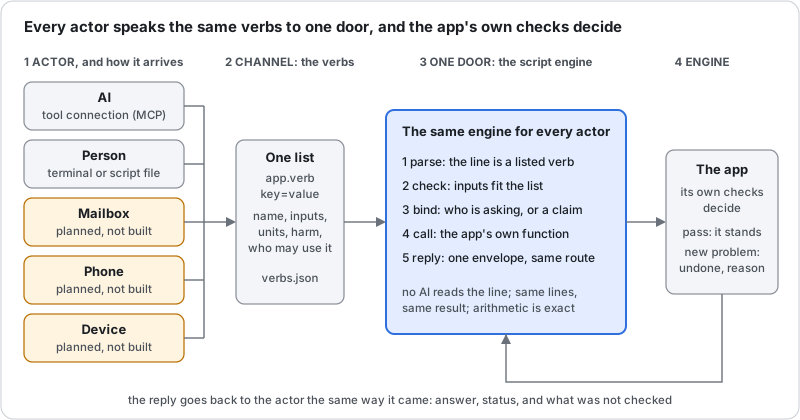
Read the picture from left to right.
- Actor. Whoever sends the line, and the way it arrives. Today that is an AI through a tool connection, or a person at a terminal. A mailbox, a phone and a device are planned and not built yet.
- Channel: the verbs. One list of everything an actor may say. Each verb has a plain description, its inputs, and a harm class. You will find the whole list below.
- One door: the script engine. It parses the line, checks the inputs, binds the line to who is asking, calls the app, and replies. Every actor goes through the same door, so the same line gives the same answer.
- Engine: the app. The app's own checks decide. A change that adds a new problem is undone, and the reason comes back.
What a good answer does not mean
An answer with no problem never means safe, compliant or good. Each answer lists what was not checked, and What is not checked lists it again. A structural engineer has the last word.
New here, with an AI? Connecting an AI to the door is in the AI Proposer Guide. This page is for commands and scripts you write yourself, and for reading what comes back.
Get the door¶
You need Node 18 or newer. These steps were run on Node 18.19.
The Modeller verbs need four files. Make an empty folder, install the browser engine, and download them:
mkdir fastscript && cd fastscript
npm init -y
npm install puppeteer@24
curl -O https://red1oon.github.io/bim-ootb/modeller/tools/edit_cli.js
curl -O https://red1oon.github.io/bim-ootb/modeller/tools/bim_mcp.js
curl -O https://red1oon.github.io/bim-ootb/common/door/door.js
curl -O https://red1oon.github.io/bim-ootb/common/door/verbs.json
Keep all four in the same folder. door.js reads the verb list from verbs.json and runs edit_cli.js, which opens the live Modeller page with no window. If a file is missing, the door says which one and prints its curl line. bim_mcp.js is only for connecting an AI; the commands on this page do not use it.
The Viewer, object and schedule verbs need a full checkout. They are not in the four files. Get the whole bim-ootb repository (git clone https://github.com/red1oon/bim-ootb) and run node common/door/door.js from its top folder instead of node door.js. The verb table says, for each verb, which of the two it needs. A one-file download for the Viewer is not built yet.
Your first command¶
One line, one verb, key=value pairs with no spaces around the =. Ask the HospitalGarage for its grid:
$ node door.js 'modeller.lines building=HospitalGarage'
{"request":"d-mw9qe1qa-1404047-1","verb":"modeller.lines","actor":"human","status":"ok","answer":{"ok":true,"building":"HospitalGarage","edits":[],"ms":51409,"model":{"grid_source":"column-derived","system":"column-framed","material":"RC","mixed":true,"girders":228,"rotation_deg":-2,"frame":"building","lines":[{"id":"gx0","axis":"x","pos":128.131,"world":132.184},{"id":"gx1","axis":"x","pos":129.223,"world":133.277},{"id":"gx2","axis":"x","pos":133.277,"world":137.334},{"id":"gx3","axis":"x","pos":133.795,"world":137.851},{"id":"gx4","axis":"x","pos":134.811,"world":138.868},{"id":"gx5","axis":"x","pos":145.987,"world":150.051},{"id":"gx6","axis":"x","pos":157.163,"world":161.234},{"id":"gx7…
It opens the Modeller and the building, so it takes 10 to 40 seconds. What you see is one line of JSON, an envelope. Only the start is shown here; the grid has more lines than fit. The answer is the app's own, unchanged, inside answer. Here gx5 is at 145.987 m and gx6 at 157.163 m on the building's own grid. status is ok.
Where does the 'request' come from?
Every line gets a request id ("request":"d-…") and is written to a journal before it runs, in ~/.cache/bim_door/journal.jsonl. Send the same id twice and you get the first answer back, so a retry never repeats a change. The door also prints one §DOOR … line on the error stream; this guide shows only the standard output.
One verb for a whole request¶
A request such as "make the bay between gx5 and gx6 13 m wide" is several steps: read the grid, work out the move, try the shift. The verb modeller.widen_bay does all three. Its inputs are the two lines and the width you want:
$ node door.js 'modeller.widen_bay building=HospitalGarage from=gx5 to=gx6 target=13' > widen.json; echo "exit $?"
exit 3
The exit code is the first answer: 0 means ok, 3 means the app gave an answer that is not a plain yes (refused, held or inconclusive), 1 means an error and 2 means a wrong command. Now look inside the file. The whole request comes first, then its two steps, each with its own envelope:
$ grep -o '"request":"[^"]*","verb":"[^"]*","actor":"[^"]*","status":"[^"]*"' widen.json
"request":"d-mw9qf5lq-1404580-1","verb":"modeller.widen_bay","actor":"human","status":"refused"
"request":"d-mw9qf5lq-1404580-1.1","verb":"modeller.lines","actor":"human","status":"ok"
"request":"d-mw9qf5lq-1404580-1.2","verb":"modeller.try_shift","actor":"human","status":"refused"
The first step read the grid. It found the bay now:
$ grep -o '"id":"gx[56]","axis":"x","pos":[0-9.]*' widen.json
"id":"gx5","axis":"x","pos":145.987
"id":"gx6","axis":"x","pos":157.163
So the bay is 157.163 − 145.987 = 11.176 m. To reach 13 m the line gx6, and every line after it, must move 1.824 m. The door worked that out, and the second step passed it on:
$ grep -o '"move":[0-9.]*' widen.json | head -1
"move":1.824
The app tried the shift, checked it, and stopped it:
$ grep -o '"why":"[^"]*"' widen.json | tail -1
"why":"line 2 (modeller.try_shift): stopped: Beam spans over limit: 91 -> 92 (limit 12 m, RC); bay gx5-gx6 newly over the limit: 13 m"
The change was made, judged and undone. Nothing is ever saved. The numbers behind the stop are in the app's report:
$ grep -o '"bay":"gx5-gx6"[^}]*' widen.json
"bay":"gx5-gx6","before":11.176,"after":13,"newly_over":true
The bay went from 11.176 m to 13 m, over this building's 12 m limit for a concrete beam (limit and material come from the building itself). That is the whole story of the Garage request: a 13 m bay needs another column line.
A script: several lines, a named result¶
A script is a text file with one command per line. A line may start with a name and an =, which keeps its answer for the lines below. Anything after -- is a comment. Save this as bay.door:
-- read the grid, then widen the bay between gx5 and gx6 to exactly 12 m
lines = modeller.lines building=HospitalGarage
modeller.try_shift building=HospitalGarage line=gx6 move={12 - (lines.model.lines[gx6].pos - lines.model.lines[gx5].pos)}
Run it with --script:
$ node door.js --script bay.door > bay.json; echo "exit $?"
exit 0
Text inside { } is arithmetic. It may use numbers, + - * /, brackets, and fields of a named result. lines.model.lines[gx6].pos means: in the answer named lines, under model, the entry of lines whose id is gx6, its pos. Only fields the verb declares can be read; any other name is an error that says so.
The arithmetic is exact decimal, not floating point. A computer using floating point gets 12 - 11.176 = 0.8239999999999998. The door gets this:
$ grep -o '"change":{"kind":"[^"]*","grid":"[^"]*","through":"[^"]*","lines":[0-9]*,"delta":[0-9.]*' bay.json
"change":{"kind":"block-shift","grid":"gx6","through":"gx16","lines":11,"delta":0.824
A script runs top to bottom and stops at the first line that is not ok. Here both answer ok:
$ grep -o '"request":"[^"]*","verb":"[^"]*","actor":"[^"]*","status":"[^"]*"' bay.json
"request":"d-mw9qghbx-1405398-2","verb":"modeller.lines","actor":"human","status":"ok"
"request":"d-mw9qgqzc-1405398-3","verb":"modeller.try_shift","actor":"human","status":"ok"
At exactly 12 m the app finds no new problem: the count of beam spans over the limit stays where it was.
$ grep -o '"label":"Beam spans over limit","scope":"[^"]*","state":"JUDGED","before":[0-9]*,"after":[0-9]*,"delta":[0-9]*' bay.json
"label":"Beam spans over limit","scope":"228 walked girders, RC (mixed building)","state":"JUDGED","before":91,"after":91,"delta":0
So the same building, asked for 13 m, is stopped, and asked for 12 m, stands. An ok is not a promise that the building is good: the same list of what is not checked applies.
The line grammar¶
| Part | Rule |
|---|---|
| A command | app.verb key=value key=value, one per line |
| A value with spaces | put it in double quotes: text="a note" |
| A named result | name = app.verb …; later lines read name.field |
| Arithmetic | { … } with numbers, + - * /, brackets and result fields; exact decimals |
| A comment | -- and the rest of the line |
| Units | never written on the line; the verb says metres, hours or days |
| Anything else | not a command: it comes back as a question, not as an action |
The last row is deliberate. Text that matches no verb is never guessed at:
$ node door.js 'please widen the bay'
{"request":"d-mw9qh1gz-1406025-1","verb":null,"actor":"human","status":"refused","answer":{"question":"I could not read that as a command. A command is app.verb key=value … Which one do you mean?","verbs":["modeller.lines","modeller.try_shift","viewer.counts","viewer.clashes","viewer.film_path","viewer.schedule_at","viewer.schedule_compare","modeller.widen_bay","object.describe","object.read","object.history","object.update","object.attach"]},"why":"not a command: \"please widen the bay\"","notChecked":[],"ops":[],"next":[],"ms":0}
Reading the reply¶
Every line, from every actor, gets the same envelope. Read these in order.
| Field | Meaning |
|---|---|
status |
ok, refused, claim, error or inconclusive. Read this first |
why |
the reason, when the status is not ok |
answer |
the app's own answer, unchanged |
notChecked |
what the check did not cover. Always pass it on |
request, verb, actor |
which line, which verb, who asked |
ops |
what was written, for a verb that writes |
next |
reserved; empty today |
ms |
how long it took |
The five statuses, each from a real run:
ok. The app answered and nothing was held back. The first command on this page is one. Even then, read notChecked.
refused. The app gave an answer that is not a yes. The 13 m request above is one: it was tried, judged and undone, and why says why. A refusal is an answer, not a failure. Text that is not a command is also refused (the question above).
error. The line itself is wrong: a missing input, an unknown verb, a value of the wrong kind. Nothing ran.
$ node door.js 'modeller.lines'
{"request":"d-mw9qh1ke-1406036-1","verb":"modeller.lines","actor":"human","status":"error","answer":null,"why":"missing input: building","notChecked":[],"ops":[],"next":[],"ms":1}
claim. The line is understood, but the actor has no proof that allows it, so the door holds it and does not run it. This is the safety rule for an AI, and it comes from the verb, not from the actor. See What is a claim.
$ node door.js --actor ai 'object.update building=Duplex kind=Element uu=abc column=Name value=x'
{"request":"d-mw9qh1ok-1406048-1","verb":"object.update","actor":"ai","status":"claim","answer":null,"why":"actor ai has proof \"local-user\", which allows read/trial verbs; object.update is writes. Held as a claim, not run.","notChecked":[],"ops":[],"next":[],"ms":1}
inconclusive. The app could not judge, and says so. It is never turned into an ok. Here the Viewer has no clash rule for the pair ARC and ZZZ. This one needs a checkout:
$ node common/door/door.js 'viewer.clashes building=Duplex discA=ARC discB=ZZZ'
{"request":"d-mw9qh1sd-1406058-1","verb":"viewer.clashes","actor":"human","status":"inconclusive","answer":null,"why":"the Viewer could not answer (exit 1): the Viewer says INCONCLUSIVE: no rule for ARC/ZZZ in clash_rules.json","notChecked":[],"ops":[],"next":[],"ms":11885}
What is a claim¶
Each verb has a harm class: read (changes nothing), trial (a change made on a throwaway copy, judged, never saved), writes, posts or sends. The class is written once, in the verb list, so no actor can talk its way around it.
Each actor has a proof. A person at the terminal is trusted for every class. An AI is trusted for read and trial only: it may look and it may try, but a writes, posts or sends verb from an AI is held as a claim, as the object.update line above was. An actor with no proof at all, such as a mail from an unknown sender, may read and nothing else:
$ node door.js --actor email 'modeller.try_shift building=HospitalGarage line=gx6 move=1.824'
{"request":"d-mw9qhb20-1406296-1","verb":"modeller.try_shift","actor":"email","status":"claim","answer":null,"why":"actor email has proof \"none\", which allows read verbs; modeller.try_shift is trial. Held as a claim, not run.","notChecked":[],"ops":[],"next":[],"ms":2}
A held claim is not run, not queued and not lost: it is in the journal. To act on it, a person sends the same line as themselves. The door does not confirm anything on anyone's behalf.
Use the door from a script of your own¶
Everything above is door.js, the same file the AI connection uses. From your own program, call it as a command and read its JSON: the exit code (0, 3, 1, 2) says whether to read an answer or a problem, and status says which. --actor human is the default; --actor ai makes the door treat the line as an AI's.
Ask what a thing is: object.describe¶
A verb can also ask the model itself what it holds. object.describe is reflection: it reads the model's own dictionary and says which properties a kind of object has, which child tabs, and which generic methods are legal for it. It reads dictionary rows only; no element is opened. It needs a checkout, and a building whose model carries its own dictionary (the Duplex does).
$ node common/door/door.js 'object.describe building=Duplex kind=Element'
{"request":"d-mw9qhb5q-1406306-1","verb":"object.describe","actor":"human","status":"ok","answer":{"kind":"Element","table":"elements_meta","uu":"3027c2ed-8cb6-5ccb-ae8c-fd7df2eca264","key":"elements_meta_uu","highVolume":true,"properties":[{"name":"guid","label":"GUID","type":"string","mandatory":true,"updateable":false,"key":false,"parent":false,"length":255},{"name":"ifc_class","label":"IFC Class","type":"list","mandatory":false,"updateable":true,"key":false,"parent":false,"length":255,"values":["IfcBeam","IfcCo…
Which methods may an Element use?
$ node common/door/door.js 'object.describe building=Duplex kind=Element' | grep -o '"methods":\[[^]]*\]'
"methods":["read","update","attach","history"]
An unknown kind is an error that lists the kinds the model has, so a wrong guess teaches the right name.
The verbs¶
This table is generated from the vocabulary file (common/door/verbs.json) and a test checks that it matches, verb for verb. It is the same list the AI's tool menu is built from. Harm is explained above; Needs says which of the two downloads runs the verb.
| Verb | What it does | Inputs | Harm | Who may use it | Needs |
|---|---|---|---|---|---|
modeller.lines |
Read the grid | building |
read | human, ai | the 4-file download |
modeller.try_shift |
Try shifting a grid line | building, line, move (metres) |
trial | human, ai | the 4-file download |
viewer.counts |
Count elements | building, by (optional) |
read | human, ai | a bim-ootb checkout |
viewer.clashes |
List clashes between two disciplines | building, discA, discB |
read | human, ai | a bim-ootb checkout |
viewer.film_path |
Film path visibility | db, path (optional) |
read | human, ai | a bim-ootb checkout |
viewer.schedule_at |
Schedule state at a day | building, day (day number) |
read | human, ai | a bim-ootb checkout |
viewer.schedule_compare |
Schedule engine against its reference | building, shift_hours (hours) (optional) |
read | human, ai | a bim-ootb checkout |
modeller.widen_bay |
Widen a bay to a target width | building, from, to, target (metres) |
trial | human, ai | the 4-file download |
object.describe |
Describe an object kind | building, kind, uu (optional) |
read | human, ai | a bim-ootb checkout |
object.read |
Read an object | building, kind, uu |
read | human, ai | a bim-ootb checkout |
object.history |
History of an object | building, kind, uu |
read | human, ai | a bim-ootb checkout |
object.update |
Change one property of an object | building, kind, uu, column, value |
writes | human, ai | a bim-ootb checkout |
object.attach |
Attach a file or note to an object | building, kind, uu, file (optional), text (optional) |
writes | human, ai | a bim-ootb checkout |
Coverage today. The list is small on purpose: 13 verbs cover the Modeller's grid edits, a few Viewer questions, the schedule, and generic object reading and writing. The Viewer has 64 actions a person can press, and the door offers 5 Viewer verbs. The ERP has 1156 documents and processes, and the door offers no ERP verb yet. So this is a start, not the whole menu.
What is not checked¶
A reply lists what its check did not cover. For the Modeller's edit report the list is:
$ grep -o '"notChecked":\[[^]]*\]' widen.json | tail -1
"notChecked":["duplicate ids","elements changed outside the edit's own list","floating or unsupported elements","grid lines placed on top of each other","invalid coordinates","real beams: only girders walked from columns are span-checked","unknown element types","wrong units or absurd sizes, unless they hit something","zero-size elements","load capacity","beam and column rules (Regulatory Report only)"]
The same words apply to any answer: overlaps are bounding boxes first, a check covers only what moved, and load capacity is never checked. A reply with no red never means safe.
Troubleshooting¶
| What you see | What to do |
|---|---|
edit_cli is not at … |
One of the four files is missing. The message prints the curl line |
puppeteer not found |
Run npm install puppeteer@24 in the same folder |
unknown verb |
The message lists every verb. Check the spelling against the table |
missing input: … |
The verb needs that key. The table lists the inputs |
The Viewer tools need a bim-ootb checkout |
Run it as node common/door/door.js from a full checkout |
exit 1 with a Chrome message |
Chrome's system libraries are missing on Linux. Puppeteer's troubleshooting page lists them |
Limits to plan for. Each Modeller call opens the whole building: about 10 to 40 seconds on the HospitalGarage. This is a measuring tool, not a service with uptime. A script with several Modeller lines opens the building once per line.
How this page stays true¶
Every command in a grey block above was run, and the output under it is what the command printed. A test, W-FAST-SCRIPT-GUIDE in the bim-ootb repository, runs them again from a clean four-file download, checks every number on this page against the runs, and checks that the verb table equals verbs.json. If a number here goes stale, that test fails.
Related: the AI Proposer Guide (connect an AI to the same door, and what an AI did with the checks), and the Modeller guide.