BIM Intent Compiler
Construction = BOM + (x, y, z). One formula that unifies geometry, procurement, scheduling, compliance, and cost — the way E=mc² unified mass and energy. Five domains that the industry treats as separate tools, separate vendors, separate budgets — unified in a formula an inch long.
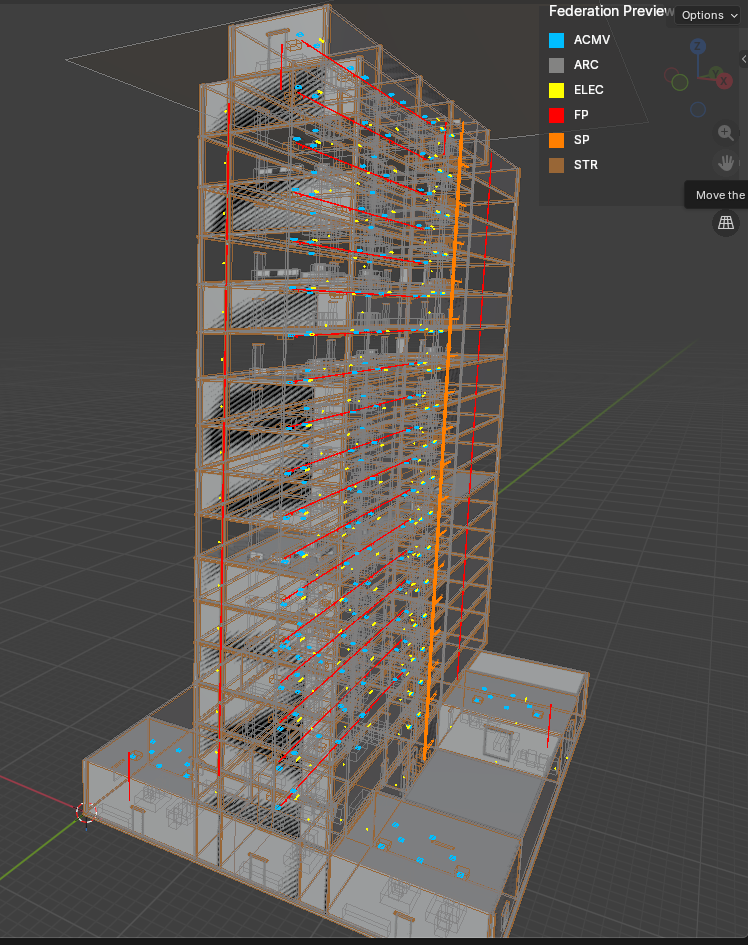
It reads a BOM and produces verified 3D coordinates — the same way an ERP system explodes a manufacturing BOM into work orders. The output renders live in the BIM OOTB browser viewer — no install, no server, two DBs, one browser. Domain-agnostic — buildings, bridges, ships, tunnels. Nothing invented. No AI, no LLM inside. Pure arithmetic. Deterministic.
together long ago — but I couldn't wait."
Redhuan D. Oon · ADempiere 2006 · iDempiere 2010 · BIM Compiler 2025
Every existing tool starts with geometry and extracts quantities downstream — draw first, count second. This compiler inverts the direction: the Bill of Materials is the source of truth, and geometry is the compiled output. Procurement doesn't follow design. Design follows procurement.
| Draw first, count second | Count first, draw second | |
|---|---|---|
| Source of truth | 3D model (Revit, ArchiCAD) | Bill of Materials |
| Quantities | Extracted after design | Inherent — the BOM IS the quantity |
| Change a wall | Redraw → re-extract QTO → re-estimate | Change one BOM line → recompile |
| Compliance | Separate checker (Solibri) | Same rule engine |
| Cost | Separate estimator | Same BOM × price list |
| Schedule | Separate tool (Primavera) | BOM tree topological sort |
| Proof | Visual inspection | Deterministic — every element traces to a source |
Built on iDempiere ERP conventions and SQLite, rendered browser-native with Three.js. From Kuala Lumpur, Malaysia — where BIM is mandated for all projects ≥ RM10M from July 2025. It is the Creator, Redhuan D. Oon's gift to the world.
The three apps you actually open
-
🧱 BIM Viewer
Drop your own IFC → extracted to SQLite right in the browser; merge disciplines, fly-through, clash matrix, 4D/5D time-machine — all on the same file. Desktop and mobile, works offline.
-
✏️ DAGeVu Modeller
Author B-rep geometry — insert library parts, sketch, extrude, sweep, edit the 3D Grid — where the signed op-log is the feature tree.
-
📊 Kernel-ERP
Real iDempiere in the browser — POS, financial statements, the full Application Dictionary from SQLite. No Java, no server, no install.
The headline ideas
-
Clash Detection — In the Browser
Discipline-pair rules, fly-to visualization, live tolerance slider, in-viewer review workflow. Tens of thousands of elements, zero server.
-
Kernel-ERP — a Fold over a Signed Op-Log
C_Order, C_OrderLine, M_Product, M_BOM — folded from the iDempiere oracle. State is a deterministic fold over a signed operation log; even an
AD_Processis re-derived as a replay, not a method.Black Book · Cross-ERP Rosetta (incl. SAP / ACDOCA) · ERP world view
-
Enterprise Security — No Server Required
Cryptographic verification with no central server: HMAC attestation, Ed25519 identity signing, SHA-256 transport integrity. Your data never leaves your browser.
-
Editable Business Rules, Live
The Holy Grail — change a rule, watch the model and the ERP re-fold. Spatial ERP where every record has a place.
Documentation map
| I want to… | Start here |
|---|---|
| Get going (everyone starts here) | 📖 User Guide |
| View a building in the browser | BIM Viewer Guide |
| Author geometry | DAGeVu Modeller Guide |
| Run the browser ERP | Kernel-ERP User Guide |
| Understand the ERP world view | MANIFESTO — read first |
| Compare to other tools | Feature Comparison · Migrate & Compare (ERP) |
| See where this sits in the industry | Strategic Positioning |
| Understand how it was built | Vibe Programming — AI + Domain Expertise |
| Author geometry as a fold | DAGeVu Modeller — Geometry as a Fold |
| Walk to any element indoors | Find & Navigate — Indoor Wayfinding |
| Distributed / offline ERP | Distributed ERP |
| Go beyond buildings | Beyond Buildings — ShipYard |
| Contribute | Contribute — start here |
Copyright (c) 2025-2026 Redhuan D. Oon. MIT Licensed.