BIM OOTB — Localization Guide¶
Why This Matters in BIM¶
The BIM industry has standardized geometry (IFC/ISO 16739) but not costing. Every country has its own cost book, its own labour rates, its own currency, its own professional terminology. Today's BIM tools translate their UI but leave the cost data US/UK-centric — a Malaysian QS using Revit still manually applies CIDB rates. The tool speaks Malay but the BOQ speaks American.
BIM OOTB solves this with project-level locales — inspired by iDempiere's AD_Window_Trl pattern, proven at enterprise scale across 50+ countries for 20+ years.
What makes this different¶
| Approach | BIM OOTB | Autodesk/Trimble | Procore/PlanGrid |
|---|---|---|---|
| UI labels | Localized via _TRL |
Localized | Localized |
| Cost rates | Per-locale rate books | US/UK only | No BOQ |
| Currency | Locale-driven | Manual config | USD only |
| Rate attribution | CIDB / RS Means / DIN 276 / Spon's per locale | None | None |
| Deployment | ?lang=ms_MY in URL |
Server config | Enterprise license |
| Project override | Copy locale file, edit rates | Not possible | Not possible |
The key insight: a locale is not just a language — it's a complete cost context. Same language, different rate books:
- en_MY — English + CIDB Malaysia rates + RM
- en_US — English + RS Means rates + USD
- en_AU — English + Rawlinsons rates + AUD
- en_MY_JKR — English + JKR Schedule of Rates + RM (government projects)
Architecture¶
rates.js              → _RATES_DEFAULTS (runtime globals, loaded by all pages)
locales/{code}.js     → _TRL_LOCALE (full override: labels + rates + currency)
                         loaded by locale_loader, deep-merged over defaults
Override priority (highest wins)¶
- URL params —
?cur=USD&rate=4.45&h_labour=Labor(any_TRLkey) - Project locale —
MyProject_TRL.js(custom file, any name) - Country locale —
locales/{code}.js - Base defaults —
_TRL_DEFAULTSinrates.js(en_MY)
Load order¶
<script src="rates.js">          ← defaults + helper functions
<script src="locale_loader.js">  ← reads ?lang= or localStorage, loads locale file
<script src="boq_charts.html">   ← uses _TRL.* for every label, CUR for currency
Available Locales¶
| Code | Language | Flag | Currency | Rate Source |
|---|---|---|---|---|
en_MY |
English (Malaysia) | 🇲🇾 | RM / USD | CIDB Malaysia 2024 / BCISM |
en_US |
English (US) | 🇺🇸 | $ / RM | RS Means 2024 |
en_GB |
English (UK) | 🇬🇧 | £ / USD | Spon's 2024 |
en_AU |
English (Australia) | 🇦🇺 | A$ / USD | Rawlinsons 2024 |
ms_MY |
Bahasa Melayu | 🇲🇾 | RM / USD | CIDB Malaysia 2024 |
de_DE |
Deutsch | 🇩🇪 | EUR / USD | DIN 276 / BKI 2024 |
fr_FR |
Français | 🇫🇷 | EUR / USD | Bordereau UNTEC 2024 |
es_ES |
Español | 🇪🇸 | EUR / USD | CYPE Base de Precios 2024 |
zh_CN |
简体中文 | 🇨🇳 | ¥ / USD | GB/T 50500-2013 |
th_TH |
ภาษาไทย | 🇹🇭 | ฿ / USD | BOQ Thailand Standard |
ja_JP |
日本語 | 🇯🇵 | ¥ / USD | JBCI Cost Index 2024 |
ko_KR |
한국어 | 🇰🇷 | ₩ / USD | KICT Standard 2024 |
ar_SA |
العربية | 🇸🇦 | ﷼ / USD | Saudi Aramco Rates |
pt_BR |
Português | 🇧🇷 | R$ / USD | SINAPI/TCPO 2024 |
id_ID |
Bahasa Indonesia | 🇮🇩 | Rp / USD | SNI BOQ Standard |
bn_BD |
বাংলা (Bengali) | 🇧🇩 BN |
৳ / USD | PWD Bangladesh 2024 |
bl_BD |
Banglish (Romanized) | 🇧🇩 BL |
৳ / USD | PWD Bangladesh 2024 |
af_ZA |
Afrikaans | 🇿🇦 | R / USD | ASAQS / RICS Southern Africa 2024 |
For Developers: Creating a New Locale¶
Step 1: Copy the base¶
cp deploy/dev/locales/en_MY.js deploy/dev/locales/xx_YY.js
en_MY.js is the base — it contains every key so you can see the full set.
Step 2: Edit identity and currency¶
var _TRL_LOCALE = {
  iso: 'YY',              // ISO 3166-1 alpha-2 (drives flag emoji)
  lang: 'xx',             // ISO 639-1 language code
  locale: 'xx_YY',

  cur: 'CUR',             // primary currency symbol
  cur2: 'USD',            // secondary currency symbol
  cur_rate: 1.00,         // 1 cur2 = cur_rate × cur
  cur_name: 'Your Currency',
  cur2_name: 'US Dollar',
Step 3: Set rate source attribution¶
Every country has its own cost book. This is the single most important part — it's what appears on the cover sheet of every Excel BOQ export.
  rate_source:       'Your Country Rate Book 2024',
  rate_mat_source:   'National Construction Cost Centre 2024',
  rate_lab_source:   'Labour Wage Survey 2024',
  rate_eq_source:    'Equipment Hire Rates 2024',
Step 4: Translate labels¶
Only override what differs from the base. Construction terms that are ISO standards stay in English.
  // Column headers
  h_material: 'Material',      // translate this
  h_labour: 'Labour',          // en_US: 'Labor'
  h_equipment: 'Equipment',    // translate this
  h_storey: 'Storey',          // en_US: 'Story'

  // Chart titles
  t_cost_by_disc: '5D — Cost by Discipline',  // translate after the dash
  t_gantt: '4D — Gantt Timeline (Strategic Tasks by Phase)',
Step 5: Set your country's rates¶
This is what makes _TRL a project locale, not just a language pack. The rates are engineering data from your country's cost book.
  rates: {
    IfcWall:  {rate: 145, unit: 'M2', desc: 'Blockwork Wall 150mm'},
    IfcBeam:  {rate: 680, unit: 'M',  desc: 'Structural Steel I-Beam'},
    IfcSlab:  {rate: 285, unit: 'M2', desc: 'RC Slab 250mm'},
    // ... all IFC classes your cost book covers
  },

  labor_rates: {
    MASON: {rate_per_day: 155, crew_size: 3, trade: 'Mason (Skilled)',
            productivity: {IfcWall: 12, IfcWallStandardCase: 12}},
    // ... your labour trades
  },

  equipment_rates: {
    MOBILE_CRANE_20T: {rate_per_day: 1850, desc: 'Mobile Crane 20 Tonne'},
    // ... your equipment hire rates
  },
Step 6: Test¶
Load with ?lang=xx_YY and check the auto-downloaded .log file:
§TRL_VERIFY  — TRL_COMPLETE: all keys populated
§TRL_VERIFY  — TRL_CUR_MATCH: CUR=CUR _TRL.cur=CUR
§TRL_VERIFY  — TRL_SHEET_NAMES: 5/5 sheets match
§TRL_VERIFY  — TRL_CHART_TITLES: 9/9 charts match
§TRL_VERIFY  — TRL_NO_HARDCODE: no RM/USD leaks
§MATHS_VERIFY — MATHS_CUR_CONV: conversion correct
All tests auto-run on every Excel save (5D or 4D button). No manual verification needed.
Translation Rules¶
DO translate¶
- Column headers (
Material,Labour,Equipment,Storey, etc.) - Chart titles (the part after
5D —or4D —) - Excel sheet names (
Cover Sheet,Executive Summary, etc.) - Section titles (
COMPREHENSIVE BILL OF QUANTITIES, etc.) - Status messages and UI labels
- Rate source attribution (use your country's actual cost book name)
- Trade names (
Mason,Electrician,Plumber→ your language) - Equipment descriptions (
Mobile Crane 20 Tonne→ your language)
DO NOT translate¶
- IFC class names —
IfcWall,IfcBeam,IfcSlabare ISO 16739 identifiers - nD dimension codes —
5D —,4D —are universal industry prefixes - Technical acronyms — BIM, BOQ, WBS, MEP, HVAC, GPS, IFC
- Units — M, M2, EA, KG (ISO standard)
- Brand name —
BIM OOTB — Frictionless BIM(stays insource_app) - Compass directions — N, S, E, W (universal)
- Axis labels — X, Y, Z (universal)
DO NOT change in locale files¶
- Rate values for IFC classes you don't have local data for — keep the base value
- Productivity numbers unless you have local trade data
- Equipment allocation factors unless your construction practice differs
RATES,LABOR_RATES,EQUIPMENT_RATESinrates.js— those are the defaults
Project-Level Override¶
For a specific project (e.g., a JKR government contract in Malaysia):
cp deploy/dev/locales/en_MY.js deploy/dev/locales/MyProject_TRL.js
Edit MyProject_TRL.js:
- Swap CIDB rates for JKR Schedule of Rates
- Adjust productivity for your project's constraints
- Set rate_source to 'JKR Schedule of Rates 2024'
Load with ?lang=MyProject_TRL — your entire 4D/5D output uses project-specific rates.
_TRL Key Reference¶
Currency (5 keys)¶
cur, cur2, cur_rate, cur_name, cur2_name
Rate Attribution (12 keys)¶
rate_source, rate_year, rate_mat_source, rate_mat_ref, rate_mat_includes, rate_lab_source, rate_lab_basis, rate_lab_prod, rate_lab_crew, rate_eq_source, rate_eq_alloc, rate_eq_basis
Column Headers (22 keys)¶
h_discipline, h_ifc_class, h_quantity, h_uom, h_description, h_storey, h_phase, h_item, h_material, h_labour, h_equipment, h_total, h_unit_rate, h_mat_rate, h_lab_rate, h_rate_day, h_trade, h_crew_size, h_man_days, h_duration, h_grand_total, h_subtotal
4D Labels (14 keys)¶
h_wbs, h_task_name, h_productivity, h_gangs, h_start_date, h_finish_date, h_labor_resource, h_status, h_pct_complete, h_day_offset, h_date, h_milestone, h_task, h_task_count, h_total_days, h_total_man_days, h_week, h_cumulative_pct
Chart Titles (10 keys)¶
t_cost_by_disc, t_cost_components, t_task_dist_phase, t_task_count_disc, t_phase_duration, t_resource_workload, t_s_curve, t_milestone, t_gantt, t_vo_impact
Excel Sheet Names (10 keys)¶
s_cover, s_exec_summary, s_material, s_labour, s_equipment, s_boq, s_prov, s_schedule, s_proj_summary, s_dashboard
Section Titles (11 keys)¶
t_comp_boq, t_cost_method, t_mat_summary, t_lab_summary, t_equip_summary, t_prov_sums, t_phase_dur_analysis, t_resource_analysis, t_s_curve_progress, t_milestone_timeline, t_gantt_timeline
Rate Data (in locale files)¶
rates (object), rates_default, labor_rates (object), equipment_rates (object), equipment_allocation (object)
Misc¶
not_started, source_app, iso, lang, locale
iDempiere Pattern Mapping¶
For developers familiar with iDempiere ERP:
| iDempiere | BIM OOTB | What |
|---|---|---|
AD_Window |
_TRL_DEFAULTS in rates.js |
Base entity (en_MY) |
AD_Window_Trl |
locales/{code}.js |
Per-language override |
AD_Client / AD_Org |
Project locale file | Per-tenant/org override |
AD_Language |
iso + lang fields |
Language identity |
AD_Element |
h_* keys |
Shared column names |
AD_Message |
ui_* keys |
UI messages |
C_Currency |
cur, cur_rate |
Currency conversion |
M_Product_PO |
rates object |
Per-vendor (per-country) pricing |
The pattern: one master record contains every field. Translation records override what differs. Deep merge at runtime. URL params override everything (like iDempiere's #AD_Language context variable).
Files¶
| File | Purpose |
|---|---|
deploy/dev/rates.js |
Default rates + helper functions (calcLabor, calcEquipment, getRate) |
deploy/dev/locales/en_MY.js |
Base locale — English (Malaysia), CIDB 2024 |
deploy/dev/locales/{code}.js |
Country locale — 18 locales shipped |
deploy/dev/boq_charts.html |
4D/5D analytics — uses _TRL.* for all labels |
deploy/dev/variation_order.js |
VO Excel — uses shared rates.js |
deploy/dev/nlp.js |
Voice/text queries — uses getRate() from rates.js |
prompts/S226_localisation.md |
Implementation spec — per-file audit, UI keys, phases |
deploy/dev/locale_loader.js |
Runtime: detect locale, fetch, cache, apply to DOM |
Flag Picker (User-Facing)¶
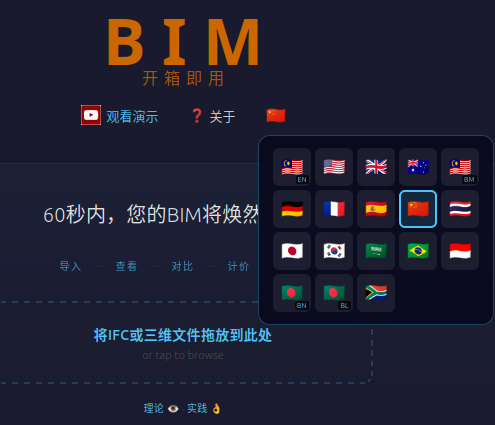
Users switch locale via a flag button in the header bar (landing page and viewer). Clicking it opens a popup grid of 18 country flags. Selecting a flag:
- Saves choice to
localStorage(bim_ootb_config) - Reloads the page
- All text, currency, and rates switch instantly
The current locale's flag is highlighted with a blue border. Dual-country locales (e.g. two Malaysian flags for en_MY and ms_MY) show small badges (EN / BM) to distinguish them.
No settings dialog, no gear icon — just click the flag.
How locale_loader.js Works (Developer Reference)¶
Detection order¶
- URL param
?lang=xx_YY localStoragekeybim_ootb_config→{ locale: 'xx_YY' }navigator.languagemapped to closest available locale- Fallback:
en_US
Fetch + cache¶
locale_loader.js
  ├── Check localStorage cache: key = 'bim_ootb_locale_{code}'
  │   └── Valid if: exists && version matches LOCALE_VERSION && age < 7 days
  ├── If cache miss → fetch from OCI: sandbox/locales/{code}.js
  │   └── Fallback: relative path locales/{code}.js (local dev)
  ├── Parse: new Function(text + '; return _TRL_LOCALE;')
  ├── Deep-merge over window._TRL (from _TRL_DEFAULTS if present)
  ├── Apply URL param overrides (?cur=USD, ?h_labour=Labor, etc.)
  └── applyTrlToDOM()
        ├── [data-trl="key"]       → el.textContent = _TRL[key]
        ├── [data-trl-title="key"] → el.title = _TRL[key]
        └── [data-trl-placeholder="key"] → el.placeholder = _TRL[key]
Cache invalidation¶
LOCALE_VERSION constant in locale_loader.js. Bump it when locale files change — any cached entry with a different version is re-fetched.
Landing page integration¶
The landing page loads locale_loader.js at the bottom. All translatable text uses data-trl attributes. JS-generated text (card buttons, progress bar) uses _TRL.key || 'fallback' pattern.
Open Issues¶
| # | File | Issue | Status |
|---|---|---|---|
| I-1 | deploy/dev/index.html |
Tooltip visibility confirmed working for locales that have ui_tt_* keys. Deploy all updated locale files to OCI bucket to activate. |
Deploy needed |
| I-5 | deploy/dev/navigate.js |
_TRL applied to panel strings at build time. If locale loads AFTER panel builds, re-open panel to see translated text. To fix fully: listen to trl-ready event and rebuild panel. |
Low priority |
CLOSED:
- I-2: boq_charts.html locale_loader confirmed working
- I-3: All 6 incomplete locales now have 14 ui_tt_* keys (af_ZA, ar_SA, bl_BD, bn_BD, id_ID, pt_BR, th_TH)
- I-4: ui_saved_excel + ui_vo_label added to all 18 locale files
Tooltip architecture note¶
- Native
titleattribute: works desktop hover only, not mobile #ootb-tipJS bubbles: appended to<body>(bypassesoverflow:hiddenon.panel-body), shows onmouseover+touchstart(1.8s)- boq_charts.html toolbar: buttons now have
title+data-trl-title— locale_loader.js applies translations viaapplyTrlToDOM() - If still not showing: check browser console for
§TRL_LOADEDlog line; if absent, locale_loader.js fetch failed
Current Status (POC)¶
- Language and currency/rates are bundled per flag — selecting Japanese gives you Japanese UI + JPY currency + Japanese rate sources
- A future version will separate language preference from currency/rate selection (e.g. English UI with Malaysian Ringgit rates)
- Rate data is illustrative — not authoritative for production cost estimation
- 18 locales ship with ~300 keys each (UI + BOQ + 4D/5D + landing)
Copyright (c) 2025-2026 Redhuan D. Oon. MIT Licensed.