nD BIM Analysis — 4D Schedule, 5D Cost, 6D Carbon, 7D FM, 8D Safety¶
← Back to the User Guide · Home
Foundation: Enterprise · LTU A-House · DATA_MODEL
What We Have¶
The Federated Model DB (_extracted.db) drives all nD analytics
from a single SQLite file. All IFC disciplines live in this one DB.
No IFC file open, no geometry iterator, no RAM spike.
Scale proof: 1,063,563 elements across 787 buildings — all 5 dimensions in 8.7 seconds.
Proven Results (LTU A-House — 125,997 elements, 8 disciplines)¶
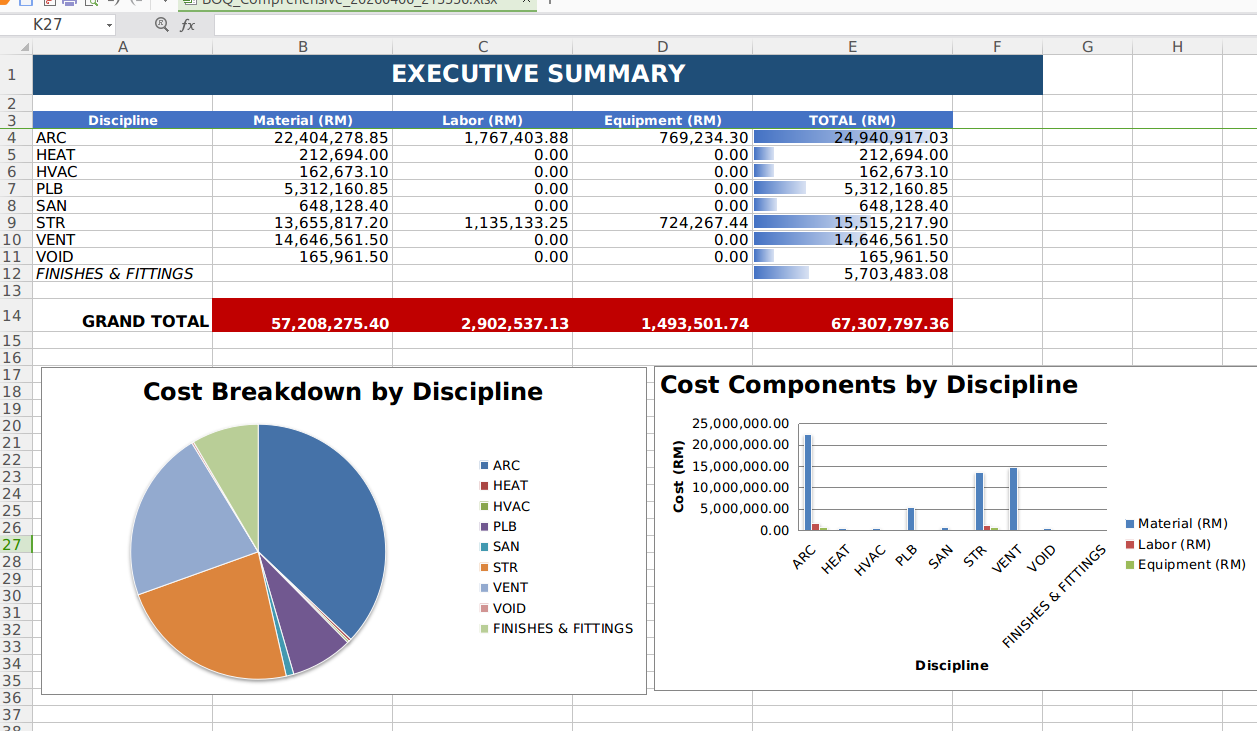
5D Costing — Executive Summary with Material + Labour + Equipment per discipline. Grand Total: RM 67M (CIDB 2024 standard rates). 133 QTO line items. Generated in ~2 seconds.
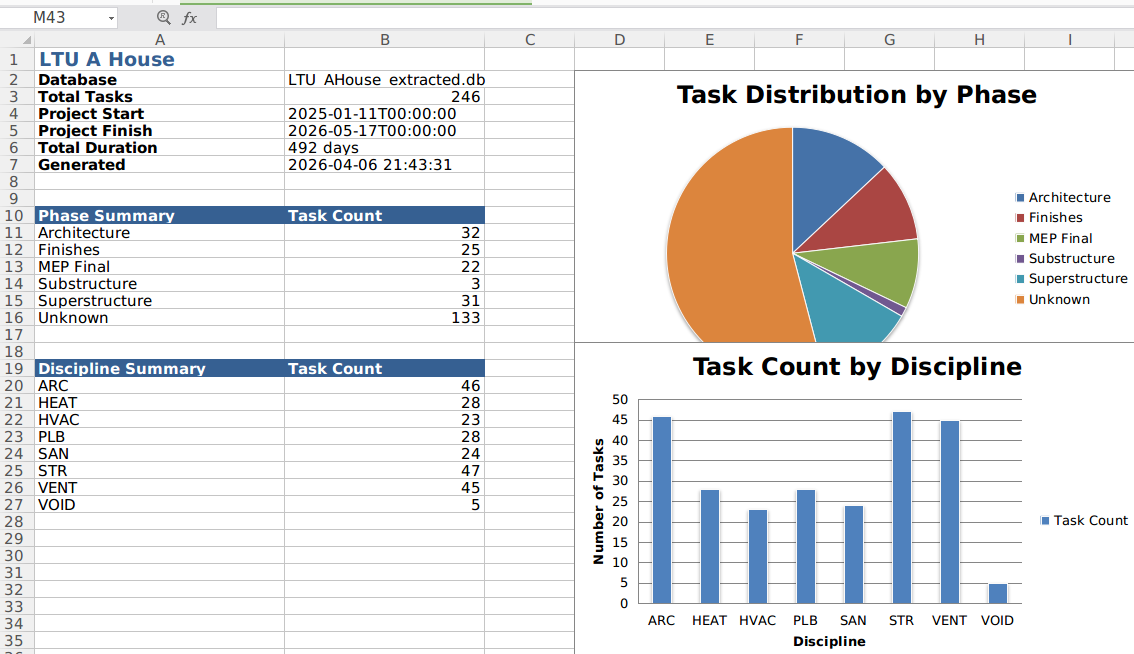
4D Schedule — 224 construction tasks, precedence-linked by phase. Substructure → Superstructure → MEP Rough-in → Architecture → MEP Final → Finishes.
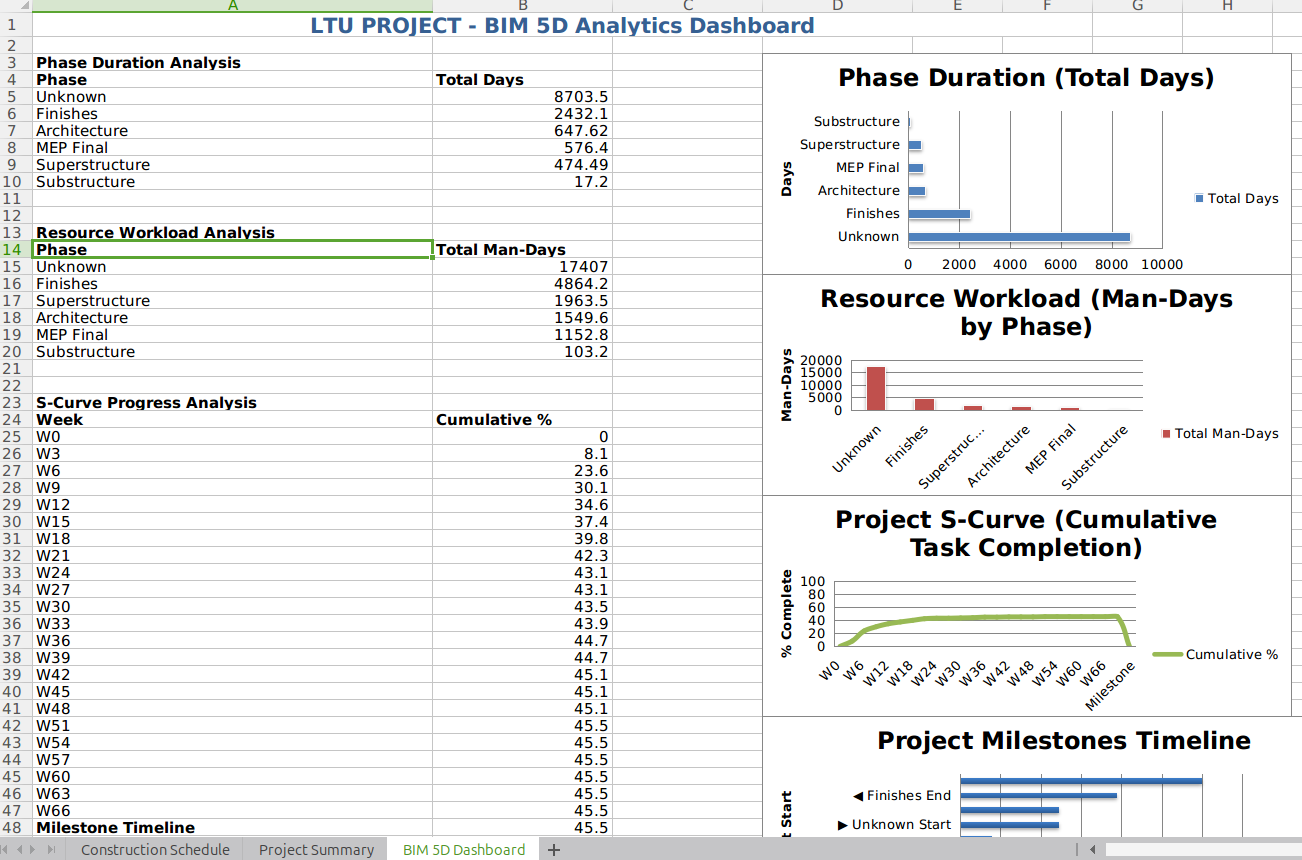
4D Dashboard — S-Curve, resource workload, milestones — all from one query on the DB.
The nD Engine¶
A single abstract engine reads user-editable JSON templates and applies formulas
to any IFC class found in the extracted DB. Zero hardcoded IFC classes — all configuration
lives in templates/. Users edit JSON, the engine applies formulas.
python3 scripts/nD_engine.py <database_path> --all
python3 scripts/nD_engine.py <database_path> --dims 4D,5D
python3 scripts/nD_engine.py <database_path> --dims 6D    # auto-runs 5D if needed
| Dimension | Template | Input | Output Table |
|---|---|---|---|
| 4D Schedule | templates/4D_phases.json |
elements_meta |
construction_schedule |
| 5D Costing | templates/5D_rates.json |
elements_meta + elements_rtree |
simple_qto |
| 6D Carbon | templates/6D_carbon.json |
elements_meta + simple_qto |
carbon_audit |
| 7D FM/Lifecycle | templates/7D_lifecycle.json |
elements_meta |
asset_register |
| 8D Safety | templates/8D_safety.json |
elements_meta + construction_schedule |
hazard_register |
Master formula file: templates/nD_formulas.json — measurement rules, cost formulas,
dimension registry.
Self-Healing Pipeline¶
If a dimension needs a prerequisite table that doesn't exist, the engine auto-generates
it. Request 6D on a fresh DB → engine detects simple_qto missing → runs 5D first →
then 6D. Request 8D → auto-runs 4D for the schedule. No manual ordering needed.
How IFC Data Becomes nD Data¶
Every dimension derives from the same elements_meta table that extractIFCtoDB.py
creates during IFC extraction. The key column is ifc_class — the JSON templates map
each class to phase/cost/carbon/lifecycle/hazard rules.
IFC file ─→ extractIFCtoDB.py ─→ elements_meta (ifc_class, discipline, storey, ...)
                                       │
            ┌──────────┬───────┬───────┼───────┬───────┐
            │          │       │       │       │       │
           4D         5D      6D     7D      8D    Viewer
         phase    cost/qty  carbon  asset  hazard  3D mesh
         from       from     from    from    from
       ifc_class  ifc_class ifc_class ifc_class ifc_class
            │          │       │       │       │
        templates/ JSON ← user-editable
If an extracted DB is empty (0 bytes, no tables), re-run extraction:
python3 scripts/extractIFCtoDB_open.py path/to/model.ifc path/to/output_extracted.db
Fleet Test Results — 37 Buildings + 1M City¶
37/37 individual buildings PASS. Sandbox city-wide 1M PASS. Zero failures.
How to Run Tests¶
# Unit test — single building (28 witnesses)
python3 scripts/test_nD_engine.py
python3 scripts/test_nD_engine.py --db DAGCompiler/lib/input/Hospital_extracted.db

# Fleet test — all 37 buildings
python3 scripts/test_nD_fleet.py

# Fleet + 1M sandbox city (takes ~14 seconds total)
python3 scripts/test_nD_fleet.py --include-sandbox
Output locations:
- Tables written into the extracted DB itself (temp copy during tests)
- Fleet report: scripts/nD_fleet_report.txt
- Debug log: scripts/nD_engine_log.txt
- For production runs, tables are written directly into the target _extracted.db
Test Witnesses¶
| Witness | What it proves |
|---|---|
| W-TEMPLATE | All 6 JSON templates load, all have _default fallback |
| W-5D_COSTED | Every IFC class gets a cost (zero uncosted) |
| W-4D_NO_UNKNOWN | Zero tasks with phase='Unknown' (was 64% Unknown before) |
| W-6D_CARBON | Carbon total > 0 and cross-checks with SUM(qty × factor) |
| W-7D_ASSETS | Asset count == element count (1:1 mapping) |
| W-8D_SAFETY | Every hazard row has a risk_level |
| W-AUTO_PREREQ | Requesting 6D auto-generates 5D if missing |
Sandbox City — 1,063,563 Elements, 8.7 Seconds¶
The sandbox contains 787 buildings (13 CBD archetypes + suburb tile instances) across 48 IFC classes and 6 disciplines.
5D — City-Wide Cost: RM 1.59 Billion¶
| Discipline | QTO Lines | Elements | Cost (RM) |
|---|---|---|---|
| ARC | 576 | 686,396 | 1,407,873,431 |
| MEP | 192 | 243,304 | 98,035,356 |
| STR | 130 | 123,427 | 76,154,312 |
| ELEC | 33 | 6,129 | 2,922,681 |
| FP | 17 | 3,709 | 1,854,500 |
| ACMV | 9 | 598 | 299,000 |
Top 10 most expensive IFC classes (city-wide):
| IFC Class | Elements | Cost (RM) |
|---|---|---|
| IfcSlab | 39,392 | 821,441,213 |
| IfcDoor | 46,064 | 131,282,400 |
| IfcWallStandardCase | 45,216 | 130,362,836 |
| IfcWindow | 59,043 | 93,287,940 |
| IfcFlowTerminal | 20,707 | 72,474,500 |
| IfcCovering | 131,595 | 48,305,718 |
| IfcOpeningElement | 78,286 | 39,143,000 |
| IfcColumn | 7,731 | 37,227,725 |
| IfcMember | 47,498 | 32,234,992 |
| IfcBuildingElementProxy | 37,829 | 32,154,650 |
4D — City-Wide Schedule: 957 Tasks¶
| Phase | Tasks | Total Duration (days) |
|---|---|---|
| Substructure | 15 | 366 |
| Superstructure | 211 | 16,004 |
| MEP Rough-in | 142 | 13,203 |
| Architecture | 447 | 63,308 |
| MEP Final | 84 | 4,169 |
| Finishes | 58 | 13,762 |
Zero Unknown phase. Every IFC class mapped via template or _default fallback.
6D — City-Wide Carbon: 434,460 tCO2e¶
| Discipline | Embodied Carbon (tCO2e) |
|---|---|
| ARC | 424,239 |
| STR | 6,603 |
| MEP | 3,249 |
| FP | 185 |
| ELEC | 154 |
| ACMV | 30 |
7D — City-Wide Asset Register: 1,063,563 Assets¶
| Discipline | Assets | Avg Lifespan | Service Interval |
|---|---|---|---|
| ARC | 686,396 | 29 yr | 12 mo |
| MEP | 243,304 | 23 yr | 7 mo |
| STR | 123,427 | 39 yr | 41 mo |
| ELEC | 6,129 | 15 yr | 10 mo |
| FP | 3,709 | 30 yr | 6 mo |
| ACMV | 598 | 30 yr | 6 mo |
8D — City-Wide Safety: 957 Hazard Entries¶
| Risk Level | Entries | Elements |
|---|---|---|
| LOW | 713 | 985,450 |
| MEDIUM | 86 | 39,392 |
| HIGH | 147 | 38,492 |
| VERY HIGH | 11 | 229 |
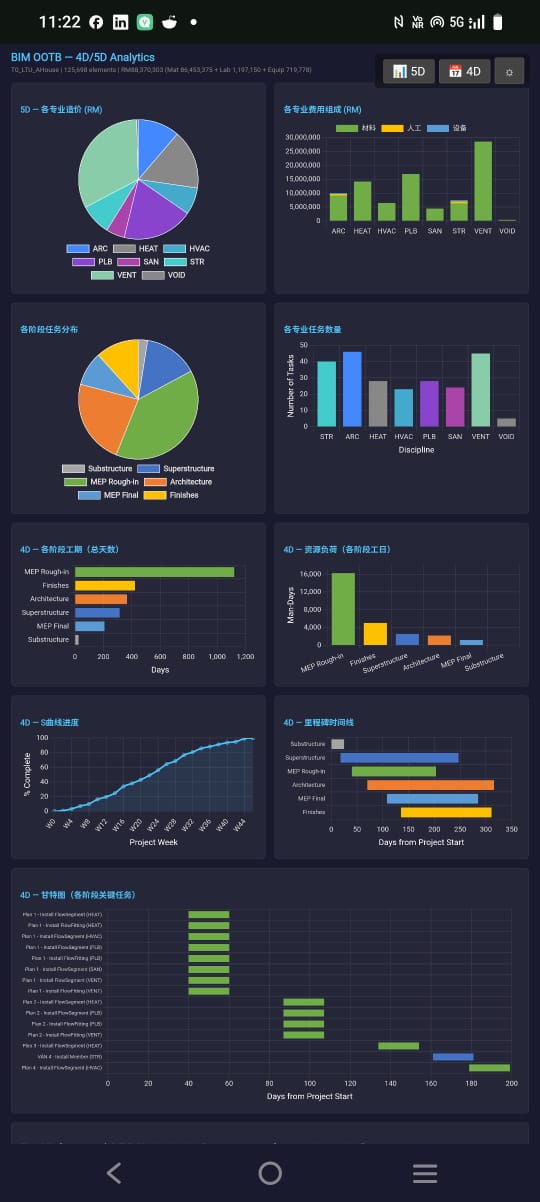
Browser 4D/5D HTML — Zero-Install Analytics¶
The nD engine outputs feed a fully browser-native HTML analytics page (boq_charts.html).
No server. No install. Open the link — charts render, Excel exports.
Performance¶
| Step | Mechanism | Speed |
|---|---|---|
| DB load (first visit) | Fetch from OCI → written to IndexedDB | Network-bound |
| DB load (return visit) | Read from IndexedDB (bim_ootb_cache) |
~0ms — local |
| DB load (after IFC import) | IndexedDB import:// key — no OCI needed |
~0ms — local |
| 9 charts rendered | sql.js WASM queries + Chart.js | < 1 second |
| 5D Excel export | ExcelJS in-browser, no server | 2–3 seconds |
| 4D Excel export | ExcelJS in-browser, no server | 1–2 seconds |
After the first load, the DB is cached in IndexedDB. Subsequent visits and every Excel export
read locally — zero network round-trip. §CHARTS_DB_SOURCE source=idb|import|oci is logged
to the console and embedded in the downloaded export log for auditability.
Browser HTML mode ready — here in exotic language (Localisation).
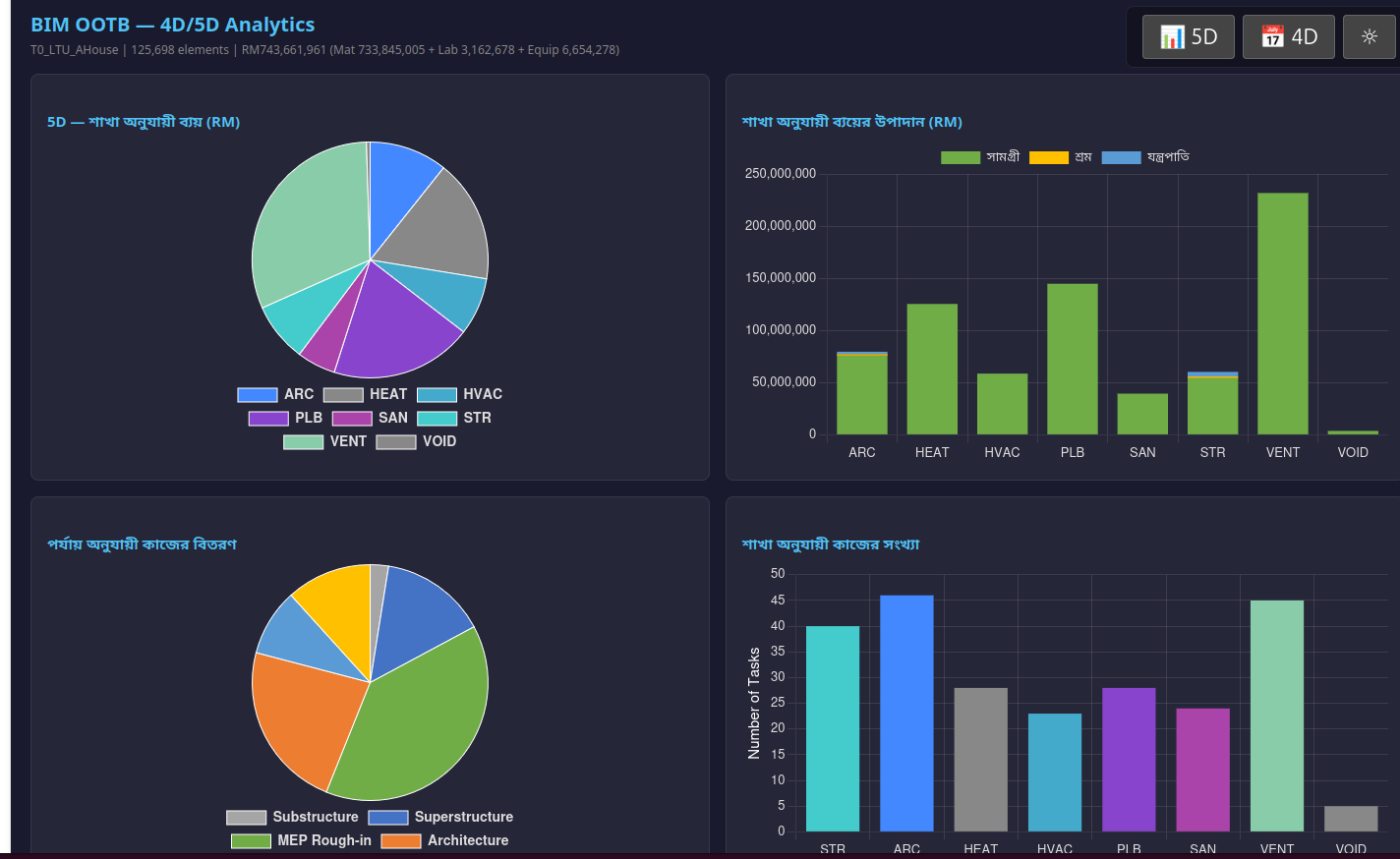
Mobile mode granted on-the-fly.
The Generated 4D Movie — Support Order Is a Measured Invariant¶
The tables above are the task-level 4D (the Python nD_engine.py path — phases, durations,
S-curve). The viewer's Time Machine plays a second, finer thing: an element-level schedule
generated in the browser from the same extracted DB — every element gets its own start and finish
from real geometry, real labour rates and real crew caps, and the movie reveals the building in that
order. Nothing is authored by hand; drop an IFC and the film exists.
The hard part of that is not the arithmetic. It is that an element must never appear before the thing holding it up. Get it wrong and the film shows a roof over open air, a duct hanging in a void, a stair flight floating between storeys — the single defect that makes an automated 4D look fake to anyone who has been on a site.
The invariant¶
No element appears before the first element it physically touches appears.
"Touches" is geometric and class-blind: bearing below, carrier above, or embedded within — the element's real bounding geometry against every other element's, with no whitelist of IFC classes and no dependence on the model author having modelled relationships correctly. Elements that form the ground layer of their own footprint are exempt: they rest on soil, which no IFC file contains.
Measured, on every shipped building¶
Before this invariant was enforced, the schedule looked clean by every internal check the engine had — and the film still had visible hangings, because the old audit only compared an element against the supports it already knew about (structure and walls), which is a small slice of what an element actually rests on. The census below counts the real thing: elements whose neighbours are all still invisible at the moment they appear.
| Building | Elements | Appeared with nothing they touch on screen | After |
|---|---|---|---|
| Terminal | 48,428 | 161 | 0 |
| Hospital | 63,182 | 165 | 0 |
| Duplex | 1,119 | 19 | 0 |
| HHS Office (federated) | 6,839 | 156 | 0 |
| Clinic | 16,071 | 345 | 0 |
| LTU A-House | 122,330 | 4,605 | 0 |
| JKR | 8,985 | 110 | 0 |
| Total | 266,954 | 5,561 | 0 |
Verification is a witness (witness_midair_zero.js, 22/22 across the seven buildings) that
re-derives the contact geometry itself rather than asking the scheduler whether it is happy — a
mis-wired or no-op repair fails the witness instead of certifying itself. Cost is a one-time
0.02–1.8 s at generation, scaling with element count.
What this does not claim¶
- Orphans are reported, not repaired. 972 elements across the seven buildings touch nothing anywhere in the model at any time. No schedule can fix an element that has no neighbour; that is an authoring/extraction fact, and it is printed rather than hidden.
- The invariant is "has appeared", not "is finished". An element may arrive while its support is still being installed — which is exactly how real trades work, and how the viewer draws it (an in-progress element is on screen, lit as the active work front). The stricter "wait for the support to complete" rule was built and measured: it moves elements by up to 103 days, still leaves violations because the supports move too, and converges only by serialising the whole project — destroying the overlapping trade train that makes a construction programme realistic. It is therefore deliberately not enforced, and the population it would affect is reported every run.
- Seven buildings, not "all buildings". The invariant is structural and class-blind, so it should hold generally — but what is measured is the seven shipped fixtures, 266,954 elements.
No Other Player Does This¶
What the industry charges for nD analytics¶
| Capability | Industry tool | Cost per seat/yr | Our speed |
|---|---|---|---|
| 5D BOQ from BIM | CostX, Cubicost, iTWO | $10-50K | 8.7s for 1M elements |
| 4D Schedule from BIM | Synchro, Navisworks, Asta | $5-15K | same run |
| 6D Carbon from BIM | OneClick LCA, Tally | $5-15K | same run |
| 7D Asset register | Maximo, Archibus, Planon | $20-100K | same run |
| 8D Safety register | Manual spreadsheets | Weeks of HSE time | same run |
| All 5 dimensions combined | $60-180K/yr | 8.7 seconds, free |
What makes this different¶
-
Speed — 1M elements, 5 dimensions, 8.7 seconds. Commercial tools take hours per dimension on models this size. Most cannot even load 1M elements.
-
All dimensions in one pass — Commercial tools are siloed. 4D is one vendor, 5D another, 6D another. Each needs its own model import, its own licence. We run all 5 from the same SQLite file in one command.
-
User-modifiable templates — JSON files, not proprietary rate databases locked behind vendor UIs. A QS edits
5D_rates.jsonin any text editor. A sustainability consultant edits6D_carbon.json. No vendor lock-in, no format conversion. -
Self-healing dependencies — Request 6D, engine auto-generates 5D. Request 8D, engine auto-generates 4D. No manual pipeline orchestration.
-
Open source — Zero licence cost. SQLite databases. Python scripts. JSON templates. Everything auditable, everything modifiable.
Template Editing — How to Customize¶
All rules live in JSON files under templates/. Edit with any text editor.
Editing Templates¶
The JSON templates are designed to be human-readable. Each entry maps an IFC class
to its nD properties. The _default key catches any unmapped class.
Direct editing (any text editor — VS Code, nano, Notepad++):
# Edit material rates
code templates/5D_rates.json

# Edit carbon factors
code templates/6D_carbon.json
Validation — run the engine after editing to verify:
python3 scripts/nD_engine.py mydb.db --dims 5D
# Check scripts/nD_engine_log.txt for §5D_RATE lines showing which rates applied
Country-specific templates — copy the defaults and swap rates:
cp -r templates/ templates_UK/
# Edit templates_UK/5D_rates.json — change currency, rates to BCIS/RICS
# Edit templates_UK/6D_carbon.json — change factors to BREEAM
python3 scripts/nD_engine.py mydb.db --all --templates templates_UK/
Adding a New IFC Class¶
Add one entry per template:
// 4D_phases.json → ifc_class_rules:
"IfcNewClass": {"phase": "MEP Rough-in", "sequence": 5, "predecessors": ["IfcSlab"],
                "resource": "HVAC_TECH", "productivity": 12.0}

// 5D_rates.json → material_rates:
"IfcNewClass": {"rate": 250.00, "unit": "M", "spec": "Your specification"}

// 6D_carbon.json → carbon_factors:
"IfcNewClass": {"factor": 15.0, "per": "M", "note": "Source reference"}

// 7D_lifecycle.json → lifespan_rules:
"IfcNewClass": {"lifespan_years": 20, "warranty_months": 24,
                "service_interval_months": 6, "note": "Maintenance note"}
Measurement Rules¶
In nD_formulas.json, IFC classes are grouped by how they're measured:
- linear: height from bounding box (maxZ - minZ) → meters
- area: footprint from bounding box (dX * dY) → m²
- volume: full bounding box (dX * dY * dZ) → m³
- count: element count → EA (default for unmapped classes)
nD Dimensions — What Each Produces¶
4D — Construction Schedule¶
Phase mapping + productivity rates → task durations → Gantt-ready data.
Calendar: Mon-Sat working, Sunday off, 8hr/day (configurable in 4D_phases.json).
5D — Cost Estimation (BOQ)¶
Material rates + labor productivity + equipment allocation → total cost per element. Currency: MYR (Malaysian Ringgit), CIDB 2024 rates. Swap template for other countries.
6D — Sustainability / Carbon Audit¶
Embodied carbon factors (ICE Database v3.0) → kgCO2e per element → project total. Operational carbon: Malaysia grid factor 0.585 kgCO2/kWh (TNB 2024).
7D — Facility Management / Asset Lifecycle¶
Per-element asset register: GUID → asset tag, warranty, service interval, replacement year. Source: RICS Building Maintenance Guide + JKR Malaysia standards.
8D — Safety / Hazard Register¶
Phase × IFC class → hazard classification, risk level, PPE requirements, permit flags. Source: DOSH Malaysia OSHA 1994, CIDB Site Safety Handbook.
Debug Logging¶
Every run produces scripts/nD_engine_log.txt with §-prefixed log lines:
§ENGINE_START, §ENGINE_DB, §ENGINE_DIMS    — session metadata
§TEMPLATE_LOADED                           — which templates were read
§5D_IFC_CLASSES, §5D_MEASURE               — per-class measurement type resolution
§5D_INSERT, §5D_RATE                       — what was inserted and at what rate
§5D_UNCOSTED                               — IFC classes with no rate (uses _default)
§4D_DEFAULT                                — classes using _default fallback (was "Unknown")
§4D_PHASE                                  — task count per phase
§6D_ROW                                    — per-row carbon calculation
§7D_ELEMENTS                               — total asset count
§8D_ROW                                    — per-row hazard classification
§ENGINE_DONE                               — summary with row counts
Read the log after every run. Exit code alone is not evidence.
Architecture¶
IFC files ──→ extractIFCtoDB.py ──→ _extracted.db
                                        │
               ┌────────────────────────┼────────────────────────┐
               │                        │                        │
         nD Engine                Bonsai Viewer            Java Backend
    (scripts/nD_engine.py)       (bbox + mesh)          (REST + Excel)
               │                        │                        │
    ┌──────────┼──────────┐             │                        │
    │     │    │    │      │        3D viewport           /api/boq/
   4D    5D   6D   7D    8D       125K elements          /api/schedule/
schedule qto carbon asset safety  smooth nav
               │
        JSON Templates
     (templates/*.json)
Files¶
| File | Role |
|---|---|
scripts/nD_engine.py |
Abstract nD engine — reads templates, queries DB, writes tables |
scripts/test_nD_engine.py |
Unit test — 28 witnesses on single building |
scripts/test_nD_fleet.py |
Fleet test — all buildings + sandbox |
scripts/nD_fleet_report.txt |
Fleet test results (regenerated each run) |
scripts/nD_engine_log.txt |
Debug log (regenerated each run) |
templates/nD_formulas.json |
Master: dimension registry, measurement rules, formulas |
templates/4D_phases.json |
Phase sequence, predecessors, productivity, calendar |
templates/5D_rates.json |
Material, labor, equipment rates (MYR CIDB 2024) |
templates/6D_carbon.json |
Embodied carbon factors (ICE Database v3.0) |
templates/7D_lifecycle.json |
Warranty, service interval, lifespan (RICS/JKR) |
templates/8D_safety.json |
Hazard class, risk matrix, PPE (DOSH/CIDB) |
scripts/schedule_database_schema.py |
Schema for construction_schedule table |
Legacy (still functional, superseded by nD engine)¶
| File | Role |
|---|---|
scripts/simple_qto_extract.py |
Original 5D — hardcoded rates |
scripts/schedule_generator.py |
Original 4D — hardcoded phase rules |
What's Done¶
- Excel export — Township Excel: Cover Sheet, Executive Summary (archetype × instances),
30 per-archetype BOQ sheets, Schedule - Township. Auto-generated by
nD_engine.py --all. - Township mode — auto-detects multi-building DBs (
COUNT(DISTINCT building) > 1). Archetype dedup: suburb tilesS{row}_{col}_{type}→ archetype, CBDT0_{name}→ name. Compute BOQ once per archetype, multiply by instance count. 786 buildings → 30 archetypes. All 5 output tables (simple_qto, construction_schedule, carbon_audit, asset_register, hazard_register) now includebuildingcolumn. Single-building DBs unaffected. - 28/28 unit tests PASS — backwards compatible, no regression.
4D Ghost Glass — Live Construction Animation (S240b)¶
"Watch your building get built."
The Gantt chart (boq_charts.html) now drives a live construction animation in the 3D viewer via BroadcastChannel. Two browser tabs, side by side — drag a timeline scrubber on the Gantt and the building constructs itself in real time.
How It Works¶
- User opens the viewer (Tab 1) and BOQ charts (Tab 2) for the same building
- The Gantt chart shows all construction tasks as horizontal bars, colour-coded by phase
- An orange vertical scrub line overlays the Gantt — drag it left/right to scrub time
- On first touch (Day 1+), the building turns into a glass shell (0.03 opacity)
- As the scrubber crosses each task's start day, those elements snap to solid with a bright glow
- Elements already built restore to normal solid material — the building fills in progressively
- Drag back to Day 0 → building fully restores to normal
Visual States¶
| State | Appearance | When |
|---|---|---|
| GLASS | Near-invisible shell (0.03 opacity, pale blue) | Future — not yet constructed |
| ACTIVE | Bright glow, shines through all geometry (depthTest:false) |
Currently being constructed |
| BUILT | Solid original material (full opacity) | Already constructed |
Active elements use rotating highlight colours (orange → green → red → yellow → cyan)
cycling per task, so MEP rough-in is visually distinct from structural steel. The glow
uses depthTest:false (the same technique as clash detection) so pipes and ducts behind
walls are visible through the structure.
Controls¶
[ ▶ Play ] [ ⏸ Pause ] Speed: [1×] [2×] [4×] [8×] Day 42 / 312 Superstructure: Beam (STR)
- Drag on Gantt — scrub the orange line across the timeline
- Play button — auto-advance through all tasks at selected speed
- Day 0 — building fully restores (no glass, normal materials)
- Click a Gantt bar — highlights just that task's elements in the viewer
- Copy URL — share the exact chart view with anyone
CTFL Audit Gate¶
Before animation starts, an 8-check audit validates the schedule quality:
| Check | What |
|---|---|
| COVERAGE | Every IFC class maps to a SEQUENCE_RULE (no defaults) |
| PHASE_ORDER | No phase inversions per storey |
| STOREY_ORDER | Bottom-up within each phase |
| DURATION | All tasks 1–120 days |
| OVERLAP | No same-trade + same-class overlap on same storey |
| TOTAL | Project duration ≤ 3× serial sum |
| LABELS | No truncated or undefined labels |
| GUIDS | Every task resolves to ≥1 element GUID |
Failed checks show a yellow warning banner. Console §4D_AUDIT_* tags show details.
Architecture¶
boq_charts.html                         index.html (viewer)
┌──────────────────┐                    ┌──────────────────┐
│ generateSchedule │                    │ ghostglass.js    │
│ audit4DSchedule  │   BroadcastChannel │ setupGhostGlass  │
│ GUID resolution  │──── bim_4d ──────►│ makeGlass/Active │
│ scrubber + Play  │  4D_PLAY/SEEK/RESET│ makeBuilt/restore│
│ Copy URL button  │                    │ material cache   │
└──────────────────┘                    └──────────────────┘
     rates.js                                main.js
  SEQUENCE_RULES                         BroadcastChannel
  LABOR_RATES                              listener +
  PHASE_COLORS                             delegation
No server. No WebSocket. Pure BroadcastChannel between same-origin tabs.
ghostglass.js is a pure renderer — no internal timer. The Gantt controls all pacing.
What This Replaces¶
| Capability | Commercial tool | Cost/yr | Our approach |
|---|---|---|---|
| 4D playback | Synchro Pro | $25K | Ghost glass animation |
| Construction sim | Navisworks TimeLiner | $8K | Drag scrubber on Gantt |
| Phase visualization | Custom Gantt tools | $5-15K | BroadcastChannel sync |
| Total | $38-48K | Free, browser-native |
Files¶
| File | Role |
|---|---|
deploy/dev/ghostglass.js |
Glass-to-solid animation engine |
deploy/dev/boq_charts.html |
Audit, GUID resolution, scrubber, Play/Pause |
deploy/dev/main.js |
BroadcastChannel listener, ghostglass delegation |
deploy/dev/rates.js |
SEQUENCE_RULES, LABOR_RATES, PHASE_COLORS (50+ IFC classes) |
deploy/dev/tools.js |
Hover preserves 4D phase colours |
deploy/dev/tests/specs/22-4d-audit.spec.js |
8 Playwright tests for audit gate |
4D Time Machine — Interactive Construction Playback¶
The Time Machine (time_machine.js) brings 4D simulation directly into the 3D viewer.
No separate app, no schedule file import, no Blender rendering. One button, any IFC model.
How It Works¶
- User drops any IFC file into the viewer
- Presses ⏳ in the toolbar
kernel_opstable is auto-populated with a weighted construction sequence derived from:SEQUENCE_RULES— phase assignment per IFC class (Substructure → Superstructure → MEP → Architecture → Finishes)LABOR_RATES— productivity per trade (units/day → seconds per element)- Spatial sort —
element_transforms.center_z(bottom-up), then X/Y - Storey rank — basements first, ground floor, upper levels, roof last
- The building constructs itself from an empty site — element by element
Playback Controls¶
| Button | Action |
|---|---|
| ◀◀ | Jump to empty site (hour 0, day 1) |
| ◀ | Deconstruct backwards at mode speed |
| ■ | Stop — slider becomes active for scrubbing |
| ▶ | Build forward from current position |
| ▶▶ | Jump to fully built |
DAY / HR / MIN — controls both playback speed and slider scope:
- DAY mode: playback advances 1 hour per tick (24 ticks = 1 day). Slider scrubs across project days.
- HR mode: playback advances 1 minute per tick. Slider = 24 hours within the stopped day.
- MIN mode: finest grain. Slider = 60 seconds within the stopped minute.
Visual States¶
Each element exists in one of three visual states:
- Future (not yet placed) — invisible
- Frontier (being installed) — orange glow, see-through,
depthTest: false,renderOrder: 999 - Recently placed (within 3 ticks) — faded yellow linger, then snaps to solid
- Built — solid, original material restored
Weighted Durations & Parallel Trades¶
Element install time is derived from LABOR_RATES.productivity:
| Trade | Example Class | Productivity | Install Time |
|---|---|---|---|
| STEEL_ERECTOR | IfcColumn | 6/day | ~80 min |
| CONCRETE_GANG | IfcSlab | 35/day | ~14 min |
| MASON | IfcWall | 12/day | ~40 min |
| ELECTRICIAN | IfcOutlet | 25/day | ~19 min |
| CARPENTER | IfcDoor | 6/day | ~80 min |
Parallel trades: different phases on the same storey overlap when the predecessor
phase finishes. MEP rough-in starts on ground floor while superstructure continues on
upper floors. This matches the Gantt chart bar layout in boq_charts.html.
Kernel Ops — The Fossil Record¶
Every construction event is logged in the kernel_ops SQLite table:
CREATE TABLE kernel_ops (
  id INTEGER PRIMARY KEY,
  timestamp INTEGER NOT NULL,      -- start time (ms)
  op_type TEXT NOT NULL,            -- 'ELEMENT_PLACE', 'VIEW_FILTER', 'ELEMENT_PICK', ...
  parameters TEXT NOT NULL,         -- JSON: {phase, cls, name, storey, _end_ts}
  input_guids TEXT,                 -- JSON array of affected GUIDs
  output_guid TEXT,                 -- primary element GUID
  undone INTEGER DEFAULT 0
);
The same table also captures live user activity:
- ELEMENT_PICK — element clicked in viewer
- VIEW_FILTER — storey or discipline filter toggled
- SECTION_CUT — section plane saved
- GRID_MOVE — grid line dragged in 2D editor
This makes kernel_ops a complete audit trail of both synthetic construction
and real user interaction — queryable, replayable, exportable.
Performance¶
The time machine is pure data playback — no geometry upload, no shader recompilation.
Each frame toggles mesh.visible and swaps a cloned material for the frontier highlight.
InstancedMesh elements use the zero-scale matrix technique (same as ghostglass).
Cost: one scene.traverse() per frame. GPU load identical to a static scene.
Shareable 4D Links¶
The Time Machine supports URL parameters for shareable construction playback:
| URL Parameter | Behaviour |
|---|---|
?tm=1 |
Open viewer with Time Machine panel active |
?tm=play |
Open and auto-play construction from empty site |
The 🔗 Share button (top-left of panel) copies the current viewer URL with ?tm=play appended — recipient opens the link, the building loads, and construction plays automatically. Zero setup, one click.
Example:
.../viewer/viewer.html?db=buildings/Duplex_extracted.db&tm=play
Architecture¶
⏳ press
  │
  ├─ kernel_ops empty? → injectGantt()
  │    ├─ reads elements_meta + element_transforms
  │    ├─ sorts: SEQUENCE_RULES.sequence → storeyRank → center_z
  │    ├─ applies LABOR_RATES productivity → weighted duration per element
  │    ├─ schedules: sequential within (phase, storey), parallel across phases
  │    └─ writes ELEMENT_PLACE ops with start_ts + _end_ts
  │
  └─ kernel_ops populated → loadOps() → playback ready
       ├─ renderAtTime(cursor) — traverse scene, set visibility + highlights
       ├─ playTick() — advance cursor by tickMs(), loop
       └─ slider scrub — maps DAY/HR/MIN to cursor position
Files¶
| File | Role |
|---|---|
deploy/dev/time_machine.js |
Time machine panel, injection, playback, highlighting |
deploy/dev/kernel_ops.js |
commitOp(), undo/redo, replay infrastructure |
deploy/dev/precision_cam.js |
Precision camera (fine move + zoom reset) for detail inspection |
deploy/dev/picking.js |
Logs ELEMENT_PICK to kernel_ops |
deploy/dev/panels.js |
Logs VIEW_FILTER to kernel_ops |
deploy/dev/section_cut.js |
Logs SECTION_CUT to kernel_ops |
deploy/dev/rates.js |
SEQUENCE_RULES, LABOR_RATES — drives injection weighting |
Next Steps¶
- Browser nD engine — port to JavaScript for BIM OOTB Phase 3.
Same JSON templates, same SQL queries, same output tables — runs in browser via sql.js (WASM).
User drags custom
5D_rates.json→ browser re-runs 5D → downloads Excel. Zero server. See BIM_Designer_Browser.md §Phase 3 for full feature list. - Excel export (browser) — SheetJS generates XLSX client-side from nD output tables. Replaces Java backend Excel generation for review/stakeholder use cases.
- Community templates — UK BCIS rates, US RSMeans, BREEAM carbon, LEED scoring
- Web template editor — HTML form that loads/validates/saves JSON templates
- SMM2 work sections — map IFC classes to CIDB standard work section numbering for client-facing BOQ
- Editable Excel (server) — Java backend generates .xlsx with formulas (
=qty × unit_rate) for advanced users - REST endpoints —
/api/boq/{building}/excel,/api/schedule/{building}/excel(Phase 4 backend only)
Copyright (c) 2025-2026 Redhuan D. Oon. MIT Licensed.