Spatial ERP × BIM × HR — One Building, One Log, Three Surfaces (ALPHA)¶
⚠ DEMONSTRATOR — NOT OFFICIAL. Screens and outputs carry the
CONTOH — TIDAK RASMI/SAMPLE — NOT OFFICIALwatermark. Demo values only.
Most enterprise stacks scatter a single fact across a dozen screens: the lease lives in the property app, the rent invoice in finance, the tenant in HR, the floor plan in the CAD tool — four systems, four logins, four copies drifting out of sync. Spatial ERP collapses that into one substrate.
One building. One signed op-log. Three surfaces — each answering a different question about the same records. Nothing is entered twice; nothing is stored twice.
This page is the map of how the Viewer, the Kernel-ERP and the HR / Operate module are the same system seen from three angles. Read the linked guides for each surface; read this for how they fit.
The shared substrate — what makes it one system¶
Two things are shared by everything, and they are the whole trick:
- One building model. The IFC geometry every surface draws on. A room, an asset, an aisle — each is a real element with a real guid. Records don't reference a place by a text field; they resolve to the actual mesh (see Records on geometry).
- One signed op-log (
kernel_ops). Every fact — a booking, a rent posting, a check-in, a ticket, a journal entry — is an append-only signed operation. Each op chains to the last; amending one breaksverifyChain. Every surface is a pure replay of this log, so two reads agree to the byte and nothing can drift. (The op-log spine is specified in Spatial ERP OOTB — §5b kernel_ops.)
Because the model and the log are shared, redundancy is structurally impossible: there is exactly one place a fact lives (the log) and exactly one place a thing lives (the model). The three surfaces are just different questions asked of that one truth.
The three surfaces (no overlap, no redundancy)¶
| Surface | The question it owns | What it shows | Guide |
|---|---|---|---|
| Viewer — spatial | Where is it, and what state is it in? | colour washes on the geometry — occupancy, presence, asset health — via the FM / Operate pill | HR / Operate Module |
| Kernel-ERP — money & documents | How much, and where in the workflow? | the deal as a signed agreement, the rent run → AR (C_Invoice → C_Payment → GL), tickets, the swipe/kanban doc UX |
Kernel-ERP Guide · Spatial ERP OOTB |
| HR — people & access | Who, and are they allowed / present? | party = C_BPartner, signed check-in, capability tokens, attendance/headcount |
HR / Operate Module |
Each surface owns its question and borrows the rest. The Viewer doesn't store money; it reads the same booking log the ERP posts against. HR doesn't store geometry; its check-ins resolve to the same zones the Viewer tints. None of them holds a private copy — they fold the one log three ways.
The delightful part — find everything, without the clutter¶
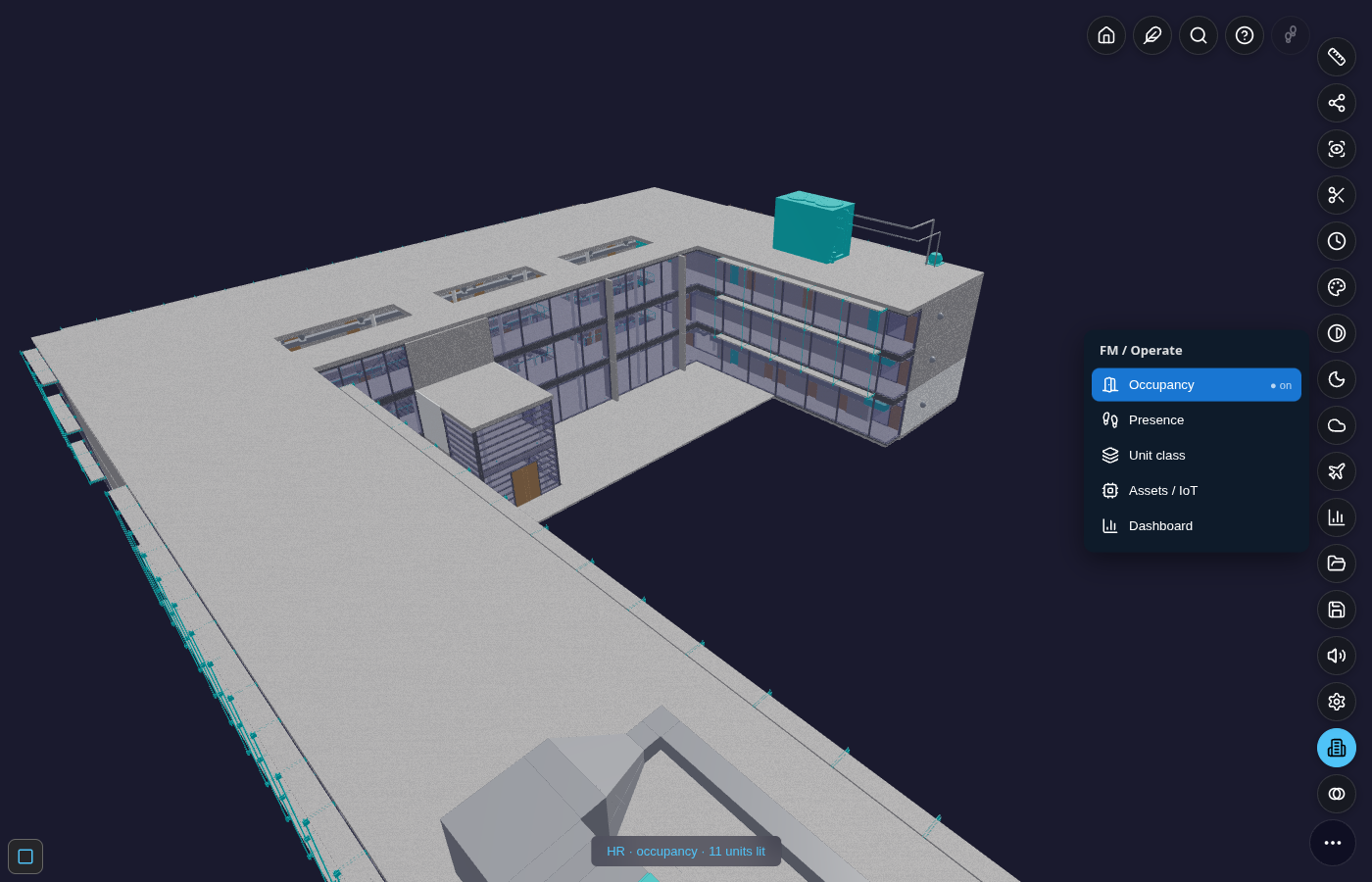
Spatial ERP's promise is “every record has a place.” The operate surface makes that literally true, and it does it without adding six buttons to the toolbar:
- One entry, not six. All the spatial lenses live behind a single FM / Operate pill. Tap it → a small drawer of lenses. One glyph instead of a cluttered rail.
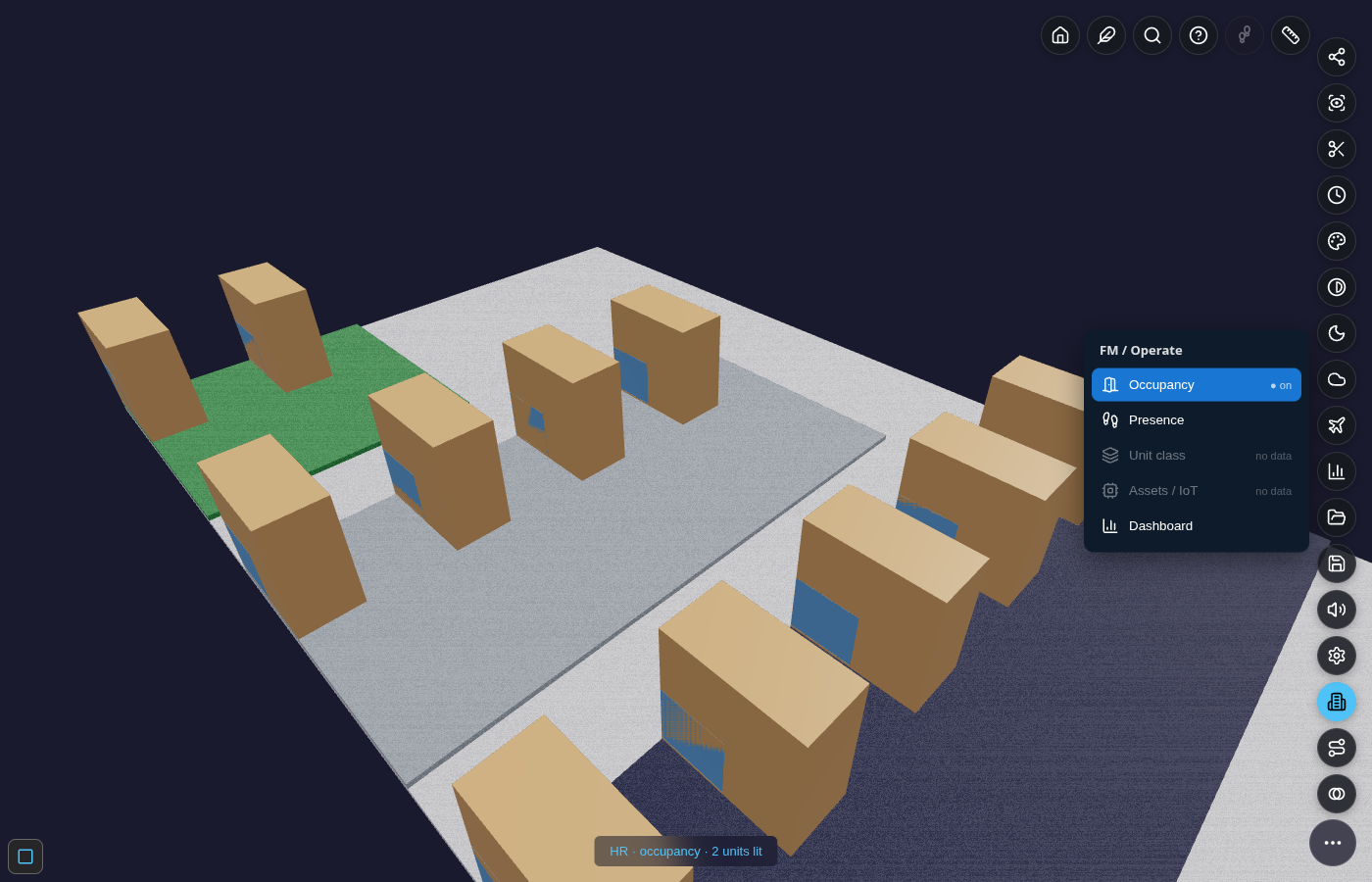
- Wake-aware — the UI hides what isn't there. The pill appears only when the building carries operate data; inside, each lens is enabled only when its data exists here, else greyed “no data”. A warehouse with no leases greys Unit class; an office with no IoT greys Assets. No data → no clutter, and nothing is faked to fill a lens.
- Records on the geometry, not in a grid. You don't hunt a room in a table — you see it. Occupied rooms glow green, expiring amber, vacant grey, blackout purple; live headcount deepens in blue; overdue equipment burns red. The answer is where the thing is.
The same restraint scales down: on a room-less warehouse the module falls back to aisle-zones and the same lenses light the aisles, while lenses with no data stay honestly greyed.
One lease, threaded through all three¶
A single tenancy is the clearest proof that the surfaces are one system. Follow one lease:
- HR registers the tenant as a party (
C_BPartner) and, later, records their signed check-ins at the unit's zone → the Presence lens lights. - The Viewer binds the lease's room guid to the real mesh; the Occupancy lens replays the booking
(
ASSIGN/RELEASE/UNAVAIL) and washes the room green/amber/grey/purple. - The Kernel-ERP treats the same lease as a signed agreement and runs the periodic RUN —
(period ×
   parties × rules) → signed lines → GL
— to raise the rent invoice, take payment, and post a balanced journal. Tenancy is payroll inverted (cash-in, not out): the same engine, a different profile.
One lease record. One op-log. Three answers — where it is, who's in it, what it's worth — and not one field typed twice. Change the lease once and every surface updates on its next replay.
Records on geometry (the non-invent join)¶
The join that makes “every record has a place” trustworthy: a record carries a guid, and a lens/overlay lights
it only when that guid resolves to a real element in the loaded building. An IfcSpace room isn't drawn as
its own mesh, so it resolves and tints through its rendered contained members (rel_contained_in_space); a
room-less building resolves through aisle-zones. A guid that resolves to nothing is honestly un-linked —
shown nowhere, never a faked tint. That single rule is why the spatial view can be trusted as the source of
truth and not a decoration.
Boots standalone, lights up with ERP¶
The operate module runs on its own seed — no ERP or ad_full required — so the Viewer's lenses work on any
building. When an ERP is present, two dotted-line adapters light up: GL posting and
C_BPartner.isEmployee. The engine and its witnesses never change; only the two seams bind. That's the
integration contract in one sentence: shared model + shared log, optional money.
Companion reads: Spatial ERP OOTB — Every Record Has a Place ·
HR / Tenancy / Operate Module · Kernel-ERP User Guide ·
BIM Viewer Guide. Spec: prompts/RESUME_HR_BIM_ASSET.md (§CROSS-APP · §FM-FAMILY · §REAL-BIND).