Compile Once, Query Forever¶
RTree GPU Query Engine — BIM Federation at City Scale¶
The industry loads the model, then queries it. We query the index. The model loads only what you ask for.
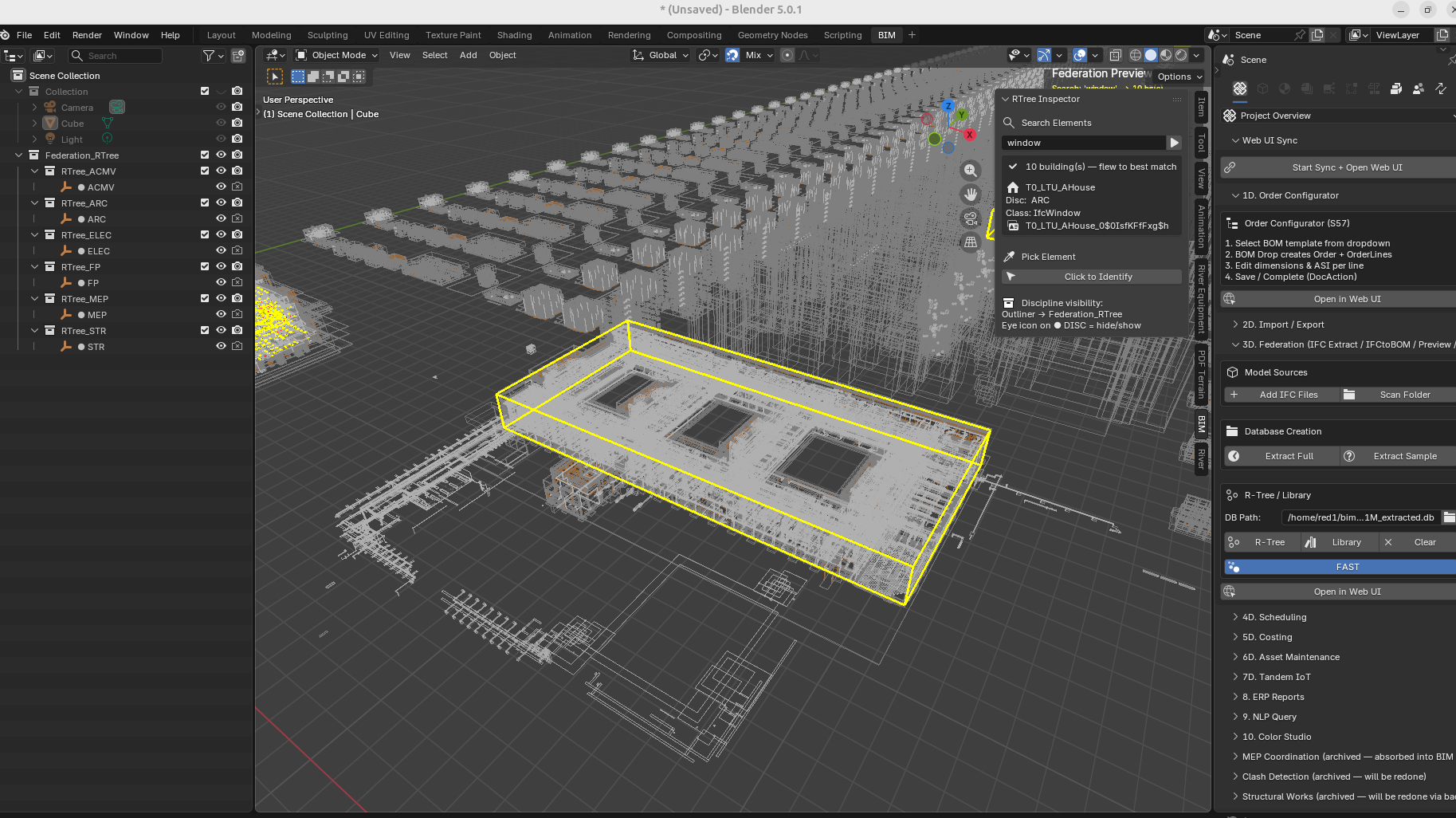
What This Is¶
The RTree Query Engine is the primary viewport and navigation system for federated BIM models at 1M+ elements. It replaces the "open the model" paradigm with a database cursor attached to a spatial GPU renderer.
The model is never fully loaded. It is always live.
Architecture¶
┌─────────────────────────────────────────────────────────┐
│  elements_rtree (SQLite R-tree virtual table)           │
│  elements_meta  (guid, name, discipline, ifc_class,     │
│                  building, storey)                      │
│  1M+ rows — compiled once by the IFC extraction pipeline│
└────────────────────┬────────────────────────────────────┘
                     │  O(log n) spatial query
          ┌──────────▼──────────┐
          │  RTree GPU Path     │  LOD-0 — always on
          │  GPU line batches   │  1M wireframes
          │  6 discipline colors│  <13s load, instant orbit
          │  zero mesh in RAM   │  zero Blender objects
          └──────────┬──────────┘
                     │  on query / pick
          ┌──────────▼──────────┐
          │  Drill-Down Engine  │  L1 → L2
          │  L1: buildings      │  click → fly + load L2
          │  L2: top 10 elements│  click → fly + white highlight
          └──────────┬──────────┘
                     │  on Direct Stream (Ctrl+Shift+A)
          ┌──────────▼──────────┐
          │  BIM Streaming      │  S195-S197
          │  from_pydata()      │  tessellate from DB BLOBs
          │  camera-driven      │  stream near, shred far
          │  no .blend files    │  two SQLite files only
          │  largest first      │  shell in 2-3 seconds
          │  geometry dedup     │  1M elements → 50K meshes
          └─────────────────────┘
Complexity Class¶
| Operation | This system | Traditional viewer |
|---|---|---|
| Open model | O(1) — load index only | O(n) — load all geometry |
| Query by type | O(log n) — R-tree spatial filter | O(n) — iterate loaded objects |
| Navigate to element | O(log n) — SQL + viewport fly | Manual — user scrolls/searches |
| Load geometry | O(k) — k = what you asked for | O(n) — everything or nothing |
At 1M elements: traditional viewer stalls on open. This system opens in seconds, queries in milliseconds, loads in seconds — only what was asked.
The Three Modes¶
Mode 1 — RTree GPU (always on)¶
- Loads on "Preview" button press
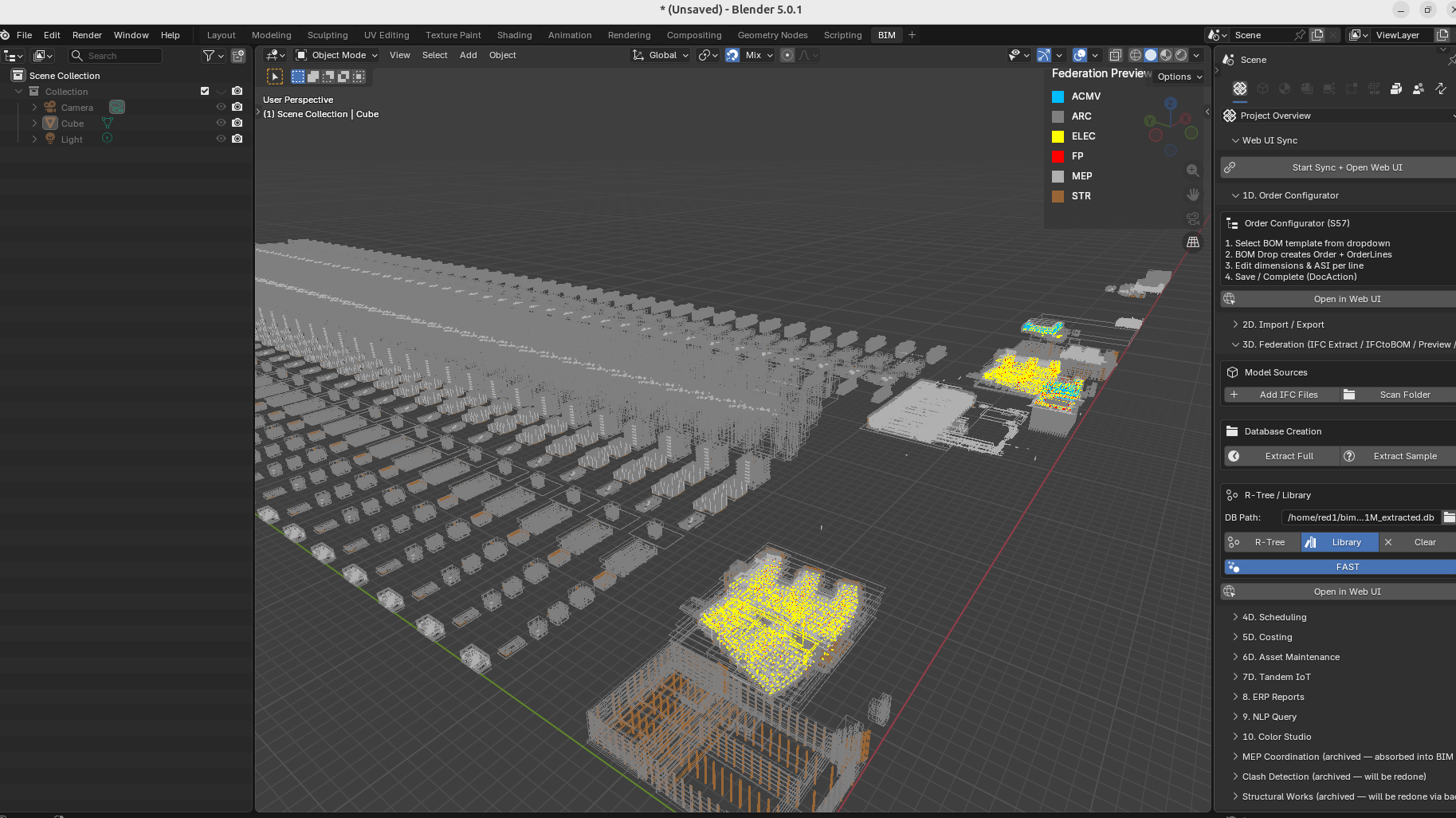
- All 1M elements rendered as colored wireframe bounding boxes
- 6 discipline colors (ARC/STR/MEP/ELEC/FP/ACMV)
- Eye icon on
● DISCin Outliner → hide/show that discipline's GPU batch - Orbit, zoom, pan: instant at any scale
- This never turns off. It is the permanent spatial context.
Mode 2 — Federation Cockpit (Query + Drill-Down)¶
Search field in N-panel → BIM tab → RTree Inspector (S183 cockpit layout):
[ search...  ▶ ]

BUILDINGS — 'IfcDoor'
  ▶ Hospital      ×2   (18,241)   ← click → fly + ghost city
  ▶ LTU_AHouse   ×18  (  699)    ← ×18 = 18 tiles, flies to nearest
  ▶ Clinic              (  321)

── on click Hospital ──────────────────
  Hospital                  Floor [     ]
  ARC  ████████████░   18,241
  STR  ███░░░░░░░░░░    3,445
  MEP  ████████████░   12,876
  ELEC ████░░░░░░░░░    4,201
  FP   ██░░░░░░░░░░░    2,109
  Total  40,872

  ELEMENTS — top 10
  IfcDoor · Frame Door · Level 3   [→][📋]
  IfcDoor · Frame Door · Level 2   [→][📋]

  MESH ACTIONS
  [+ARC][+STR][+MEP][+ELEC][+FP][+NEXT]
  [ SHRED SELECTED  ✂ ]

LOADED
  Hospital_ARC_0
  Hospital_STR_0
When a building is drilled into, all city wireframes ghost — the yellow building envelope and white picked element read clearly against a dim city. When x-ray is on (Alt-Z), wireframes return to full visibility. On new search or clear, full colours return.
Buildings deduplicated by type — T0_LTU_AHouse … T17_LTU_AHouse shows as one
entry LTU_AHouse ×18. Sandbox tile prefixes (S0_0_, T0_) stripped automatically.
Click flies to the nearest tile to camera.
Search resolves: element name, IFC class, discipline, GUID, building name. One search box. No mode switching. Works across 500+ building rows, deduplicates to 10 display entries.
Cockpit features (S183–S184): - Unicode discipline bars — proportional fill showing ARC/STR/MEP/ELEC/FP counts - Storey filter — set floor, MESH loads only that storey - GUID copy to clipboard — one click per element - Pre-warm on drill-in — building meshes link in background while user reads cockpit
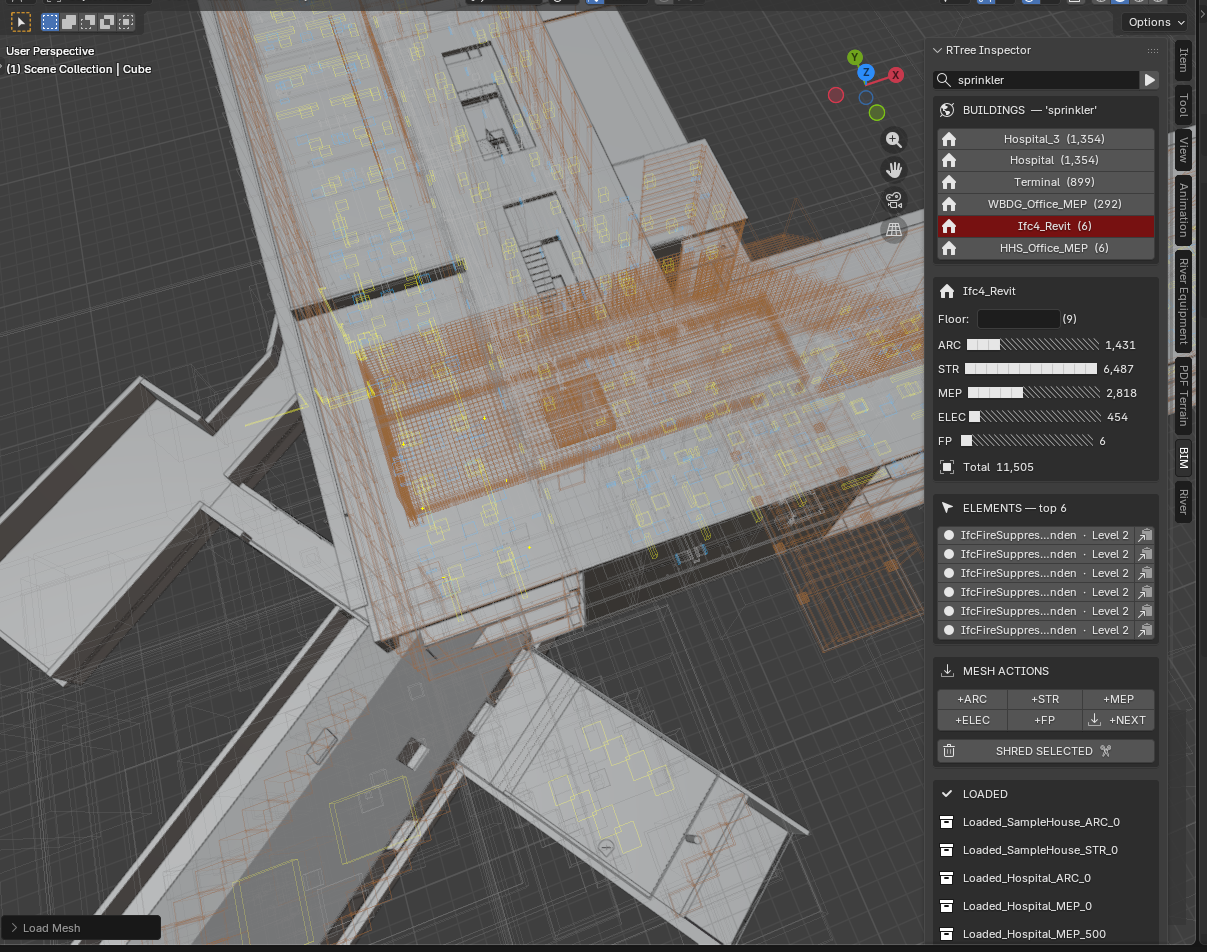
Two navigation patterns from one query model: - Know what, find where → type "IfcDoor", find which buildings have doors + discipline breakdown - Know where, find what → click any wireframe box, system identifies it, GUID to clipboard
Mode 3 — BIM Streaming (Ctrl+Shift+A)¶
Direct Stream renders BIM models directly from a SQLite database — no intermediate files. Each IFC element's geometry is stored as a binary hash in the database; identical elements (every door of the same type, every standard column) share one hash, so a million-element city compresses to ~50,000 unique meshes.
When the user presses Ctrl+Shift+A, a timer reads elements nearest to the camera, unpacks their vertex data from the database, and places them into Blender's viewport in real time — largest pieces first so the building shell appears within seconds. The camera drives everything: stream what's near, discard what's far, pause when the user navigates.
The entire viewer runs on two SQLite files totalling ~1.1GB, with zero .blend files, zero baking, and zero server infrastructure.
Three speed secrets:
-
Geometry hashing — identical elements share one mesh. A hospital has 10,000 doors but only 15 unique door shapes.
from_pydata()runs 15 times, not 10,000. Object placement is near-zero cost. -
Spatial ordering —
ORDER BY bbox volume DESCmeans walls and slabs stream first. The building looks "done" after 5% of elements are placed. -
No format conversion — IFC→tessellate→BLOB happens once at extraction. After that it's binary unpack →
from_pydata(). No parsing, no file I/O. SQLite reads are effectively memcpy from disk cache.
The pipeline:
IFC files → extractIFCtoDB.py → _extracted.db + component_library.db
                                        ↓
                              Ctrl+Shift+A → Direct Stream
                                        ↓
                              SQL query → BLOB unpack → from_pydata() → viewport
Envelope-first streaming (S198):
Buildings render in three phases based on camera position:
| Phase | What renders | Trigger |
|---|---|---|
| Envelope | Exterior shell — walls, roof, facade, railings | Within 300m, from orbit |
| Shell | Interior ARC+STR — partitions, stairs, interior columns | Camera enters building |
| Detail | Services — MEP, ELEC, plumbing, HVAC | Camera enters building |
A 5m bbox shell filter ensures only elements near the building boundary render from outside. Interior walls behind the facade are invisible from orbit and don't waste GPU budget. A 60K-element hospital streams ~850 exterior elements — the rest appear when you fly inside.
Homogeneous roof elements (IfcPlate, IfcCovering with >20 identical tiles) merge into a single combined mesh for efficiency.
Cinematic autopilot:
If the camera is idle for 5 seconds, Direct Stream automatically flies to the nearest unfinished building with a 15-frame ease-out animation (~450ms). It prefers novel building types — a city of 100 Duplex copies and 1 Hospital will visit the Hospital first. The camera rotates slightly during approach for a cinematic orbit feel.
One-click "Sun" button adds Hosek-Wilkie procedural sky, sun lamp with shadows, ground plane, and EEVEE bloom/AO — presentation-ready viewport with zero performance cost on EEVEE's real-time renderer.
The workflow: 1. Preview → 1M wireframes in 13s (GPU bboxes, zero mesh) 2. Direct Stream → cinematic fly-to nearest building, envelope appears 3. Camera orbits — exterior shell renders, interior hidden 4. Fly inside → partitions + services stream automatically 5. Fly out → idle 5s → autopilot to next building type 6. Sun button → instant sky, shadows, ground for presentations
How It Works — The Technology¶
The stack is deliberately simple: Python + SQLite + Blender's C API.
There is no render engine, no game engine, no shader graph, no custom
GPU code. The viewer is ~1,200 lines of Python that reads a database
and calls Blender's built-in from_pydata() function.
Step 1 — Extraction (once, offline):
IFC file → IfcOpenShell iterator → tessellate each element → store as BLOB
Result: vertices + faces packed as binary arrays in SQLite
        + spatial R-tree index (minX/maxX/minY/maxY/minZ/maxZ per element)
        + material RGBA from IFC surface styles
Step 2 — Streaming (live, interactive):
Camera position → SQL query (R-tree spatial + discipline filter)
    → fetch geometry BLOBs for unique hashes
    → struct.unpack() → list of (x,y,z) tuples
    → bpy.data.meshes.new() + mesh.from_pydata(verts, [], faces)
    → bpy.data.objects.new(name, mesh) → link to collection
    → apply material (Principled BSDF from IFC RGBA)
    → apply transform (Translation + Euler rotation from DB)
Why it's fast:
| Layer | Technology | Why fast |
|---|---|---|
| Storage | SQLite WAL mode | OS page cache — second read is memcpy |
| Geometry | Binary BLOB (struct pack) | No parsing — direct unpack to float arrays |
| Dedup | Geometry hash | 1M elements → 50K unique meshes. from_pydata() runs 50K times, placement runs 1M times (near-zero cost) |
| Placement | bpy.data.objects.new() |
Blender C-level append. No modifier, no dependency graph, no re-evaluation |
| Rendering | EEVEE real-time | GPU rasterization. No raytracing. 200K objects at 60fps |
| Spatial query | R-tree index | Camera position → nearby elements in O(log n) |
Why NOT Geometry Nodes:
Blender's Geometry Nodes (GN) system uses a dependency graph — adding one object to a GN-referenced collection triggers re-evaluation of ALL modifier trees. At 7,000+ unique meshes this caused multi-second freezes per addition. GN is designed for parametric design (few templates, many instances — like scattering 5 tree models across a forest). BIM has the opposite profile: 108,000 unique meshes, each placed 1-10 times. Direct object creation bypasses the dependency graph entirely.
The two files:
component_library.db  (~300MB) — geometry BLOBs for all buildings
sandbox_1M.db         (~800MB) — element metadata, transforms, R-tree, materials
No .blend files. No baking. No server. A laptop with SQLite reads a database and streams a city.
Viewport Click-Picker¶
"Click to Identify" button activates a modal LEFT_MOUSE handler.
Click any wireframe box in the viewport: 1. Ray cast from camera through click position into IFC coordinate space 2. Two-pass hit test: - Pass 1: does ray hit a highlighted building envelope? → return that building, trigger L2 - Pass 2: does ray hit any individual element bbox? → return that element 3. Result populates L2 list in N-panel 4. Picked element highlighted white in GPU overlay
The click is the fastest path to identification — no typing, no scrolling. Point at something, click, know what it is.
Performance (sandbox_1M, S184 2026-04-13)¶
A whole city of one million elements, 100 thousand unique meshes, loaded in 13 seconds. Search, drill, mesh — under 1 second. Ultra smooth navigation with no lag on a normal laptop.
| Metric | Result |
|---|---|
| DB size | 1,061,736 elements, 6 disciplines |
| Unique geometry hashes | 108,000+ |
| City extent | 1.73km × 2.48km × 79m |
| RTree load time | ~13s |
| Orbit / pan | Instant (GPU batch, no per-frame eval) |
| Search SQL | <2s (LIKE scan, 1M rows) |
| Building drill-down | <0.5s (+ background pre-warm, invisible) |
| Mesh load (pre-warmed) | <1s (all meshes cached, viewport-centre query, batch transforms) |
| Mesh load (cold) | ~2.5s (library.blend open overhead per batch) |
Direct Stream Performance (S195-S197)¶
| Metric | Result |
|---|---|
| Time to first geometry | 2-3s (largest walls/slabs appear first) |
| Small building (500 elements) | ~0.3s shell complete |
| Medium building (16K elements) | ~3s shell (ARC+STR) |
| Large building (64K elements) | ~8s shell, incremental |
| Tessellation cost | ~0.3ms per unique mesh (from_pydata) |
| Geometry deduplication | 1M elements → 50K unique meshes (95% reuse) |
| Budget | 200K elements in viewport, auto-shred beyond |
| Camera settle | 1s pause after user stops navigating |
Two files, total ~1.1GB:
- sandbox_1M.db (835MB) — 1M elements, transforms, R-tree spatial index
- component_library.db (305MB) — 50K geometry BLOBs (vertices + faces)
Scales to 10M+ elements with no architectural changes. The DB is the ceiling, not the viewer.
Files¶
Source root: /home/red1/IfcOpenShell/src/bonsai/bonsai/bim/module/federation/
| File | Role |
|---|---|
direct_stream.py |
BIM Streaming engine — tick logic, fly-to, candidate scoring, remove |
mesh_utils.py |
Shared tessellation — ensure_meshes(), apply_material(), apply_transform() |
bbox_visualization.py |
RTree GPU batches, draw handler, search/pick, streaming state |
operator.py |
_tessellate_from_blobs(), shred, surface styles, bake (legacy) |
progress_hud.py |
GPU overlay — discipline bars, streaming status, settle detection |
ui.py |
N-panel — cockpit, discipline bars, Stream/Shred buttons |
prop.py |
Scene properties — search, results, discipline counts |
__init__.py |
Operator + panel registration |
| Database | Role |
|---|---|
sandbox_1M.db (835MB) |
1M elements — meta, transforms, rtree, surface_styles |
component_library.db (305MB) |
50K geometry BLOBs — vertices + faces |
{Building}_extracted.db |
Per-building source (input to sandbox merge) |
Related Specs¶
prompts/S193_dlod_auto_linker.md— Direct Stream architecture, learning points, camera rulesprompts/S198_envelope_streaming.md— Envelope-first rendering (next)prompts/S192_cloud_deploy_onboard.md— Cloud deployment, three-tier DB resolutiondocs/MANIFESTO.md§The Viewer — DB Is the Model
Historical Note¶
S165-S184 explored Geometry Nodes (GN) instancing — halted at S184 due to 8-min evaluation overhead at 500 modifier trees. S185-S188 built a Stingy Mesh Loader (on-demand from library.blend) and Smart Bake Engine (background subprocess → .blend files → link). S189-S193 added BLOB tessellation, overnight bake, DLOD auto-linker (.blend link/unlink by camera distance), and save-to-link pipeline. All of these were superseded by Direct DB Streaming (S195-S197) which eliminated .blend files entirely. The baked/ directory and library.blend have been removed. The code remains in operator.py for reference but is not part of the active pipeline.
The Paradigm¶
Every BIM viewer built before this one assumes the same workflow: open the model, wait for it to load, then navigate what's loaded. At city scale — 50 buildings, 10M elements, 20 disciplines — that workflow breaks. The model is too large to hold in memory. The viewer stalls.
The alternative is to treat the BIM model as a database, not a file.
The compiled output of the IFC extraction pipeline — elements_meta,
elements_rtree, element_transforms — is a queryable index.
The geometry exists in component_library.db as tessellated BLOBs (S189).
Nothing is loaded until asked.
The user navigates by querying. The geometry appears on demand. The city is always visible as wireframes. The detail appears where attention goes.
This is how game engines work at 100M polygons. This is how databases work at 1B rows. BIM has been doing neither. Until now.
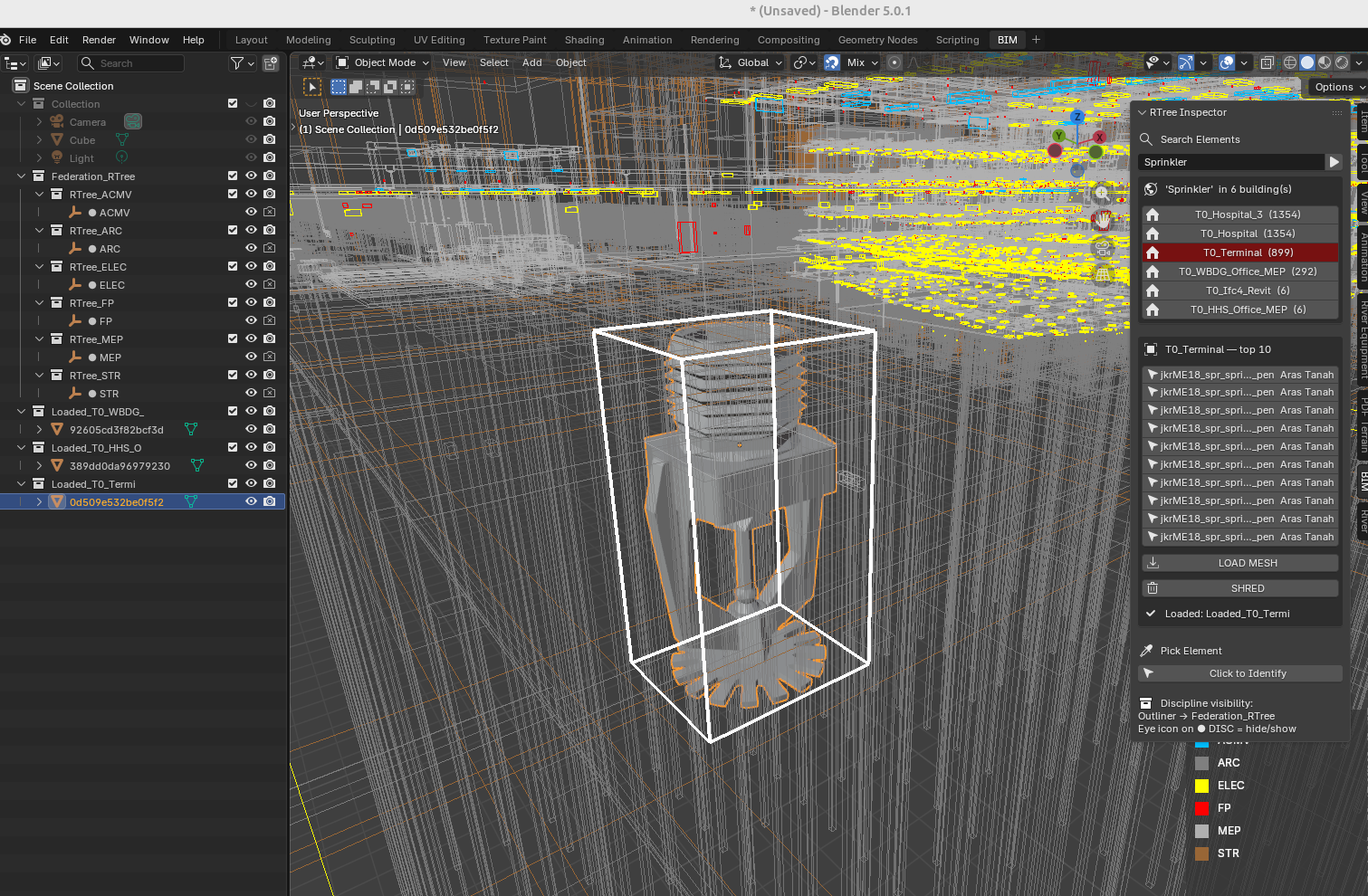
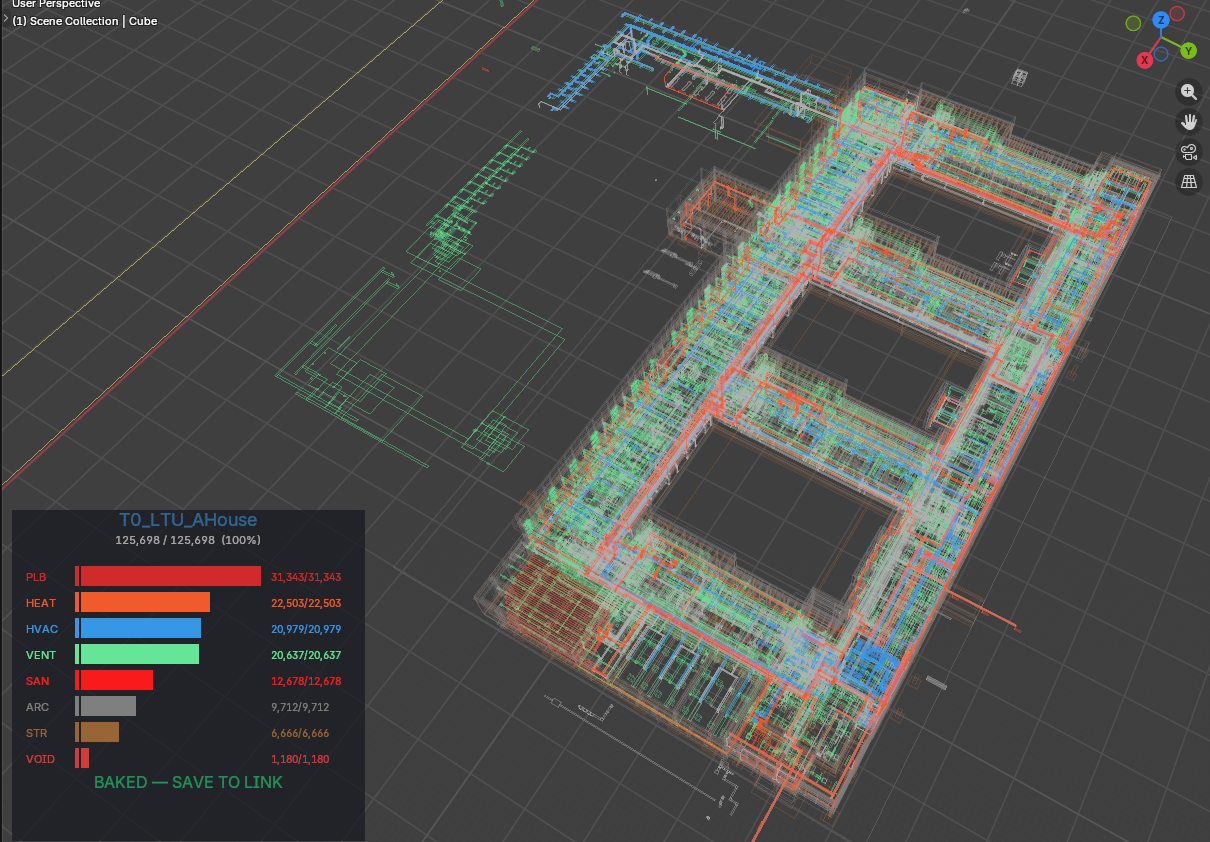
Compile Once, Query Forever.
Video Demo¶
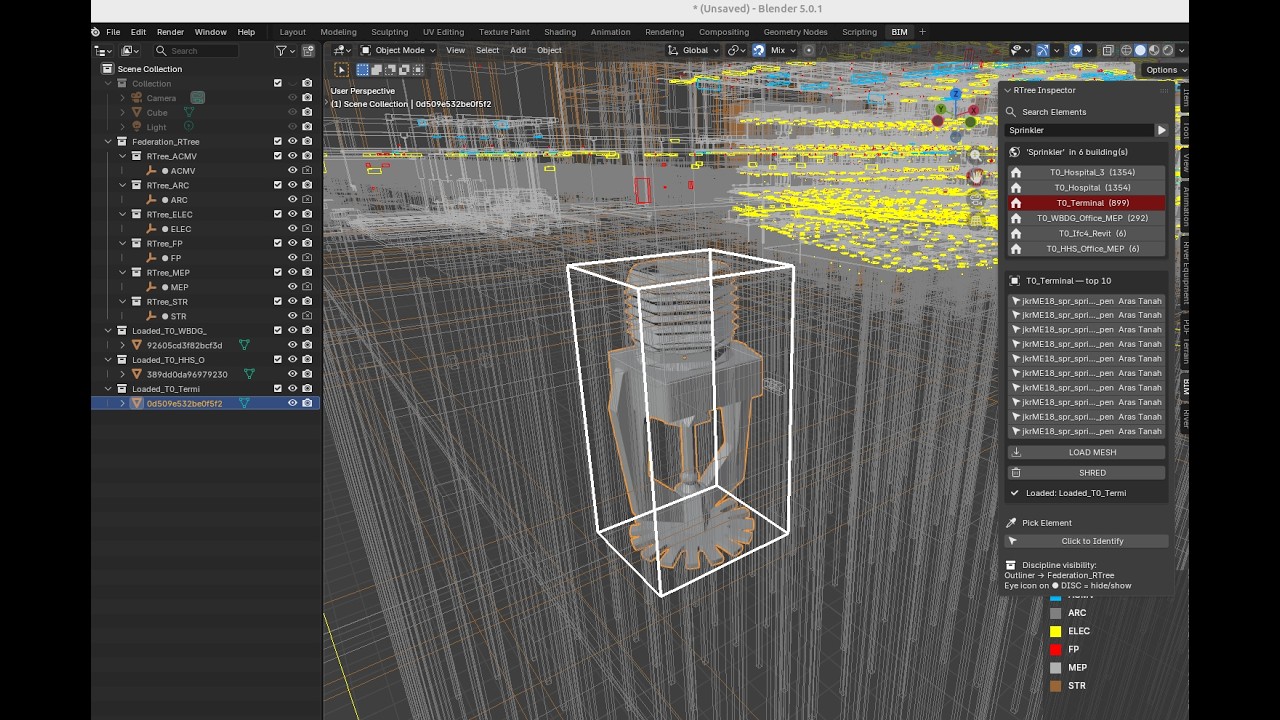
RTree Query Engine in action — 1M+ elements, search, drill-down, instant mesh loading.
Watch on YouTube
Copyright (c) 2025-2026 Redhuan D. Oon. MIT Licensed.