このページはまだ翻訳されていません。英語のまま表示しています。英語のページ。
BIM → ERP and the CAPEX Dashboard — Guide for iDempiere Users¶
⚠ DEMONSTRATOR — NOT OFFICIAL. Every screenshot and figure comes from a local GardenWorld test server (iDempiere 13) holding test projects, some of them repeat test runs. Treat every number as a sample (
SAMPLE — NOT OFFICIAL). The health and schedule rules are provisional until a client confirms them.
What this is. One set of project and capital-spending figures from your iDempiere, in three places:
- The dashboard page: a full executive page in a browser. It reads your iDempiere and writes nothing back.
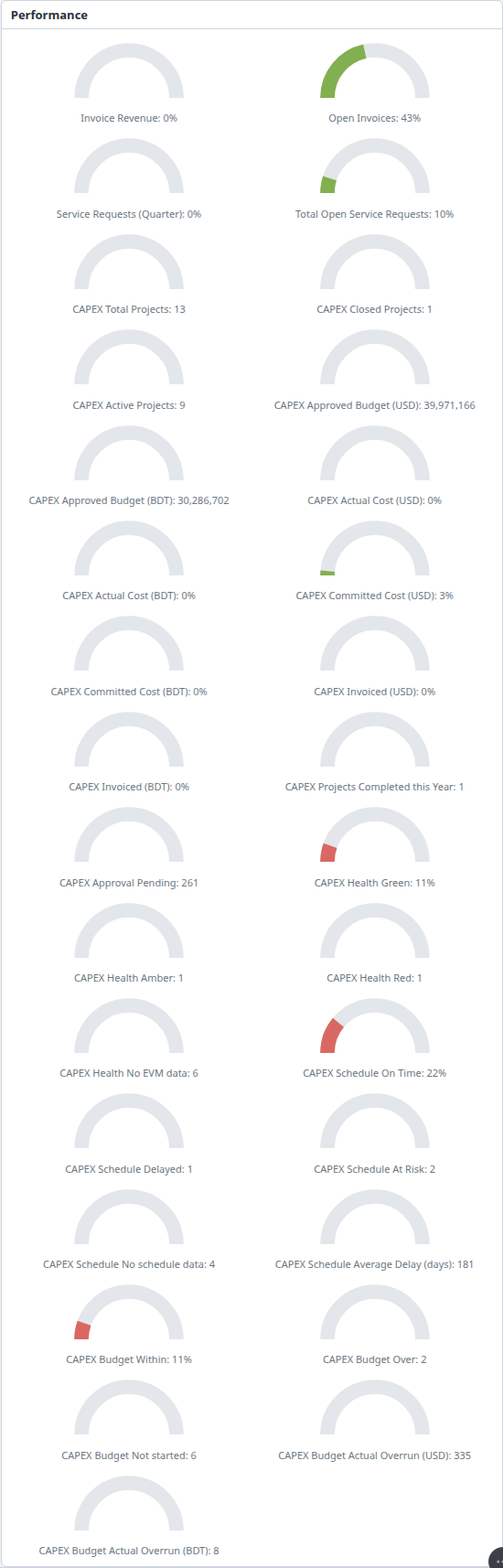
- The Performance panel on your iDempiere Home tab: the same figures as ordinary Performance Goals, which you change in the stock windows.
- The Performance panel on the twin's Home tab: the same goals in Kernel-ERP, the SQLite twin of iDempiere that runs in a browser.
What it changes on your iDempiere: no change to iDempiere's code or tables for the dashboard, which needs only read-only setup data. The optional BIM Document plugin adds its own table, and two date columns (
BIM_StartDate,BIM_EndDate) to the Project Task, for the Schedule tab's task bars. Sending a Project Order from a BIM model into iDempiere is a separate thing: that is one standard plugin. How it, the drawings filed against the project and this dashboard fit together is the next chapter. BIM Document (the drawings) is part of Kernel-ERP today; on your own iDempiere it needs a pack and a plugin: see Installing it and the Developer's note.
Who reads what. Project manager: The dashboard page, The Home tab and What moves the numbers. Administrator: Changing it and Installing it. Everyone: Three places, What it does not do yet and Troubleshooting.
From the BIM model to the dashboard (the whole flow)¶
One project, four places. Each hands the next the same project:
- The model becomes a Project Order. In the Modeller or Viewer, select parts and send them: the order's phases and cost lines are the model's own, and the order is keyed by the model's name. A second send adds nothing.
- Drawings and model files are filed against the project: BIM Document. A deliverable sits under one task of the project, with a revision and a state: Draft, Issued for review, Issued for construction, Superseded. Issuing a newer revision for construction makes the older one Superseded; an older revision cannot be issued after a newer one. The Project window shows, per task and phase, how many deliverables are issued for construction.
- The register decides what a walker may read. The project's register (every deliverable at its latest revision, plus the superseded
ones: number, revision, state, discipline, file kind, the file's
sha256) is exported from the BIM Document. A sheet issued for construction is used as placed; issued for review as provisional and left out of totals; Draft and Superseded sheets are refused. It is exported by the Export Register process, under the gear of a document in the BIM Document window; the Modeller reads the exported file. - This dashboard reads the same Project Order. Its BIM button appears when the project's building file is found, by the project's value (the model's name). The BIM Documents issued for construction tile and the project page's Documents tab show the counts.
Where every number comes from (the sources, and how they come together)¶
A figure on the dashboard is never typed on the page. It is made from five sources, in this order. If a source is missing, the tile says no data and names why; it never shows zero.
| Step | Source | What it gives | Where you can change it |
|---|---|---|---|
| 1 | The model (the building's IFC, read once) | every element with its class and its size (length, area, volume taken from the element's bounding box) | the model itself. Elements with no size of their own (a roof or curtain wall made of parts) are priced through their parts; elements with no geometry at all are listed, not priced |
| 2 | The rates table (one price per material class) | a unit price for each class | the rates table. The shipped tables are examples (for instance a 2024 US table): a cost from them is quantity-true to the model, but it is not an estimate until you load your own rates |
| 3 | The programme (the 4D schedule) | which elements are built in which phase, and each phase's start and end date | the 4D template and rules |
| 4 | The Project Order (project, phases, tasks, lines) | the planned amount: quantity x price per line, summed to tasks, phases and the project | it is computed from steps 1-3; edit the inputs, not the order |
| 5 | Real documents in iDempiere | what has actually happened: a phase ticked complete, material issued to the project (a Project Issue), a completed purchase order on the project | the stock windows: tick the phase, issue material, complete the order |
Steps 1-4 are the plan; step 5 is what happened. Each tile compares the two, or reports one of them:
| Tile | Plan side | Actual side |
|---|---|---|
| Approved Budget | sum of the project's planned amounts (steps 1-4) | |
| Actual Cost | the project's balance, which iDempiere builds from completed Project Issues | |
| Committed Cost: contract | completed purchase orders on the project (proposed) | |
| Committed Cost: verified | the actual cost of projects that have a completed Project Issue (proposed; it overlaps Actual Cost) | |
| Forecast Cost at Completion | budget, and the value of the phases ticked complete | the project's balance (proposed) |
| Physical vs Spent | the value of the phases ticked complete against the plan | spent against the plan |
| Budget Status | planned amount | the project's balance |
| Schedule, Project Health | each phase's dates and planned amount (step 3-4) | which phases are ticked complete, and the project's balance |
| Project Stage | the project's own Standard Phase (empty until it is set) | |
| BIM Documents issued for construction | the BIM Document register (empty until sheets are filed) |
Two rules keep the sources honest. (1) The page only reads. Every actual figure is a document a person completed in iDempiere, so it can be traced to a window. (2) Money is shown per currency and never added across currencies.
What to check before you trust a figure (known limits, under review): the Actual Cost and the Budget must be on the same basis. If the material issued to the project is priced from stock costs that have nothing to do with the rates table, a project can read "72 % built, 0.08 % spent", and the forecast and health tiles then follow that gap; they are only as meaningful as the pairing. The Project Health tile currently counts a phase as planned-to-date only once its end date has passed, so a long phase that is half way through counts as nothing planned yet. Since 2026-11-12 Project Health also never reads Green while a phase is overdue (it reads Amber), so it can no longer disagree with the Schedule tile's Delayed count. How "due" is counted (end date passed, or spread over the phase's dates) is still being reviewed against the specification.
BIM Document fields¶
| Field | Means |
|---|---|
| Project, Phase, Task | Where the deliverable sits. The task is required |
| Deliverable no | The sheet or model number. Revisions of one deliverable share it |
| Revision | A number. The highest revision is the current one |
| Document status | Draft (DR), Issued for review (IP), Issued for construction (CO), Superseded (RE) |
| Superseded by | Set on the older revision when a newer one is issued for construction |
| Discipline, File kind | What the sheet covers (for example architecture, structure, services) and its format (IFC, DXF, ...) |
Attachment sha256 |
The fingerprint of the attached file, so a register row can be checked against the file it names |
| Issued (on a task or phase) | Number of deliverables whose current revision is Issued for construction. Computed, never typed |
| Earned hours | Hours budget of those issued deliverables. Computed |
| Hours booked | Time-and-expense hours booked on the task. Computed |
The formulas behind the figures, and what data to prepare¶
Every figure is built from five working quantities per project. If you prepare these five well, every tile follows. They use the standard earned-value names, with the plain name this page uses beside them.
| Working quantity | Plain name on the page | Formula | Where it lives in iDempiere | What you prepare |
|---|---|---|---|---|
| Budget (BAC) | Approved Budget | the sum of the project's planned amounts | C_Project.PlannedAmt, which iDempiere rolls up from the project lines (quantity x price) |
The plan: phases, and lines with quantity and price, in the project's currency. A project with no planned amount has no budget figures |
| Planned to date (PV) | Due | the planned amounts of the phases whose End Date has passed | C_ProjectPhase.PlannedAmt where EndDate is today or earlier |
Start Date and End Date on every phase. A phase with no dates counts as nothing planned yet |
| Done (EV) | Done | the planned amounts of the phases ticked complete | C_ProjectPhase.PlannedAmt where IsComplete = Y |
Tick the phase when it is finished. It is all or nothing: a phase half built counts as nothing until it is ticked |
| Spent (AC) | Actual Cost | the cost of the material issued to the project | C_Project.ProjectBalanceAmt, which each completed Project Issue adds to |
Issue the material to the project with a Project Issue and complete it. Cost that is never issued to the project (for example a vendor invoice that did not become a Project Issue) is not in Spent |
| Committed | Committed Cost: contract | the totals of completed purchase orders on the project | C_Order (purchase, completed) with the project set |
Complete the purchase order with the Project filled in on the order. An order with no project is not counted |
The abbreviations, in full, and where each one comes from. One table, so you can read any formula in this guide or on the page.
| Short | Long form | On this page | Source in iDempiere |
|---|---|---|---|
| BAC | Budget at Completion | Approved Budget | C_Project.PlannedAmt (rolled up from C_ProjectLine) |
| PV | Planned Value | Due, "planned to date" | C_ProjectPhase.PlannedAmt where EndDate is today or earlier |
| EV | Earned Value | Done | C_ProjectPhase.PlannedAmt where IsComplete = Y |
| AC | Actual Cost | Spent, Actual Cost | C_Project.ProjectBalanceAmt (completed C_ProjectIssue) |
| SPI | Schedule Performance Index = EV ÷ PV | the schedule index | worked out from EV and PV |
| CPI | Cost Performance Index = EV ÷ AC | the cost index | worked out from EV and AC |
| EAC | Estimate at Completion = AC + (BAC − EV) ÷ CPI | Forecast Cost at Completion (proposed) | worked out from the above |
| PO | Purchase Order | Committed Cost: contract, Procurement | C_Order with IsSOTrx = N |
| WS | Web Service | the read access in Installing it | iDempiere's standard web services |
| PA | Performance Analysis | the Home tab goals | PA_Measure, PA_MeasureCalc, PA_Goal |
| BIM | Building Information Model | the model a project order is made from | the building's IFC file |
From these, the page works out the rest. The ƒ line under each tile shows the same in iDempiere columns.
| Figure | Formula | Reads as |
|---|---|---|
| Schedule index (SPI) | Done ÷ Planned to date | 1 or above: at least as much finished as the dates asked for. Below 1: behind |
| Cost index (CPI) | Done ÷ Spent, when Spent is above zero | 1 or above: each unit spent has earned at least a unit. Below 1: over cost |
| Project Health | Green: every index at least 0.9 and no overdue phase. Red: every index below 0.9. Amber: anything else. (The cost index counts only where Spent is above zero.) | A phase is overdue when it is not ticked and its End Date has passed, so such a project is never Green |
| Schedule tile | Delayed: a phase not ticked past its End Date. At risk: SPI below 0.9. No schedule: no phase with both dates. Otherwise On time | |
| Budget Status | Not started: Spent is zero or empty. Over: Spent is above the planned amount. Otherwise Within | |
| Physical vs Spent | Physical = Done ÷ all planned amounts of the phases; Spent = Spent ÷ the planned amount of the project | Compares how much is built with how much is spent |
| Forecast at completion (proposed) | EAC = Spent + (Budget − Done) ÷ CPI | What the project will cost if the cost performance so far continues |
Only the 0.9 threshold is the client's; the rest of the Health rule is ours and is marked provisional until you confirm it. The three definitions under For review are proposals; the page says so.
What the forecast can and cannot tell you. The cost index is a single figure for the project so far: it adds everything spent and everything done up to today. So the forecast assumes the rest of the project will cost what the part so far did. It cannot show whether cost performance is getting better or worse, because iDempiere keeps no completion date on a phase: it records that a phase is ticked, not when. Cost over time can be rebuilt from dated documents (Project Issues, invoices, payments); earned value over time cannot. If you want a trend or a time-phased planned value, say so: it needs either iDempiere's change log switched on for the phase's Is Complete, or a completion date added to the phase through the BIM Document module. Two other textbook forms exist: Budget ÷ CPI, and Spent + (Budget − Done) when overruns are not expected to continue. Which one is yours is a question for you under For review; changing it is editing one Performance Measure row.
Check before you rely on a figure (what to prepare):
- Plan on every project: phases, lines with quantity and price, one currency per project.
- Dates on every phase (Start and End). Without them Schedule says No schedule and Health has nothing planned to compare.
- Tick phases the day they finish. Done, Health, Physical and the forecast all move only when you do.
- Issue material to the project and complete the issue. Spent is only what was issued. If the cost the stock carries has nothing to do with the rates behind the plan, Spent and Budget are not on one basis and the forecast and Health follow that gap (the page warns basis differs when they diverge by more than a factor of two).
- Set the Project on purchase orders and complete them. For the Supply chain card also complete the receipts, invoices and payments with the Project and the Order filled in.
- Set the Project Category if you want that filter to work, and the project's Standard Phase (from the CAPEX Project Type) if you want the Stage tile to.
- Keep one currency per project. Money is shown per currency and never added across currencies.
When something is missing the tile says no data, never zero, and the page says what is missing.
How the dashboard connects to the data¶
The page holds no data of its own and writes nothing. It is pointed at one source, reads that source's rows, and works every figure out in your browser. You can see which source it is on at the bottom left (Data source).
| Source | What it is | When you use it |
|---|---|---|
| B · Legacy iDempiere | Your iDempiere's own rows, read through its standard web services with a read-only role. A small job beside the server reads them and writes the file the page opens (the job and the file are in the Developer's note). | Production: the figures are your server's, as of the last job run |
| A · SQLite ERP DB | The rows of a Kernel-ERP twin: the same tables as iDempiere, held in the browser. The page can open the twin's own store, for example the one that holds the film's test projects. | Trying the whole flow without an iDempiere server, or showing it |
Either way the page asks for the same tables, and a figure means the same thing on both. A difference between the two is a defect, not a feature.
What it reads, and what you need for each part. The first row is the dashboard itself; every row after it is optional, and a missing one never shows as zero: the tile or card says no data (not installed) and names what is missing.
| It shows | It reads | Needed on iDempiere |
|---|---|---|
| Projects, phases, tasks, lines, organisations, currencies, approvals | C_Project, C_ProjectPhase, C_ProjectTask, C_ProjectLine, AD_Org, C_Phase, C_Currency, AD_WF_Activity |
the read-only access in Installing it, step 1 |
| Actual cost, Committed: verified | completed Project Issues (C_ProjectIssue) |
the Q4 read types (optional) |
| Committed: contract, open purchase orders | purchase orders on the project (C_Order) |
the same optional read types |
| The Supply chain card on the project page (see below) | receipts (M_InOut), vendor invoices (C_Invoice), payments (C_Payment) |
three more optional read types |
| Task bars on the Schedule tab | each task's start and end date, which the BIM Document module adds to a Project Task | BIM Document installed, and the date columns on the task read type |
| BIM documents issued for construction | the BIM Document register (BIM_Document) |
BIM Document installed |
One use case, followed through: a purchase order from order to payment. Take a project whose order was pushed from a building model.
- The plan is the Project Order: phases and lines with their planned amounts. This is Approved Budget. Task dates, where the module is installed, come from the same programme as the phases and give the bars on the Schedule tab.
- Someone raises a purchase order on the project. While it is a draft it counts under open purchase orders; once completed it is Committed Cost: contract.
- The goods arrive: a receipt on the order. The order's stage on the project page becomes Received.
- Material is issued to the project (a completed Project Issue). The stock goes down by the quantity and the project's balance goes up by its cost: that is Actual Cost and Spent. On a Kernel-ERP twin a Project Issue completes the way it does on iDempiere, and reversing it puts both back.
- The supplier's invoice arrives and is completed: the stage becomes Invoiced.
- A payment is made against the invoice: the stage becomes Paid once the payments cover the invoice, and Invoiced while they do not.
Steps 3, 5 and 6 are shown in one place only, the Supply chain card at the top of the project's Procurement tab. It has a strip of four counts (Ordered, Received, Invoiced, Paid) and one row per purchase order, with its received count and its invoiced and paid amounts. It is a drill-in, so the glance and the left menu stay as they are. Each document in the card opens its own record in the system the figures came from (iDempiere's own page for that record, or the matching window of the twin). The stages are proposed, like the Procurement Risks view: they come from completed documents only, a document in another currency is counted and flagged and never converted, and a receipt, invoice or payment that names no order is counted on a line under the table instead of being added to an order.
Two honest limits. The page shows the rows of its source as of the last read (the job's last run, or the store it opened); it does not refresh itself. And a twin can show a different Spent from iDempiere's for the same project when receipts have moved the product's average cost in one and not the other: the issue itself behaves the same on both, which was checked on the test server, but the cost it takes depends on the stock history.
For review: three definitions we propose (not yet agreed)¶
Three of the design's tiles have no formula we could verify. These are our proposals, built the iDempiere way, so you can say whether they are what you have in mind. Until you confirm, the page prints them as ours. Each is a Performance Measure row, so changing one is editing a row, not code.
| Tile | Proposed definition | Why this | Question for you |
|---|---|---|---|
| Project Stage | A Project Type "CAPEX" whose standard phases are your five stages (Concept, Initiation, Planning, Execution, Closing). The stage is the project's own Standard Phase. | It is how iDempiere holds a project's stage, with no new column. The stock Standard Phase rows are sales steps and are not used | Are these the five names, in this order? Built, labelled proposed: the Project Type and its five stages are installed as data (a migration script), the same rows on iDempiere and on the twin. |
| Committed Cost: contract and verified | Contract = completed purchase orders on the project. Verified = the actual cost (ProjectBalanceAmt) of projects that have at least one completed Project Issue. |
The project's CommittedAmt is typed by hand and a purchase order never fills it, so the contract figure is computed from the orders. A completed Project Issue adds its cost to the project's balance, so verified overlaps Actual Cost |
Is "verified" delivery, or invoice? |
| Forecast Cost at Completion | EAC = Spent + (Approved Budget − Done) ÷ CPI, where CPI = Done ÷ Spent | The usual form when past cost performance continues. Spent, Done and Approved Budget are already on this page. With Spent or Done at zero the tile says no data, not a number | Is this your formula, or plain Budget ÷ CPI? Built, labelled proposed: the page tile shows the figure per currency (active projects with Spent and Done above zero), and the Home has a matching goal CAPEX Forecast Cost at Completion USD (proposed) whose value was checked equal on iDempiere and on the twin. |
Order of work: Project Stage first (data only), then the committed split, then the forecast, because the forecast needs the actual cost to be settled.
Three places, one set of figures¶
These are different screens over the same kind of rows. They are not one HTML page shown three times.
| Dashboard page | iDempiere Home tab | Twin Home tab | |
|---|---|---|---|
| What you see | Seven tiles, five panels, project lists | Performance dials, one per goal | The same dials as iDempiere, on purpose |
| What defines the figures | Formulas built into the page | PA_Goal and PA_Measure rows |
The same rows |
| What calculates them | The page, in the browser | iDempiere | The twin's goal engine, running the same SQL |
| Where its data comes from | A file written by a small job, or a twin's own store | Your iDempiere | A copy of your iDempiere's rows, in the browser |
| Change a formula without code | No | Yes, in the stock windows | Yes, in the same stock windows |
| Change the look without code | Yes: the Layout and Skin selects | No | No |
Rich or editable: today you choose¶
A goal is one number on a dial, so the Home tabs cannot draw a stage pipeline, a Physical vs Spent panel or a project list. The page can, because it is not limited to what a goal expresses. But the page is the part you cannot change without a developer: its layout and formulas are built into it. There is no editor for the page. On it you can change the filters, the data source and, by choosing a Layout and Skin, how it looks (never what it says). Its tiles and rows click through to the projects behind them and on to a project page, and each project and each document of the Supply chain card has a link out to its record in the ERP.
The windows under Changing it edit a goal's numbers and SQL. They do not change how anything looks. Where a figure appears on both, the checks under How it was checked keep the two formulas in agreement.
What the twin does and does not add¶
The twin does not show more figures than iDempiere. It is built to show the same ones in the same way, and a difference is a defect to fix. What differs is where it runs:
| The twin adds | The twin lacks |
|---|---|
| Runs in a browser, with no server of its own | The page's panels: Stage, Physical vs Spent and the lists are not on its Home either |
| The password stays with the job: the copy and the browser never hold it | Six of its ten Home gadgets say Not ported yet, including Calendar, Views and Running Jobs |
| A Project Order folded from a BIM model can reach its Home before anything is pushed. A copy from iDempiere, while active, hides it until it is pushed | Edits made in its windows stay in the twin: they do not reach your iDempiere |
| You can change a goal there without touching your server | Nothing tells a user the copy is old. If the job stops, the figures just stop moving |
| Each saved edit is kept in a signed log | Tested on a test server only, with a handful of projects |
Inside its 30-minute refresh, one difference remains. The twin stores a recalculated goal on each device, so one user's Home does not refresh another's stored value. On iDempiere it does, because there is one database.
How close the page is to the design it follows¶
The page follows an executive dashboard a client prototyped. We have seen one screenshot of it, not its code or its formulas, so its tiles are matched by name.
The same: the title, the left menu's six items, the Org, Category and Status filters, Last Updated, the seven tiles and the five panels.
| That design | This page | Why | |
|---|---|---|---|
| Forecast Cost at Completion | A figure | Our proposed figure, labelled proposed | No formula has been stated; see For review |
| Committed Cost | Split into verified and contract | Committed, with invoiced under it, and our proposed contract and verified lines | No column for that split has been stated; see For review |
| Project Stage | The client's own five stages | The Standard Phase names | How those stages map to C_Phase is not agreed |
| Money | One currency, in large units | Each currency separately, in full | Never added together |
| Explaining a tile | An information mark | The formula printed on the tile | So anyone can check it in SQL |
| Tiles | Icons and progress bars | The Executive layout draws meters and a coloured health bar; the Classic layout is plain text | Both are built; you choose under Choosing a look |
| Data | Described as live | The last run of the job | See Installing it |
The figures themselves come from different data, so they will not match.
The dashboard page¶
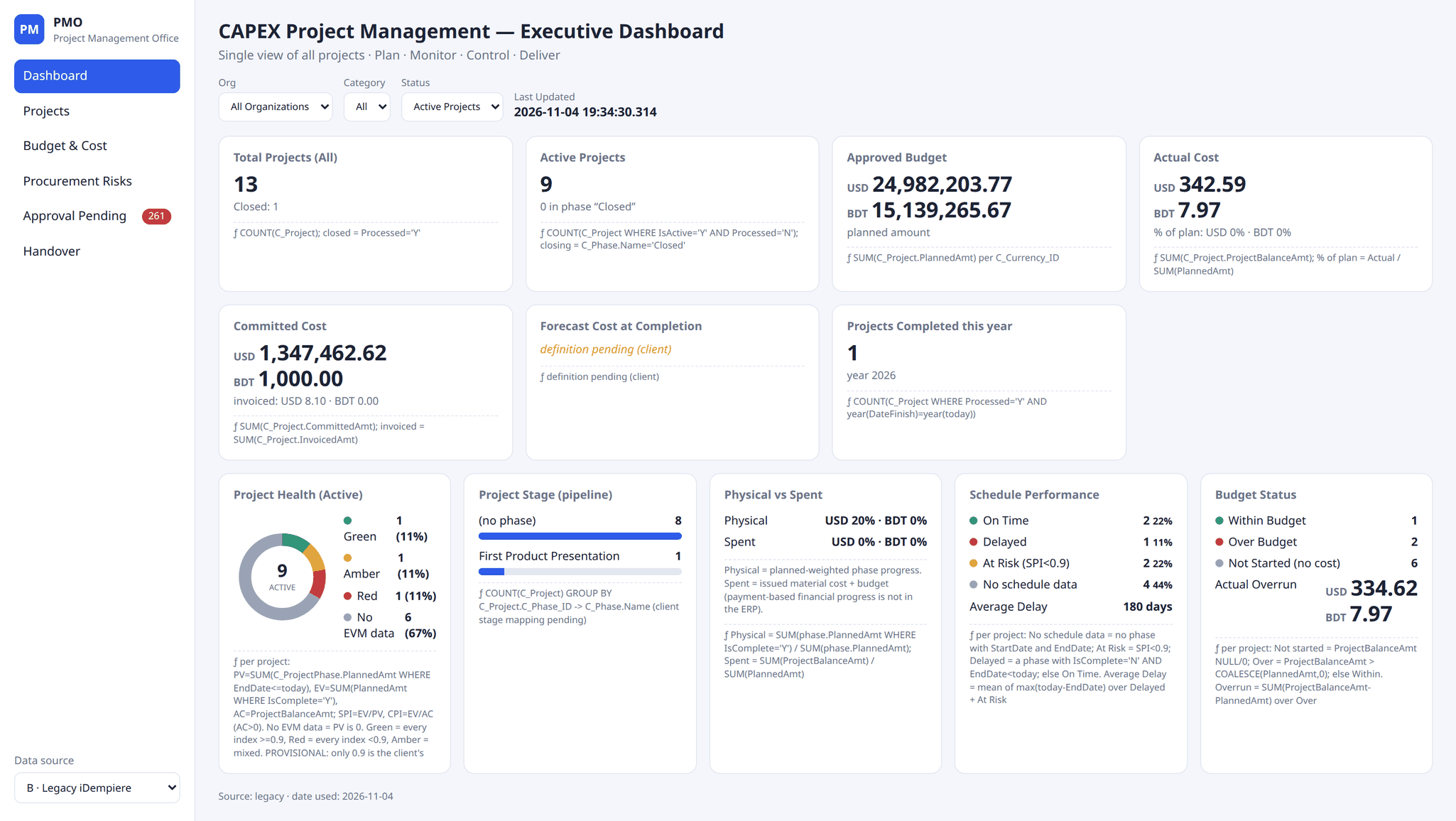
Open the page with the sample data: real rows read from the test server, the date held at 4 Nov 2026 so it matches this guide.
How to read it¶
- Left menu. Dashboard is this view. The others are below. The red badge on Approval Pending is that count.
- Data source (bottom left). B · Legacy iDempiere is your server's data, from the job's file. A · SQLite ERP DB is a Kernel-ERP store: by default the stock sample database shipped with the page (not your data), or a twin's own store when the page is opened on one. See How the dashboard connects to the data.
- Filters. Org, Category (
ProjectCategory) and Status. Status starts on Active Projects. A fourth filter, Project, picks one project: its first choice is All Projects, and it lists only the projects the other three filters let through (change Status and a project that no longer fits drops out and the choice goes back to All Projects). A page address with&project=<Value>opens with that project already chosen. That changes the money tiles, as explained under Page and Home tab: why a figure can differ. - Last Updated. The newest
C_Project.Updatedin the data, never the clock. An old date means old data. - The ƒ line under each tile states its formula in iDempiere columns, so anyone can check it in SQL.
- Click any number to see the projects behind it. The page stays one screen for a glance; clicking a tile (Total, Active, Approved Budget, Actual Cost, Committed Cost, Forecast, Completed) or a row of a panel (a Health, Schedule or Budget bucket, a Stage) opens a side panel on the right. It lists the projects that make that number, each with Approved, Spent, Due, Done and its Health, Schedule and Budget bucket. The count at the top of the panel is always the number you clicked, and for money tiles the listed amounts add up to the tile. Click a project code to open that project in iDempiere itself (its Phase tab, documents and schedule). Esc or × closes the panel. The BIM Documents tile counts deliverables, not projects, so it has no project list.
A tile with nothing to judge says no data, not 0%. A tile with no agreed formula says definition pending, not a guess.
The summary tiles¶
Money is shown per currency, never added together.
| Tile | Sample shows | Where it comes from |
|---|---|---|
| Total Projects (All) | 13, Closed: 1 | Every C_Project. Closed = Processed = Y |
| Active Projects | 9 | IsActive = Y and Processed = N |
| Approved Budget | USD 24,982,203.77, BDT 15,139,265.67 | Sum of PlannedAmt |
| Actual Cost | USD 342.59, BDT 7.97 | Sum of ProjectBalanceAmt, also as % of plan |
| Committed Cost | USD 1,347,462.62, BDT 1,000.00 (invoiced USD 8.10, BDT 0.00) | Sum of CommittedAmt, with InvoicedAmt under it. Two further lines, contract (proposed) and verified (proposed; overlaps Actual Cost), show no data (not installed) until the purchase-order and project-issue web-service types are registered |
| Forecast Cost at Completion (proposed) | the figure of the proposal under For review, per currency, or no data when no active project has both Spent and Done above zero | Per active project: Spent + (Approved Budget − Done) ÷ CPI, with CPI = Done ÷ Spent. Summed per currency. Not agreed yet. Under the figure the page prints basis differs when, on any project in it, Done ÷ Spent is below 0.5 or above 2: Spent and Done are then not measured on one basis, and the forecast is an alarm, not a result |
| BIM Documents issued for construction | issued / deliverables, for example 3 / 6 | Counts each deliverable at its latest revision; issued means that revision is Issued for construction. Says no data (BIM Document not installed on this server) where the plugin is not installed, and no data for a project with no deliverables |
| Projects Completed this year | 1 | Processed = Y with DateFinish in this year |
The panels¶
These work per project, from its Phase tab, with three amounts (the full set of formulas and the data to prepare is under The formulas behind the figures):
- Due (PV) = planned amount of phases whose End Date has passed.
- Done (EV) = planned amount of phases marked Complete.
- Spent (AC) = the project's
ProjectBalanceAmt.
| Panel | Sample shows | What it means |
|---|---|---|
| Project Health | Green 0, Amber 2, Red 1, No EVM data 6 | No EVM data: nothing due yet. Green: Done is at least 90% of Due, and of Spent if there is any, and no phase is overdue (not Complete, End Date before today). Red: below 90% on all of them. Amber: mixed, or the figures say Green but a phase is overdue |
| Project Stage | (no phase) 8, First Product Presentation 1 | Count by the project's Standard Phase (C_Phase_ID). Your own stages are not mapped onto this yet |
| Physical vs Spent | Physical USD 20%, BDT 0%. Spent 0% (the amounts spent are tiny) | Physical = Done as a share of all phases' planned amount. Spent = ProjectBalanceAmt as a share of PlannedAmt. Payment-based progress is not in the ERP |
| Schedule Performance | On Time 2, Delayed 1, At Risk 2, No schedule data 4, Average Delay 180 days | No schedule data: no phase with both dates. At Risk: Done is under 90% of Due. Delayed: a phase not Complete is past its End Date. Average Delay is over At Risk and Delayed projects |
| Budget Status | Within 1, Over 2, Not Started 6, Overrun USD 334.62, BDT 7.97 | Not Started: nothing spent. Over: Spent is above Planned. Overrun is the excess |
What is in the sample. Real documents on a test server, entered through iDempiere's own services, not invented figures. Most of the projects are test pushes of one building, so the amounts themselves mean nothing. What each one is there to show:
| Project | What was done in iDempiere | Where it lands |
|---|---|---|
| HHS_VIEWER_PUSH_..840 | All phases past due. 5 of 6 marked Complete | Health Amber (the sixth phase is overdue), Schedule Delayed |
| HHS_VIEWER_PUSH_..809 | All phases past due. Smallest marked Complete, material issued | Health Amber, At Risk, Budget Within |
| SHED | One phase past due, not Complete | Health Red, At Risk |
| HHS_PLUGIN_POC | Marked Commitment, Committed Amount on a line, one sales invoice | Committed Cost, Invoiced |
| CAPEX_BDT_POC | New project in BDT: Committed Amount, material issued, no budget | BDT amounts, Budget Over, Overrun |
| Standard | Material issued, no budget | Budget Over, Overrun |
| HHS_VIEWER_PUSH_..730 | Finish Date entered, then Close Project | Closed, Completed this year. Not Active any more |
Choosing a look: Layout and Skin¶
Two selects in the header change how the page looks, never what it says. Every number comes from the same calculation in every look, for both the Kernel ERP and legacy iDempiere.
| Choice | Options | What changes |
|---|---|---|
| Layout | Classic (the default: tiles and panels) | The tiles and panels described above |
| Executive | Four large tiles with meters (Approved budget, Spent so far, Forecast, Project health as one coloured bar), a portfolio map, a Needs attention list and the stage bars | |
| Skin | Light, Dark | Colours only |
The choice is remembered in your browser. It can also be set in the address (?theme=executive&skin=dark).
The portfolio map (Executive layout) draws one bubble per active project that has a planned amount. Left to right is how many days behind schedule the project is (its longest overdue phase); bottom to top is how much of its budget is spent; the colour is its health. Hover or Tab to a bubble to see its figures and the reason it is amber or red; click it to open the project. Bubble size shows the planned amount, but only when all plotted projects share one currency (amounts in different currencies are never compared). Projects with no planned amount are counted under the map as not plotted. Table view shows the same projects as a table.
The project page¶
Click a project code in any list (or a bubble, or a row under Needs attention) and the project opens on its own page, in five narrow tabs. Open in iDempiere at the top right opens the same record in the ERP, and ‹ Dashboard brings you back.
| Tab | Shows |
|---|---|
| Overview | Approved, Spent, Due against Done, the forecast warning if Spent and Done are not on one basis, and In plain words: sentences made from the project's own rows, for example Substructure is overdue: it ended 2026-09-22 and is not ticked complete. If nothing is flagged it says so |
| Schedule | The phases as bars against a today line (Complete, In progress, Overdue, To come) and the same phases as a table. Under them, a Tasks card with one bar per task where the server has task dates (BIM Document installed); otherwise it says no task dates on this server and draws nothing |
| Cost | Each phase's planned and committed amount, a total row, and the project's committed and invoiced amounts from its lines |
| Procurement | The Supply chain card (proposed): per purchase order, received, invoiced and paid, with a strip of four counts, each document one click from its record; then the project's purchase orders and which are still open. no data (not installed) where they cannot be read |
| Documents | The BIM deliverables at their latest revision and how many are issued for construction. no data (not installed) without the BIM Document module |
The tabs can be used from the keyboard: Left and Right move between them, Home and End jump to the first and last.
The other views¶
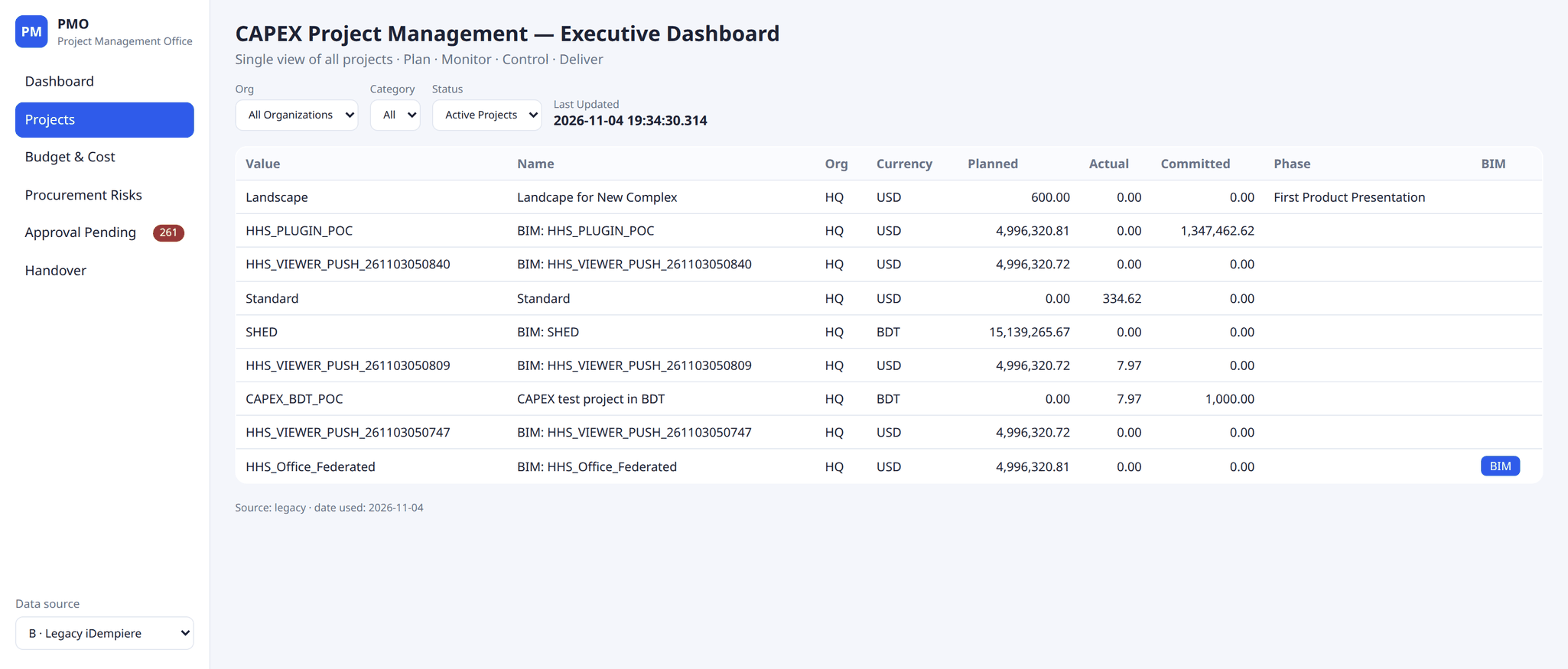
Projects lists each project: Value, Name, Org, Currency, Planned, Actual, Committed, Standard Phase. The BIM button appears only when
that project's building file is found, and opens it in the BIM viewer. The file is found by name: <project Value>_extracted.db, the same name the BIM push uses for the Project Order. The drawings and models filed against the project (BIM Document) are not shown here yet; see the Modeller guide, After the order.
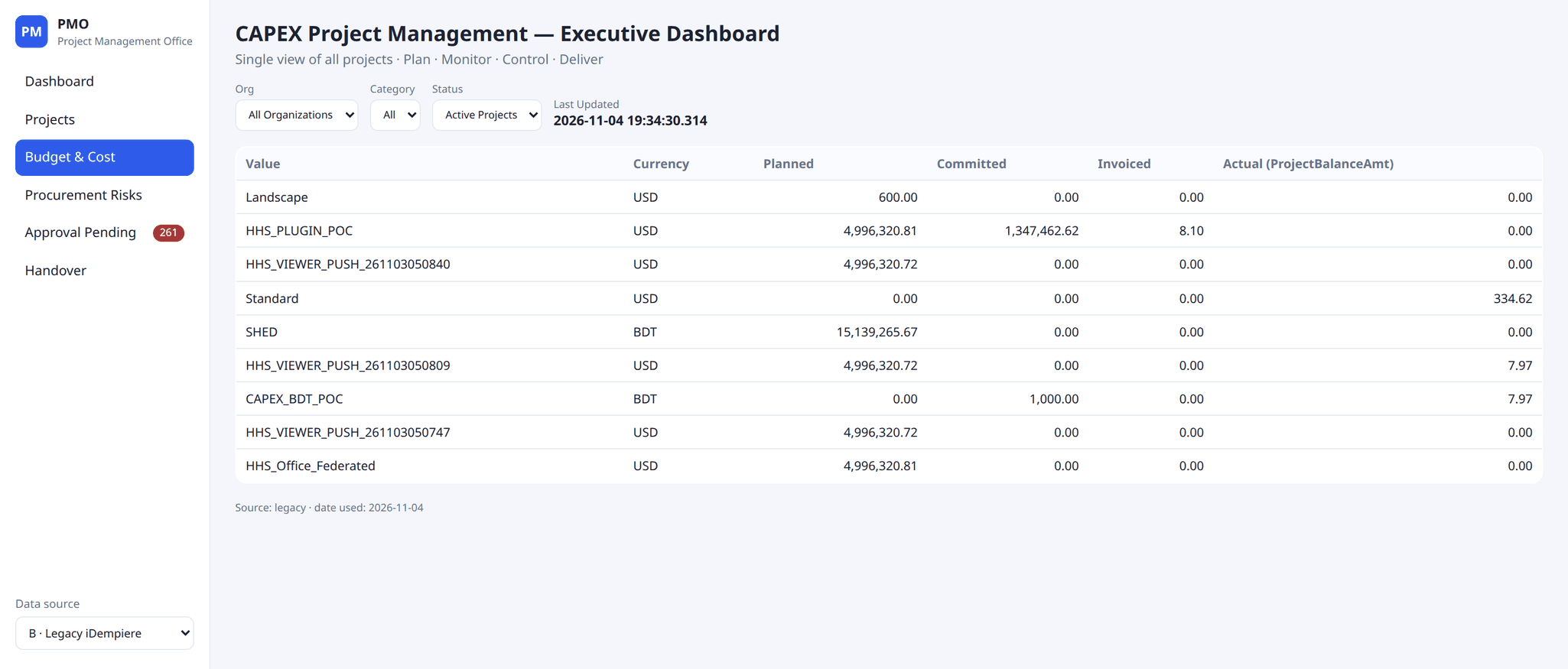
Budget & Cost lists Planned, Committed, Invoiced and Actual per project.
Approval Pending shows how many workflow approvals are waiting for someone to act (AD_WF_Activity, state Waiting, not processed), 261 in the sample. The red badge on the menu is the same number.
Procurement Risks (proposed) shows where buying may go wrong. Our proposal, until the client says otherwise:
| Line | Meaning |
|---|---|
| Open purchase orders | Purchase orders on the filtered projects that are not Completed, Closed, Voided or Reversed: how many, and their total per currency |
| Over-committed projects | Active projects whose Committed Amount is above their Planned Amount |
| Budget, nothing ordered | Active projects with a Planned Amount and no purchase order at all |
The first and last need purchase orders to be readable on the server; where they are not, the line says no data (not installed), never 0.
Handover (proposed) shows how close projects are to being handed over: Ready for handover (active projects with phases, every phase ticked Complete), Handed over (closed projects), and the drawings issued for construction, as on the dashboard.
Every count on these two views opens the projects behind it, like the dashboard's. Both views say proposed because the definitions are ours (question Q6 to the client).
One sentence under every page. Each view starts with a plain sentence saying what it is for, so a first-time reader does not need this guide to open it.
Page and Home tab: why a figure can differ¶
They use the same columns, but the page starts on Status Active Projects while the Home tab's money goals count every project, including inactive ones. Set Status to All and they agree:
| Figure | Page, Status Active | Page, Status All | Home tab goal |
|---|---|---|---|
| Approved Budget (USD) | 24,982,203.77 | 39,971,166.17 | 39,971,166 |
| Approved Budget (BDT) | 15,139,265.67 | 30,286,701.64 | 30,286,702 |
If you know iDempiere¶
The Home tab side is made of windows you already have.
| Dashboard piece | iDempiere window | Menu |
|---|---|---|
| One figure on the Home tab | Performance Goal | Performance Analysis and Accounting › Performance Measurement |
| What a goal measures | Performance Measure | same folder |
| The SQL behind it | Performance Measure Calculation | same folder |
| The dial's colours | Performance Color Schema | same folder |
| The panel itself | Dashboard Content (Performance, shown at login) | Organization Rules folder |
Search any of these by name in the box at the top left (Alt+G).
The Home tab¶
- Log in as usual. The goals have no Role or User set, so every user of the tenant sees them.
- On Home, find the Performance panel, a narrow column at the far right.
- Click the panel's maximize button (top right of the panel). Your stock goals come first, then the 27 CAPEX goals.
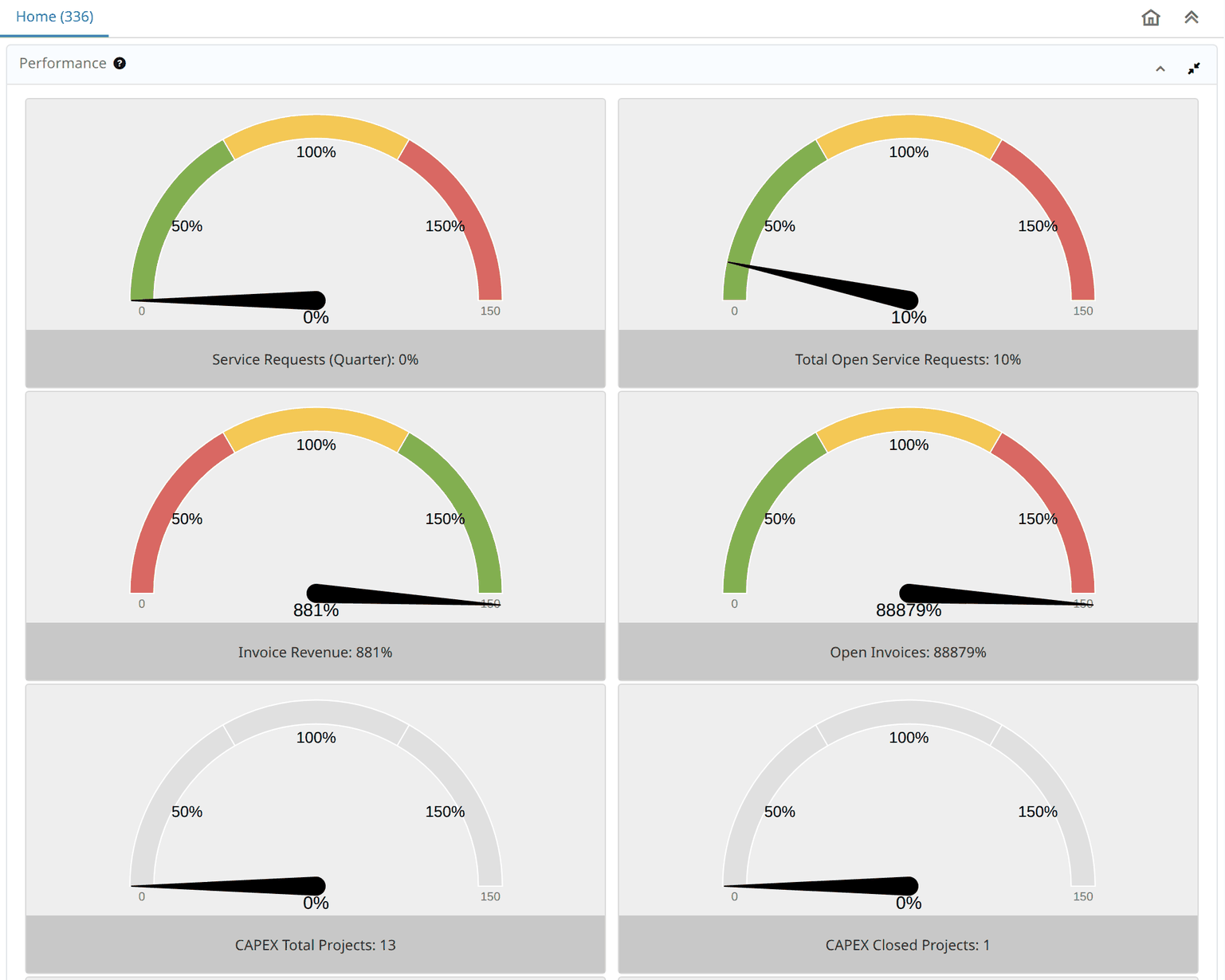
Three kinds of dial¶
| Dial | Caption | Used for | How to read it |
|---|---|---|---|
| Gray | A number | Goals with no target | Read the number. The needle stays at 0: it means nothing here |
| Green → Red | A percent | Cost against budget, lower is better | Green up to 50%, yellow up to 100%, red beyond |
| Red → Green | A percent | Share of active projects, higher is better | Red up to 50%, yellow up to 100%, green beyond |
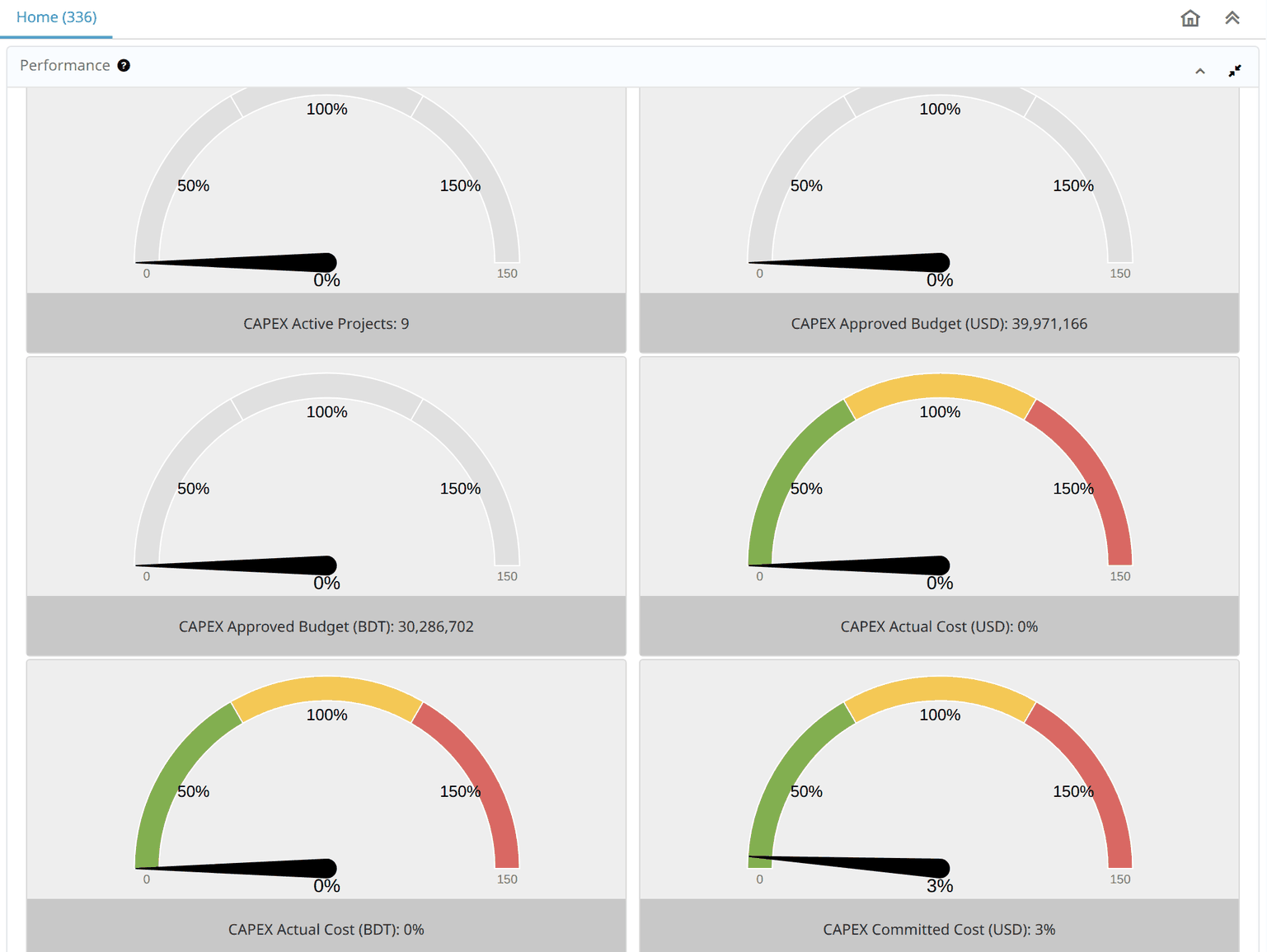
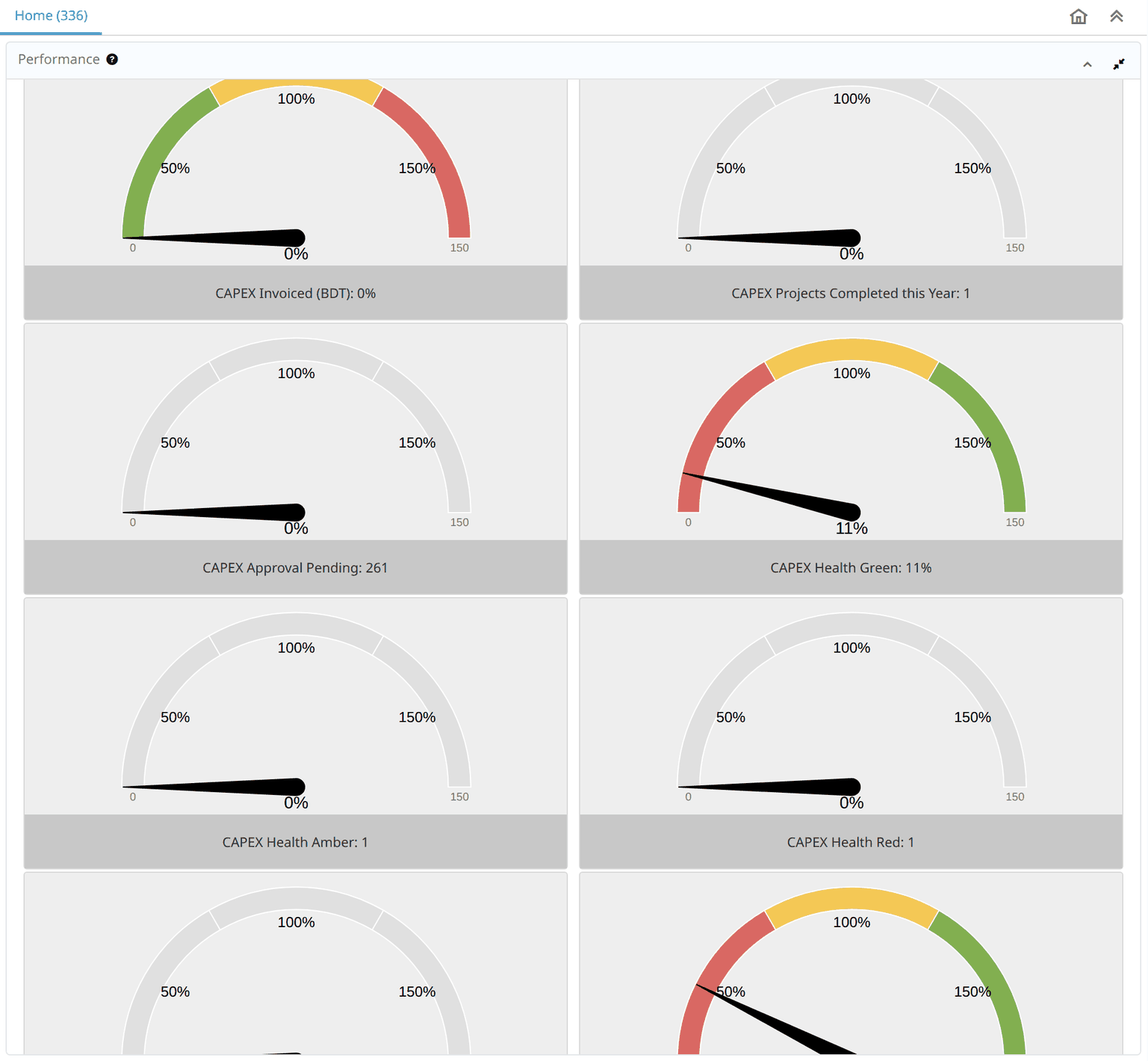
Why only 9 of the 27 have a target¶
We followed what GardenWorld's own goals do: a plain plan number on the goal, and the colour schema that fits the direction. A target turns the caption into a percent and hides the number, so it is used only where the percent says more.
| Goals | Target | Reads as |
|---|---|---|
| Actual Cost, Committed Cost, Invoiced (USD, BDT) | Approved Budget: USD 39,971,166.17, BDT 30,286,701.64 | Share of the budget used |
| Health Green, Schedule On Time, Budget Within | Active projects: 9 | On Time: 22% means 2 of 9 |
| The other 18 | None | The number itself |
The other 18 are the totals themselves, goals with no plan behind them (Completed this Year, Approval Pending, Average Delay, Overruns), and the bad buckets (Amber, Red, No EVM data, Delayed, At Risk, No schedule data, Over, Not started). A bad bucket with a target gets worse either way: on the stock schema, "33% of projects are red" would draw green.
These targets are the test server's own figures. Enter your own plan. A target is a fixed number, as on any stock goal, so when projects are added, "of 9" stays 9 until someone changes it.
The 27 goals¶
Projects and money:
| Goal | How it is worked out | Counts inactive projects? |
|---|---|---|
| Total Projects | All projects | Yes |
| Closed Projects | Processed = Y |
Yes |
| Active Projects | IsActive = Y and Processed = N |
No |
| Approved Budget (USD, BDT) | Sum of PlannedAmt |
Yes |
| Actual Cost (USD, BDT) | Sum of ProjectBalanceAmt |
Yes |
| Committed Cost (USD, BDT) | Sum of CommittedAmt |
Yes |
| Invoiced (USD, BDT) | Sum of InvoicedAmt |
Yes |
| Projects Completed this Year | Processed = Y, DateFinish in this year |
Yes |
| Approval Pending | Workflow activities with WFState = OS and Processed = N, on any table |
n/a |
Health, schedule and budget, active projects only, using Due, Done and Spent from The panels above:
| Goal | A project counts here when |
|---|---|
| Health No EVM data | Nothing is due yet |
| Health Green | Something is due, Done ≥ 90% of Due, Spent is 0 or Done ≥ 90% of Spent, and no phase is overdue (a phase that is not Complete and whose End Date is before today) |
| Health Amber | Something is due, Spent is above 0, and only one of those two tests passes; or both pass but a phase is overdue |
| Health Red | Something is due, Done < 90% of Due, and Spent is 0 or Done < 90% of Spent |
| Schedule No schedule data | No phase has both a Start and End Date |
| Schedule At Risk | Has dated phases, something is due, and Done < 90% of Due |
| Schedule Delayed | Has dated phases, not At Risk, and an unfinished phase is past its End Date |
| Schedule On Time | Has dated phases, and neither At Risk nor Delayed |
| Schedule Average Delay (days) | Over At Risk and Delayed projects: the average of each one's largest overdue days |
| Budget Not started | Spent is 0 |
| Budget Within | Spent is not 0, and is at or below Planned |
| Budget Over | Spent is above Planned |
| Budget Actual Overrun (USD, BDT) | Total of Spent minus Planned over the Over projects |
The 90% is the one rule a client stated. The rest are our working definitions, and you can change any of them: see Change what a goal counts.
What moves the numbers¶
Both places only read your project records. These are the iDempiere actions behind each figure, read from iDempiere's own code and tried on the test server:
| Figure | What moves it | Where |
|---|---|---|
| Schedule goals | Phases with Start Date and End Date | Project window, Phase tab |
| Due, Done, Health | Planned Amount on phases. Tick Complete when a phase finishes | Phase tab |
| Actual Cost, Budget goals | Issue material to the project | Issue to Project |
| Committed Cost | Tick Commitment on the project, then type Committed Amount on its lines | Project window, Project Line tab |
| Invoiced | Complete a sales invoice with the Project field set | Sales Invoice and Credit/Debit Note |
| Closed | Run Close Project | Project window |
| Completed this Year | Enter Finish Date, and close the project | Project window |
Three things that may surprise you:
- A purchase order does not fill Committed Cost. iDempiere has no code that writes it from a PO, not even Generate PO from Project. It is typed in.
- Close Project does not set the Finish Date. Without one, the project counts as Closed but not as Completed this Year.
- Actual Cost is in your accounting currency, whatever the project's. Issue to Project adds the product's cost without converting it. On the test server, a BDT project shows 7.97, which is the USD cost. If you run projects in another currency, read that tile knowing this.
A measured example (taken before the overdue rule above; the Health Green line would now also depend on the other phases). On the test server, ticking Complete on SHED's one overdue phase moved five goals. It was then undone.
| Home tab caption | Before | After |
|---|---|---|
| Health Green | 11% | 22% |
| Health Red | 1 | 0 |
| Schedule On Time | 22% | 33% |
| Schedule At Risk | 2 | 1 |
| Schedule Average Delay (days) | 180 | 269 |
The average delay went up although a project improved: it left the average, and it had one of the shorter delays. Read that goal beside the At Risk and Delayed counts, not on its own.
Changing it¶
You need no developer for any of this. It changes the Home tab goals; the page's formulas stay as they are.
Set or change a target¶
- Open Performance Goal. Find the goal with the arrows or search.
- Enter Measure Target and pick a Color Schema that fits the direction. Save.
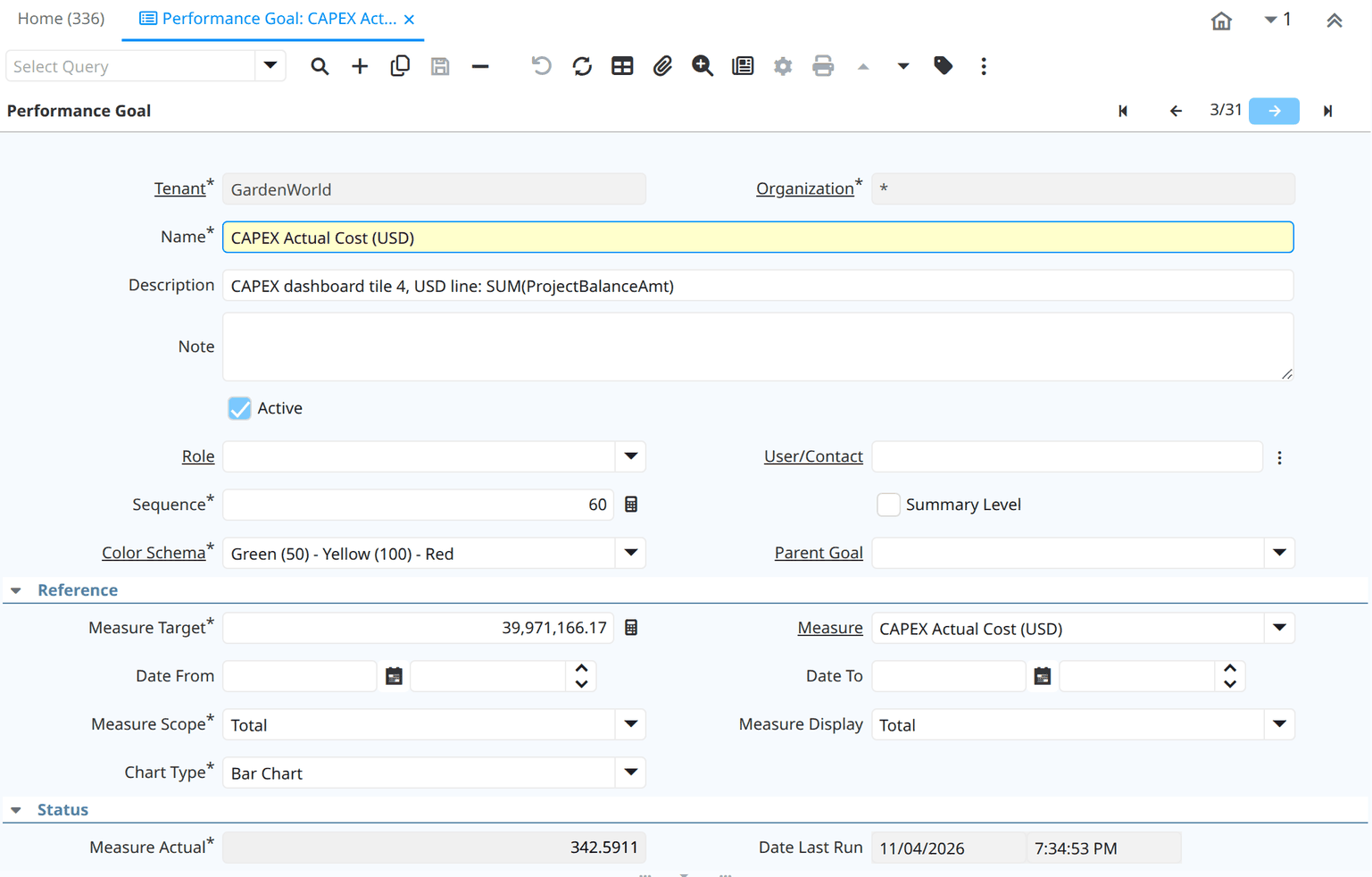
The amount behind a percent stays visible here, in Measure Actual.
The first percent can be out of date
Saving a new target recalculates at once, but that first percent is scored against the previous target (standard iDempiere behaviour). The new target applies at the next refresh, see Troubleshooting.
Show a goal to fewer people¶
In Performance Goal, set Role or User/Contact. To hide it, clear Active. Your stock goals can be hidden the same way if you want only the CAPEX goals on Home.
Change what a goal counts¶
- Open Performance Measure Calculation and find the row with the goal's name.
- Edit Sql WHERE (or Sql SELECT). Save.
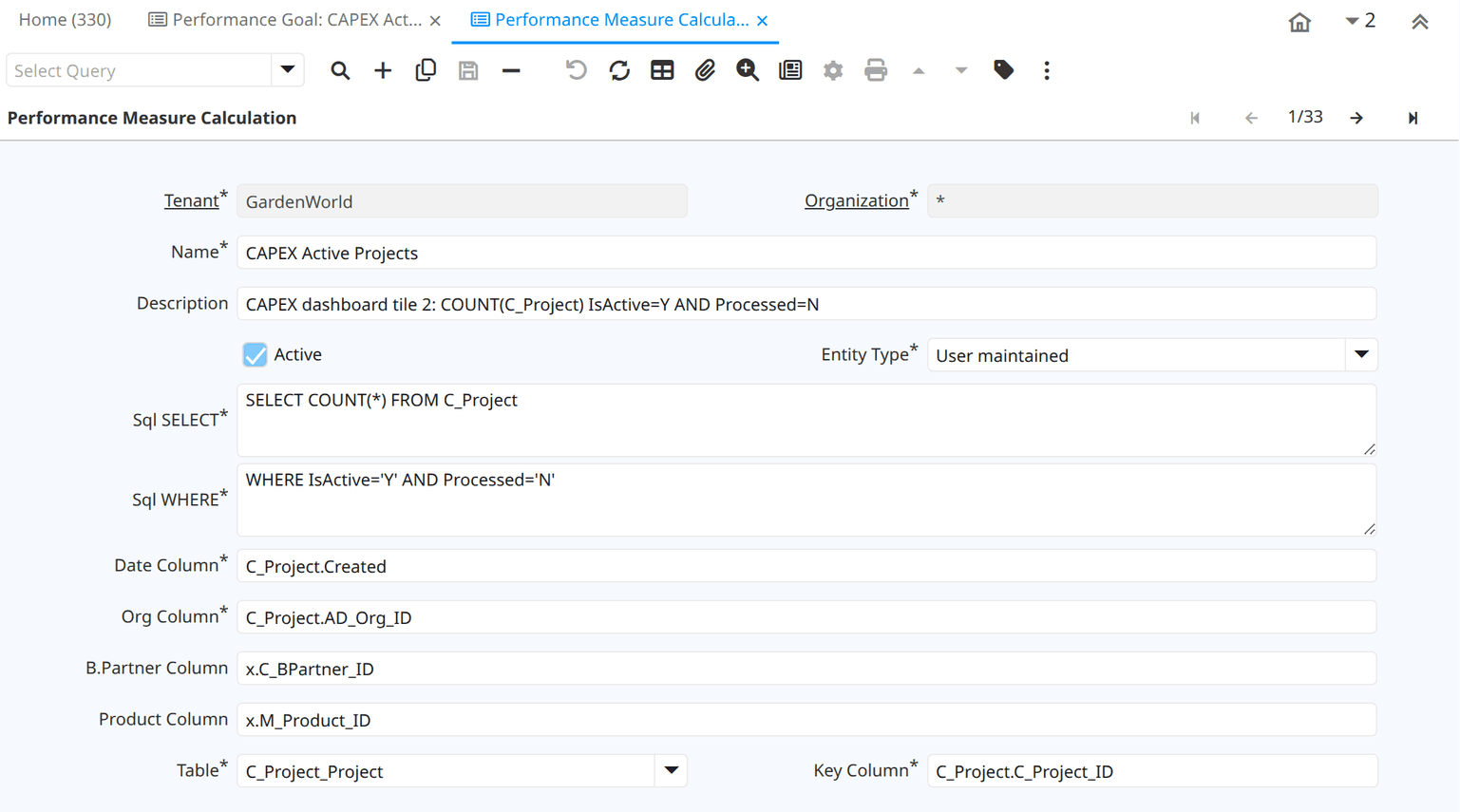
A broken SQL shows 0, not an error
iDempiere catches a measure's SQL error, logs it and returns 0. After any edit, check the number is what you expect. A sudden 0 may be your SQL.
To see a narrower population (one organization, for example), iDempiere offers the Restriction tab of Performance Goal. We have not tried it on these goals.
Change the dial's colours¶
Open Performance Color Schema. Each schema gives a colour up to Mark 1, up to Mark 2, and up to Mark 3.
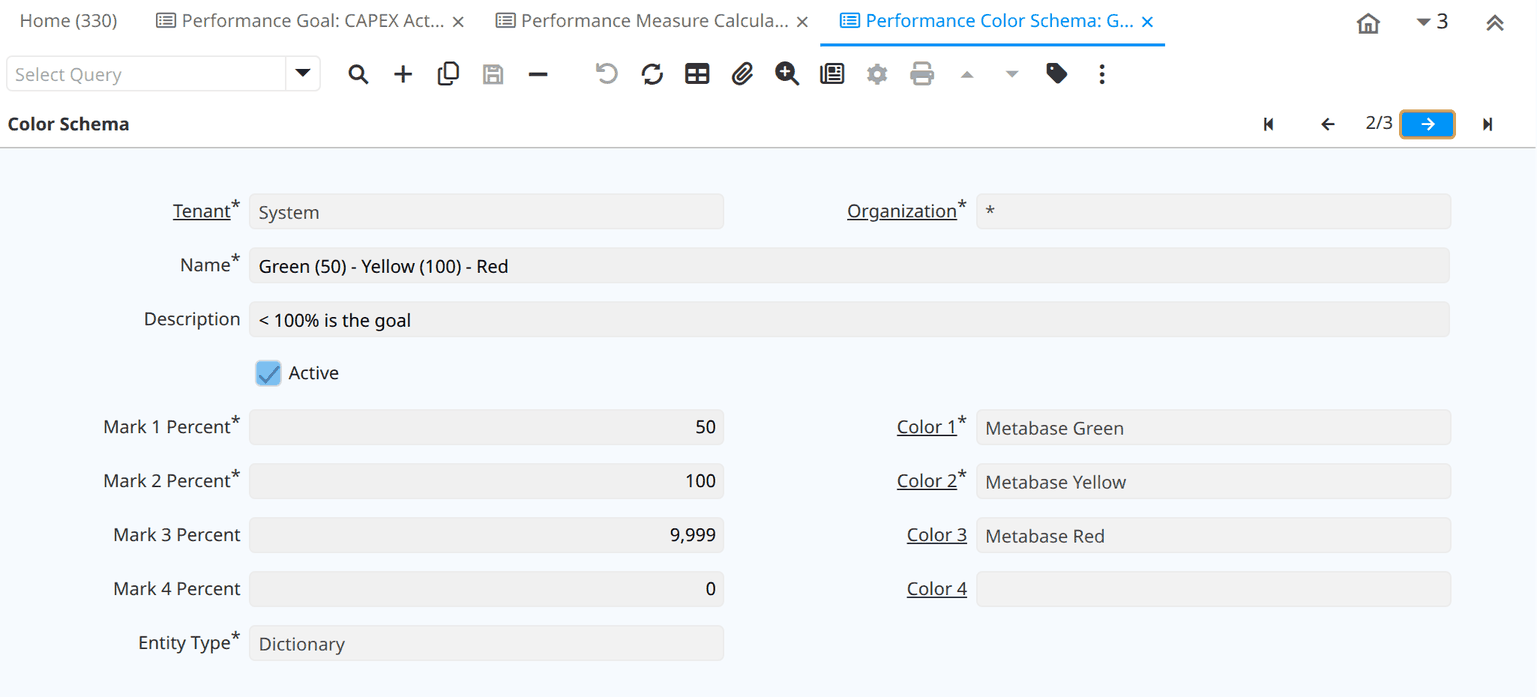
| Schema | Tenant | Editable by a tenant user? |
|---|---|---|
| Green (50) - Yellow (100) - Red | System | No |
| Red (50) - Yellow (100) - Green | System | No |
| No target (Gray) | Yours | Yes |
To use other marks, add a schema in your tenant, then pick it in the goal's Color Schema field.
Add a goal¶
Add a row in Performance Measure Calculation, a Performance Measure that uses it, then a Performance Goal on that
measure. To add a currency, copy an existing pair and change C_Currency_ID in Sql WHERE. We have edited targets through these windows and tested that; adding a goal by hand is standard iDempiere, but we have not run it for this dashboard.
Installing it¶
Your administrator installs it once; nothing is installed on a user's computer. What gets installed, in order:
- The dashboard's read access on your iDempiere (data only, no program code): the read-only web-service types and a user allowed to use them.
- The Home tab goals (data only), if you want the Performance panel.
- BIM Document, if you want drawings filed against projects: a metadata pack and one plugin (a
.jar) on the server.
Kernel-ERP needs no installation: its Home tab goals and BIM Document are built in, and start or stop from Plugins & Releases.
The steps, the scripts and the plugin's contents are in the Developer's note at the end of this guide.
What it does not do yet¶
| Topic | Today |
|---|---|
| Forecast Cost at Completion | Shows our proposed figure, labelled proposed, until you confirm the formula (For review) |
| Procurement Risks, Handover | Show our proposed definitions, labelled proposed, until you confirm them |
| Project Stage | Shows the project's Standard Phase. The five CAPEX stages are installed as a Project Type (proposed); a project shows them once you set its Standard Phase to one of them. For review |
| Payment-based progress | Not in the ERP |
| Document figures | The tile BIM Documents issued for construction is on the page. Not yet shown: Issued for review as a separate count |
| BIM Document on your own iDempiere | The plugin's source is written and compiles against iDempiere 13; it has been installed and checked on a real iDempiere 13 test instance (see the Developer's note), not yet on a client's server. It runs in Kernel-ERP today |
| A revised model | Sending a revised model again adds nothing today (a second send changes nothing). On Kernel-ERP a revised model arrives as a new, version-tagged order that replaces the old one (the project is still in alpha, so no baseline is kept). Whether a push to your iDempiere may delete the old order is still to be decided |
| Register in the Modeller | The register is exported by Export Register in the BIM Document window; a button in the Modeller itself is not built |
| Project Stage, Physical vs Spent, project lists on the Home tab | Page only, not goals |
| Other currencies on the Home tab | No money goal covers them until you add one. The page shows each currency it finds |
Still 0 on the test server: Invoiced (BDT). It has no BDT price list or USD-to-BDT rate, so a sales invoice can't reach a BDT project. Every other goal has counted real documents.
Check Approval Pending against your own meaning of "approval". It counts every suspended workflow activity. On the test server all 261 are on Business Partner, not on project documents.
How it was checked¶
- Every tile drawn on the page equals the formula run separately over the sample's rows (19 of 19, at Status Active and All).
- Every CAPEX caption on the test server's real Home tab equals the twin's, all 27.
- For 26 of the 27 goals, Home tab values equal iDempiere's own goals, recalculated just before comparing. The other, Invoiced (BDT), is 0 on both sides, which proves nothing.
- iDempiere's calculation, the twin's and the page's own formulas agree on the same rows.
- A goal's stored value behaves the same on iDempiere and the twin: the caption holds inside the refresh interval, and moves after it, in three steps compared exactly.
- The read types, built from their script alone on a clean server, each answered a real call. A write through a read type is refused.
-
A real edit in iDempiere reached the twin after the next job and reload, changing exactly one row, and was undone.
-
The Supply chain card equals a separate count from the raw rows for a set of awkward cases (a draft order, a part payment, a payment tied only through its invoice, a document in another currency, an unlinked receipt, another project's documents), and the three read types it needs return the same rows on the test server.
- Task dates written from the 4D programme equal the programme's own tasks one by one, each phase's window equals the span of its tasks, and the Schedule tab draws exactly those bars. On the test server the dates come back through the standard read type.
- A Project Issue on Kernel-ERP moves the project's balance and the stock by the same amounts as the same issue on iDempiere (checked on the test server); reversing it restores both.
- The dashboard opened on a Kernel-ERP store built through the twin's own operations shows totals equal to separate sums over that store's rows.
Not checked: a site larger than this test server. If the job stops, the copy just goes quietly out of date.
Troubleshooting¶
| You see | Why | What to do |
|---|---|---|
| A gray dial at 0% | That goal has no target | Read the number in the caption |
| A percent, and you want the amount | A target hides the number | Open the goal: Measure Actual |
| A share over 100% | The target is fixed, and projects were added | Update Measure Target |
| A number looks out of date | A goal recalculates only when a Home tab shows it and its value is over 30 minutes old. We saw one still showing 318.68 when the real figure was 334.62 | Wait, or set ZK_DASHBOARD_PERFORMANCE_REFRESH_INTERVAL (milliseconds, default 1800000) in System Configurator |
| I changed the SQL and nothing moved | Only saving a goal's target or scope recalculates at once | Wait for the refresh |
| A goal suddenly reads 0 | The SQL may be broken: errors show as 0 | Check Sql WHERE and the server log |
| Page and Home tab budgets differ | The page starts on Status Active, the goals count inactive projects too | Set Status to All |
| Page shows old figures | The job has not run since. Check Last Updated | Run the job |
| The page has no B · Legacy iDempiere source | The job's file is not beside the page | Run the job, or check where it wrote |
| A project is missing from every Home tab money goal | Its currency is not USD or BDT | Add a goal for that currency |
| The panel is hard to read | It is a narrow column | Use the panel's maximize button |
Related guides: Kernel-ERP User Guide · Distributed ERP.
Developer's note¶
For the person who installs and extends it. Nothing here is needed to use the dashboard.
How to install¶
The Home tab goals¶
For an administrator with database access. On the test server these were applied with psql, in name order, followed by
update_sequences.
| Script | Adds |
|---|---|
202611031900_CAPEX-R0.sql |
The first measure: Approved Budget (USD) |
202611032000_CAPEX-G2.sql |
The count and sum measures |
202611032100_CAPEX-G3.sql |
A goal for each of them |
202611032200_CAPEX-G4.sql |
The health, schedule and budget measures, and their goals |
202611121000_CAPEX-S2-HEALTH-OVERDUE.sql |
Health Green and Amber also look at overdue phases |
202611041000_CAPEX-G7.sql |
The targets and the gray colour schema |
They are in the bim-ootb repository, under capex/legacy/migration/iD13/postgresql/, in iDempiere's own migration format.
The first statement of each registers it in the migration log. Most carry a Restore line at the top that removes what they
added. Goals calculate themselves the first time a Home tab shows them.
These scripts are written for GardenWorld
They set AD_Client_ID = 11, the currencies USD (100) and BDT (322), and this test server's target figures. Do not run them
on your own tenant. Render your own from them instead, as below.
For your own tenant¶
capex/tools/site_migration.js writes your tenant's two scripts from the shipped ones. It never connects to your server.
node capex/tools/site_migration.js --preflight <AD_Client_ID>prints a read-only SQL. Run it withpsql -qtAand save the line it prints aspreflight.json. It reports your roles, the currencies your projects hold and your next free ids.node capex/tools/site_migration.js preflight.json --role <AD_Role_ID> --out <folder>. Add--targets <file>to state your plan, for example{"budget":{"USD":1000},"activeProjects":3}.- Apply the two scripts with
psqlin name order, runupdate_sequences(), and restart the server.
A goal with no target stated goes on the gray schema, so another company's numbers can never reach you. It refuses, and says why, if no role is given, if your projects hold no currency yet, or if these types or goals are already there.
Tested on a second tenant of a test server, through to that tenant's real Home tab. It has not been run on a real site.
The page¶
The page is plain files (capex/index.html and what it loads), with no server of its own and nothing to install in iDempiere's
code. Your iDempiere needs a read-only web-service read type for each of the 8 tables it reads, and a user allowed to use them.
These come in one migration script, 202611042300_CAPEX-WS-READ.sql, under capex/legacy/ws/migration/iD13/postgresql/, for GardenWorld.
For your own tenant, For your own tenant above writes it. Restart the server afterwards. The write types in capex/legacy/ws_testserver/
are for a test server only: do not install them on yours.
A small job beside your server reads iDempiere and writes the file the page opens:
BRIDGE_BASE=https://your-server BRIDGE_USER=... BRIDGE_PASS=... BRIDGE_CLIENT=... BRIDGE_ROLE=... BRIDGE_ORG=... BRIDGE_WH=... \
  node capex/tools/legacy_snapshot.js
It writes capex/legacy_snapshot.json. The password stays with the job: the file and the browser never hold it, and nothing is
written to iDempiere. Run it on a schedule. The page shows what the last run saw. Add ?source=legacy to the page's
address to open on your data.
The file holds your project figures
Whoever can open the page can read them. Serve it only where you would show them.
The optional read types come in their own migration scripts, one folder each, so a site installs only what it uses: capex/legacy/ws/q4/ (QueryCOrder, QueryCProjectIssue), capex/legacy/ws/bimdoc/ (QueryBIMDocument, and the task-date columns added to QueryCProjectTask and BridgeCreateCProjectTask), and capex/legacy/ws/chain/ (QueryMInOut, QueryCInvoice, QueryCPayment: the Supply chain card). Each script does nothing where its table or column is absent, finds columns by name, and is safe to run twice; restart the server afterwards, because web-service types are cached.
To open the page on a twin's own store instead of the job's file, add ?db=/path/to/store.db to its address. node capex/tools/twin_mockchain.js builds the film's 12-project store through the twin's own model layer (projects, issues, purchase orders, and for each completed order a receipt, a vendor invoice and a payment) and exports it; the page's A · SQLite ERP DB then reads that file.
In Kernel-ERP¶
Nothing is installed by hand. The Home tab goals and BIM Document are built in: open Plugins & Releases to start or stop them. A stopped one stays stopped.
BIM Document on your own iDempiere¶
Two parts, kept apart (metadata is data; code is code):
- A 2Pack file: metadata only. The table
BIM_Documentand its columns, the lists (discipline, file kind, the four states), the window, the BIM Document tabs in the Project window, the menu entry, and the two process rows (they carry class names). The pack creates the physical table when it is missing (ColumnElementHandler). It holds no program code. - An OSGi plugin,
org.idempiere.bimdocument, with the Java in itssrcfolder. Source:iDempiereOOTB/org.idempiere.bimdocument/in the bim-compiler repository. Install it like any iDempiere plugin. A pack that names a class the server does not have is reported as class not on the server.
How the metadata gets in is your choice, as in any iDempiere installation:
rows in the pack's PackOut.xml (the dictionary itself); SQL statements inside PackOut.xml (a database type is stated per statement);
or a SQL migration script under the plugin's migration folder, as the dashboard's read types already do. A pack version is applied once and
never changed: a changed pack gets a new version. Start the database first, apply the pack, then check the rows on the server.
Status: installed and tested on a real iDempiere 13 server (a test instance on the developer's machine). The pack and the I_/X_ classes are generated from one
Excel data-model workbook. The four document types (DocBaseType BIM: Drawing, Model, Specification, Report) come from a migration script, and the Project window has a project-level BIM Document tab.
Try it: the BIM Document test instance¶
scripts/legacy_bimdoc_refresh.sh (in the bim-compiler repository) rebuilds a test instance from iDempiere's base seed in about two minutes: it creates a fresh
database, imports the seed, applies the newer migration scripts, installs the plugin and starts the server, then reads the rows back. The instance is
~/idempiere-bimdoc, at http://localhost:8108/webui; start and stop it with the start.sh and stop.sh beside it. scripts/legacy_bimdoc_witness.sh then runs the
checks inside the server (a document issued for construction supersedes the older revision, an older revision cannot be issued after a newer one, the register file,
a task-less deliverable refused) and rolls its changes back. Do not use iDempiere's own ImportIdempiere.sh on a database server shared with other databases: it drops
the shared adempiere role.
The BIM Document model (what is in the plugin)¶
Class (package org.kernel.bim) |
What it is |
|---|---|
model.I_BIM_Document |
The interface: the table name, every column name as a constant, a getter and setter for each. The table id is read from the dictionary, never typed (it differs per database) |
model.X_BIM_Document |
The persistent class, in the shape iDempiere's own model generator writes (extends PO implements I_BIM_Document, I_Persistent). Plain getters and setters, no rules |
model.MBIMDocument |
The model class: the document rules, below |
model.BIMDocumentModelFactory |
Tells iDempiere that BIM_Document is served by MBIMDocument |
process.BIMDocumentRegisterExport |
Export Register |
process.BIMDocumentOpen |
Open |
process.BIMDocumentProcessFactory |
Tells iDempiere which class serves each process row |
What MBIMDocument updates, and when. It is the document-action class (DocAction), so the stock Document Action field drives it. Only two actions are offered:
| Action | Checks | What it changes |
|---|---|---|
| Issue for review (prepare) | The deliverable has a number and a title; it hangs under a project task; no newer revision is already Issued for construction. Otherwise the document goes Invalid and says why | Status becomes Issued for review |
| Issue for construction (complete) | The same checks, if it was not prepared first | Status becomes Issued for construction and the document is closed to further action. Every older revision of the same deliverable that was Issued for construction or for review is set to Superseded, its Superseded By points to this revision, and it is closed. Nothing else is touched |
Void, close, reverse and re-activate are not offered: a deliverable is replaced by a newer revision, not undone. The log carries
§BIMDOC-SUPERSEDE for each older revision changed, §BIMDOC-ISSUED, and §BIMDOC-CHAIN with the project's issued count before and after.
What the processes update. Neither changes any data.
| Process | Reads | Gives |
|---|---|---|
| Export Register | Every active document of the selected document's project | A .json file: each deliverable's current revision plus every superseded revision, with number, revision, status, discipline, file kind, name and the attached file's sha256 (null when nothing is attached). The walkers read this file |
| Open | The attached file of the document's file kind | The file as a download, with its sha256. Refuses when there is no file kind or no attachment of that kind. (Kernel-ERP opens the Modeller or Viewer instead, because it has a browser file store; a server has none) |
The Project window's Issued, Earned hours and Hours booked columns are computed from the table by their own SQL: no class writes them.